

The templates screen
Templates, blocks and forms in one library, with the controls that list and switch them.
Templates is the fourth icon in the header. One library holds your email templates, the reusable blocks you drop into messages, and your forms.
The library
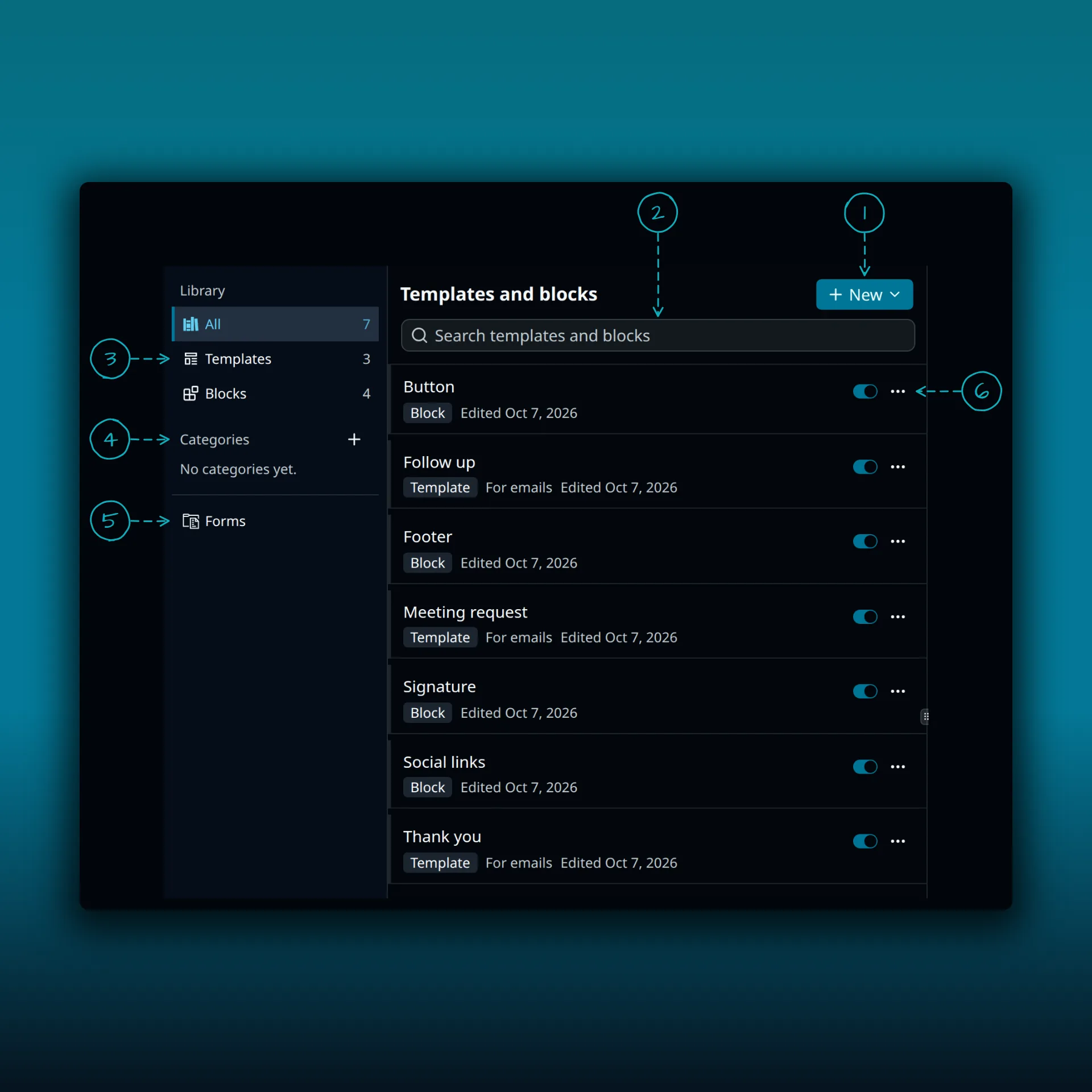
- New. Opens a menu for creating something new.
- Search templates and blocks.
- The library filters: All, Templates and Blocks. The number on each is how many items it holds.
- Categories. The plus button creates a category. Before you make one it says “No categories yet.”
- Forms. Opens your signup forms.
- The switch and the three-dot menu on a row. The switch turns the item on or off. The menu holds more actions for that item.
Each row says whether it is a Template or a Block, and when it was last edited. Templates also say “For emails”. Click a row and it opens in the pane on the right. Until you do, that pane says “Pick a template, or start a new one.”
Where to go next
- Email templates covers building and sending from a template.
- Signatures and snippets covers blocks.
- Signup forms and unsubscribe links covers forms.