

Use code "LIGHTHOUSE20" to save 20% on all plans forever. Get it now!
Manage Email in Your WordPress Dashboard.
Read, send, and manage email in the WordPress dashboard you already use. Connect the provider you already have.
- Runs in
- WordPress admin
- Works with
- Gmail · Outlook · IMAP/SMTP
- Accounts
- Bring your own provider
Hi there,
Please review the invoice and source package for the redesign milestone. The archive includes the responsive layouts, brand exports, and implementation notes.
If everything looks correct, we can queue the final deployment package for the client workspace.
Best regards,
Alex Morgan
Folders, tags & accounts. Every account, one list. Read, reply & organize.
Email Client
Manage every inbox inside WordPress.
Email Templates
Reusable templates, blocks, and personalization.
Email Campaigns
Signup forms, mailing lists, and newsletters.
AI Tools
Smart tagging, spam detection, and phishing alerts.
SMTP Delivery
Reliable sending for WordPress and transactional emails.
Team Sharing
Role-based access without shared passwords.
Why leave WordPress to manage email?
You're already managing your website, customers, and content in WordPress. Why switch to another application every time you need to check a message?
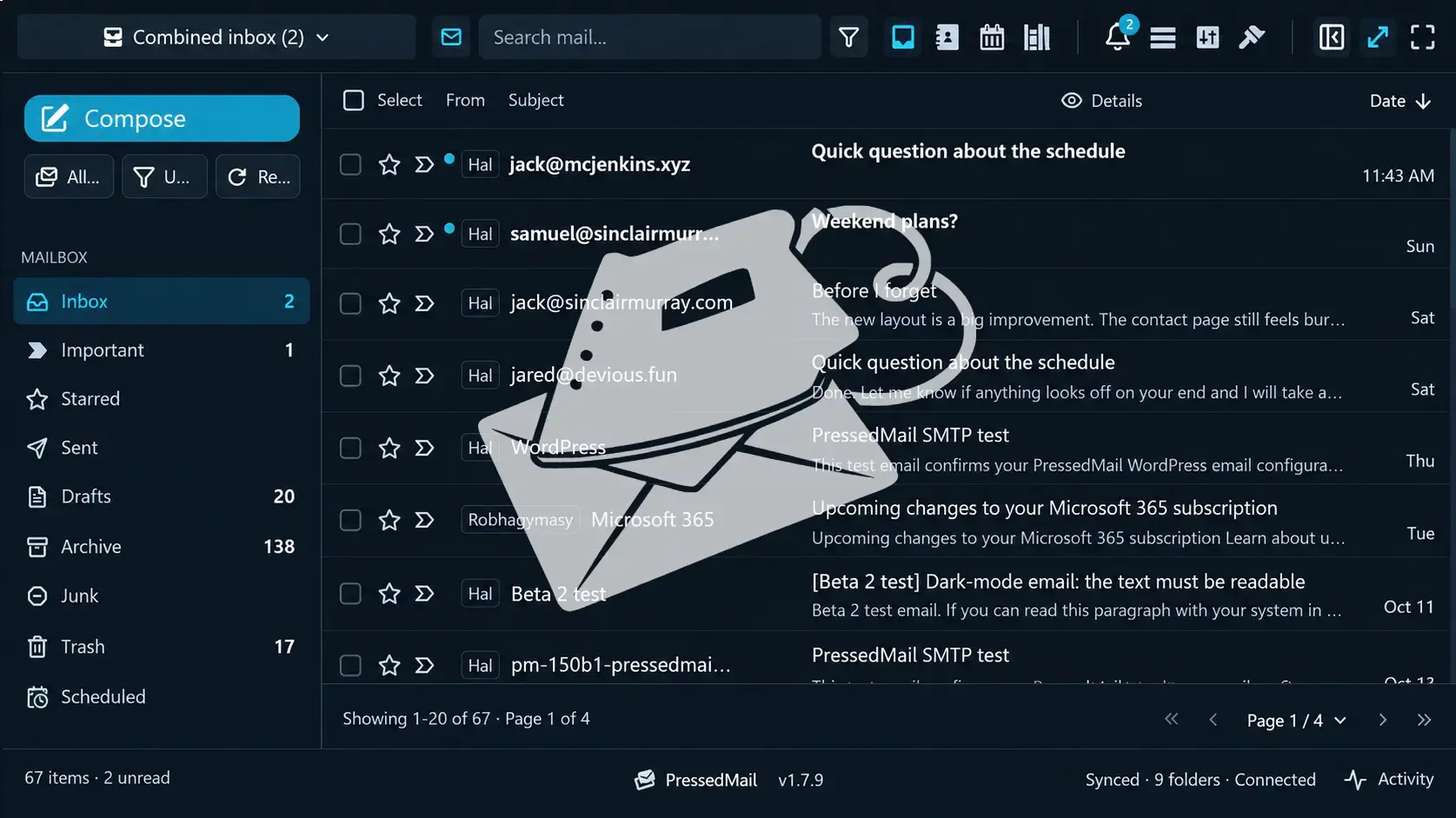
PressedMail brings a complete email client directly into your WordPress dashboard. Read, send, reply, and organize your email without interrupting your workflow.
Everything in one dashboard
Your website and email, working together.
A complete email experience
Inbox, composer, attachments, search, contacts, and calendar.
Less switching, more doing
Stay focused without constantly jumping between applications.
Too many email plugins?
SMTP, transactional email, marketing campaigns, newsletters, forms, and email management. Why install and maintain separate plugins when one can bring them together?
PressedMail combines essential email functionality into one integrated WordPress solution, reducing plugin clutter and giving you more capabilities without the complexity.

SMTP & transactional email
Manage delivery of WordPress notifications and transactional messages.
Marketing & newsletters
Create campaigns, design templates, manage subscribers, and collect signups.
A full email client
Send, receive, and manage conversations from multiple accounts.
How organized is your inbox?
Multiple accounts, overflowing inboxes, lost conversations, and messages that never seem to end. Keeping email organized shouldn’t require constant attention.
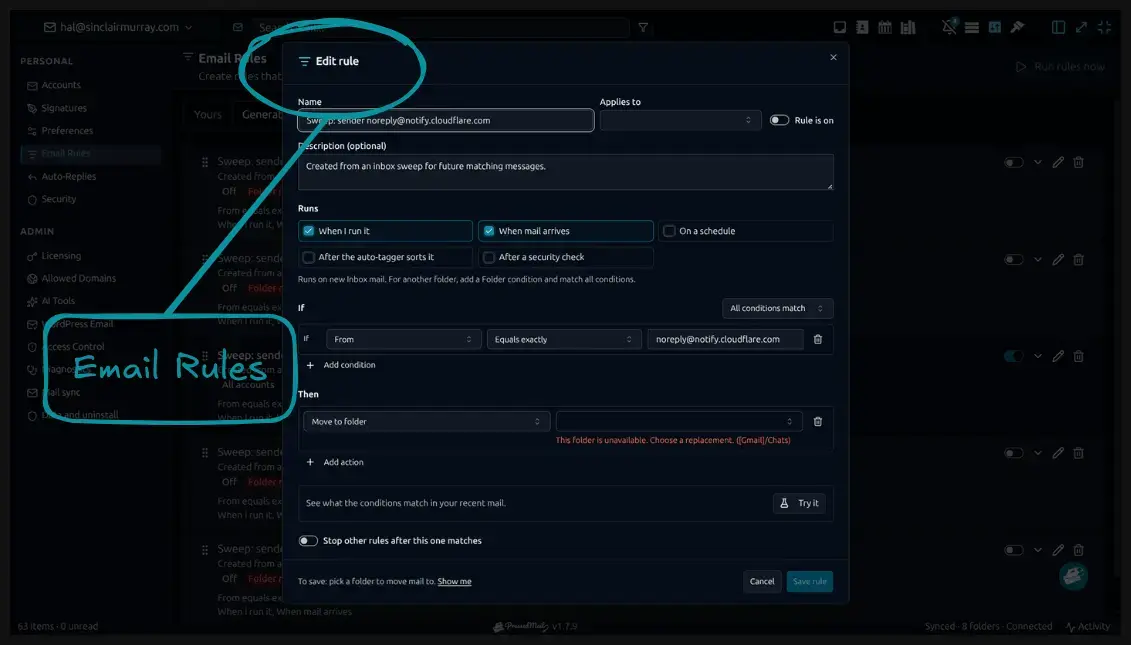
PressedMail brings your accounts together and helps you stay organized with smart rules, AI-powered tagging, bulk actions, shared inboxes, contacts, and calendars.
One combined inbox
Connect Gmail, Outlook, and other compatible email providers in one workspace.
Organization on autopilot
Automatically categorize, tag, move, and manage messages with intelligent rules.
Everything connected
Shared inboxes, contacts, and calendars keep communication organized.
Connect all of your Providers
Every account you already use, in one inbox inside WordPress.
Is your email secure and private?
Spam, phishing attempts, suspicious messages, and unnecessary access create risks for your business. You need more than basic email management to stay protected.
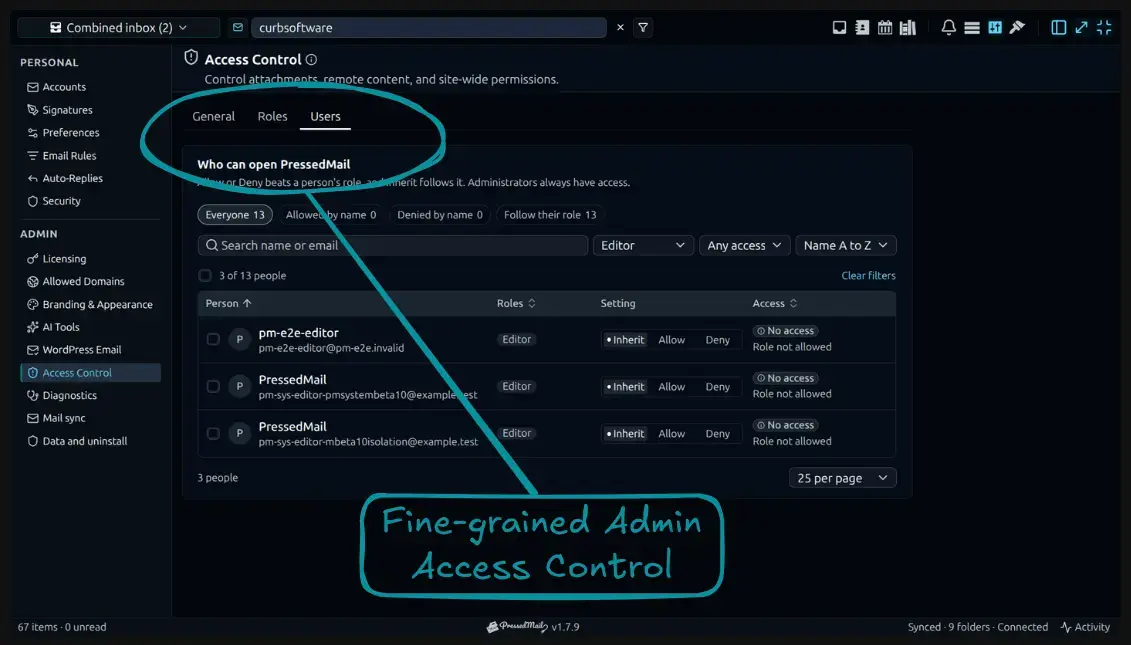
PressedMail combines AI-powered threat detection with detailed administrative controls, giving you better visibility and control over your email environment.
Intelligent threat detection
AI-assisted spam and phishing identification helps flag potentially dangerous messages.
Granular user permissions
Fine-tune access and administrative settings to suit your organization.
Greater control
Configure accounts, privacy preferences, and email settings around your needs.
Spending too much time on email?
Sorting messages, repeating replies, organizing folders, and handling routine tasks can consume hours every week. What if most of that work could take care of itself?
PressedMail makes everyday email management faster with automated workflows, rules, templates, AI assistance, and powerful bulk actions.
Automate your workflow
Create rules that respond to incoming messages, schedules, and manual triggers.
Reply faster
Reusable templates and AI-powered writing tools simplify everyday communication.
Clear the clutter
Bulk Sweep actions help clean up hundreds of messages without handling them one by one.
Is your email stuck at your desk?
Your work doesn't stop when you leave your computer. And your email shouldn't be limited to one device, layout, or way of working.
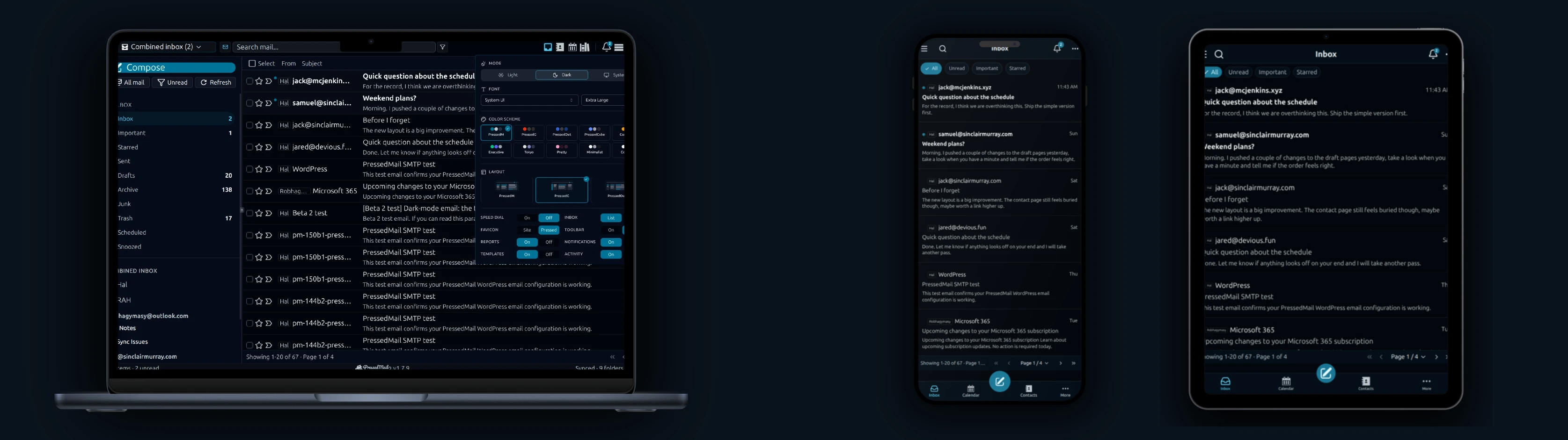
PressedMail gives you a flexible email experience with Progressive Web App support, desktop and mobile access, and extensive interface customization.
Email wherever you are
Install PressedMail as a PWA on supported devices for convenient mobile and desktop access.
Choose your layout
Multiple inbox arrangements and navigation options adapt to your workflow.
Make it yours
Customize themes, colors, typography, and appearance to create your ideal workspace.
Newsletter
Get useful PressedMail updates.
New releases, setup guidance, and practical ways to handle email in WordPress.
Occasional PressedMail email. Unsubscribe whenever you like.
Choose the plan that fits your WordPress sites.
Paid plans include unlimited accounts and users. Compare Premium and Ultimate features, then choose the site count you need.
Yearly plans are priced by number of sites. Lifetime is a one-time payment covering up to 100 sites.
Starter
For one site
- All current and future Premium features
- Unlimited email accounts
- Contacts, calendar, and scheduled email rules
- Templates, blocks, and signup forms
- AI tools and phishing detection
- Layouts, themes, and workspace controls
- Licensed updates and priority support
- 10,000 PressedMail AI credits a yearLimited time
Premium
For multiple sites
- All current and future Premium features
- Unlimited email accounts
- Contacts, calendar, and scheduled email rules
- Templates, blocks, and signup forms
- AI tools and phishing detection
- Layouts, themes, and workspace controls
- Licensed updates and priority support
- 25,000 PressedMail AI credits a yearLimited time
Ultimate
For agencies
- Everything in Premium, plus:
- Campaigns and shared templates
- Share inboxes, calendars and contact lists
- White labelling with a brand theme
- 50,000 PressedMail AI credits a yearLimited time
I save hours & it’s easy to use
I have a lot of email accounts and it’s annoying to manage them through different providers. I installed PressedMail, added my accounts, and automated the cleanup of over 3000 emails. PressedMail has saved me hours of work.
 Robert H. AlexanderFounder - CurbSoftware Tech Innovations
What customers say after bringing email into WordPress.
I save hours & it’s easy to use
I have a lot of email accounts and it’s annoying to manage them through different providers. I installed PressedMail, added my accounts, and automated the cleanup of over 3000 emails. PressedMail has saved me hours of work.
Helps get more clients
As a freelancer I need to manage several clients’ accounts. I installed PressedMail on WordPress on localhost and use it as my main email client. I manage everything for clients from PressedMail. And several clients use PressedMail now after I have set their WordPress instances up.
 Gene Piki
Email Swiss Army Knife
We use PressedMail as a value added service for clients and potential clients as a feature of our agency’s offering helping put us ahead of competition. We love the white-labelling feature, automation, and security controls. It also replaces several of the other plugins we used to use and it’s like a small CRM.
 Cyrus M. (InCurb Digital)
Fast inbox organization with phishing detection
PressedMail helps us organize our inboxes fast. We especially like the phishing detection feature.
 John & Andrea
One source of truth for every client
As a VA, I use PressedMail to keep each client’s inbox separate while managing everything from one app. It gives me a single source of truth without mixing client work together.
Teaching and client work stay organized
I balance teaching with social media marketing clients. PressedMail helps me keep both sides of my work organized in one place.
 J.A. Payo
Using PressedMail in your own work?
Common questions
See what is coming next.
Follow planned work, current progress, and recently completed features.
- Planned
Calendar Sync with External Providers
Planned. Today calendars and events live in WordPress and do not sync with any outside provider. Two-way sync with Google Calendar, Outlook, iCloud and CalDAV-compatible services is on the roadmap.
- Planned
Dedicated Support
A higher-touch support channel beyond the current paid Priority Email Support entitlement.
- Planned
Activity Log
A searchable audit trail of key actions across PressedMail accounts, with per-user and admin views, retention controls, and export.
Get started
Bring your working inbox into WordPress.
Compare Premium and Ultimate features, then choose a paid plan for the number of WordPress sites you manage.