Use code "LIGHTHOUSE20" to save 20% on all plans forever. Get it now!

Free or Paid: Which PressedMail Plan Do You Need?

See what PressedMail Free covers, what Starter, Premium, Ultimate and Lifetime add, and how to pick by what you will actually do.

Cover image for Free or Paid: Which PressedMail Plan Do You Need?

PressedMail Free is a complete email client for one mailbox. The paid plans add more mailboxes and more tools around the mail. Which one you need depends on a short list of things you will actually do, so this post starts there.

Prices and limits below are the ones on the pricing page at the time of writing. Check it before you buy.

A silent animation of how AI credits are spent, about 15 seconds. PressedMail AI tags mail, scores spam and checks phishing without an AI key of your own. Auto-tagging costs 1 credit per email. The spam and phishing checks on one email share 1 credit, so all three on one email cost 2. Running one again costs another credit, and credits never expire.

What Free covers

Free connects one mailbox per site. You get the whole client for it: reading, composing in rich text, Markdown or plain text, folders, threads, search, tags, email rules, attachment previews, a phone layout and the mailbox lock. It also sends WordPress’s own mail through one SMTP server you set up under Settings, WordPress Email, with a delivery log.

There is no subscription, no trial that expires, and no PressedMail account to create. Updates come from WordPress.org.

If one address is all you read from the dashboard, Free is enough. The first-message tutorial works on Free from start to finish.

What the paid plans add

Starter and Premium share the same features and differ in how many sites they cover. They add:

  • more than one mailbox, read in a combined inbox, plus Yahoo Mail and iCloud Mail in the provider list
  • contacts and a calendar beside your mail
  • templates, signup forms, snooze, scheduled send, undo send and auto-replies
  • AI tools and phishing checks, using your own provider or PressedMail AI credits
  • more themes and layouts
  • several SMTP servers with sender-based routing for WordPress mail

Ultimate and Lifetime add what teams and agencies ask for: campaigns, shared mailboxes, calendars and contact lists with Viewer, Responder and Manager roles, and white labelling.

Replacing Free with a paid build keeps your accounts, settings and data. Take a site backup before you switch editions, as you would before any plugin change.

Plans at a glance

PlanPriceSitesAI credits
Starter$49 a year110,000 a year
Premium$89 a year1025,000 a year
Ultimate$169 a year10050,000 a year
Lifetime$499 once100200,000 once

Credits matter only if you use PressedMail AI. If you bring your own AI provider, the provider bills you and the credits are not involved.

What you see on screen

The main screen is the same on every edition. A paid build shows more in the header and the account switcher.
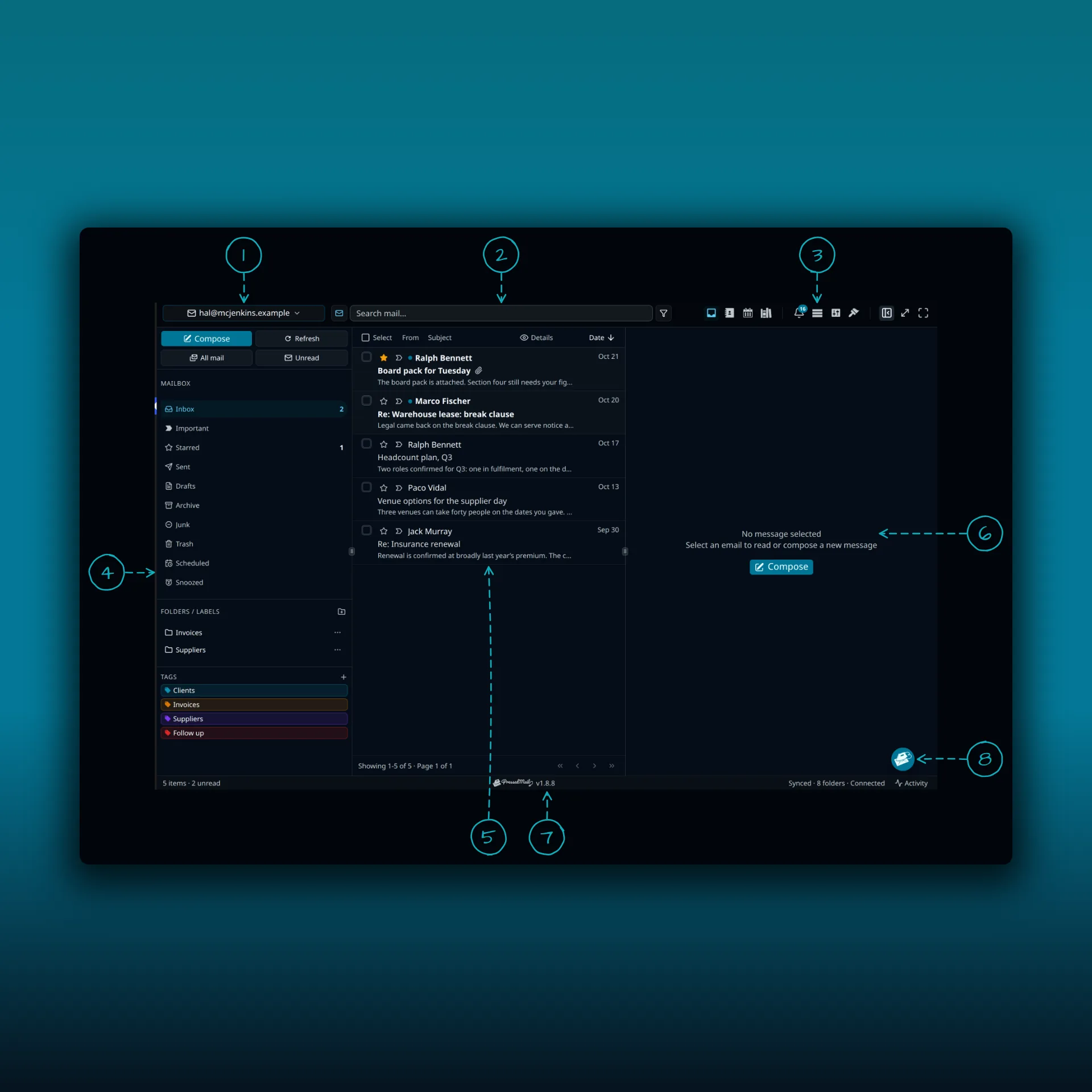
The PressedMail inbox with eight areas numbered, from the account switcher at the top to the speed dial at the bottom right

  1. The account switcher. Choose one mailbox, or the combined inbox that merges them.
  2. The search box.
  3. The icon cluster. A paid build adds contacts, calendar and templates here.
  4. The folder pane.
  5. The message list.
  6. The reading pane.
  7. The status bar.
  8. The speed dial, a round button you can drag.

The screenshot comes from a paid build, so it shows the combined inbox and the extra icons. A Free site shows one mailbox and fewer icons.

The Accounts tab shows where the plans differ for sharing.
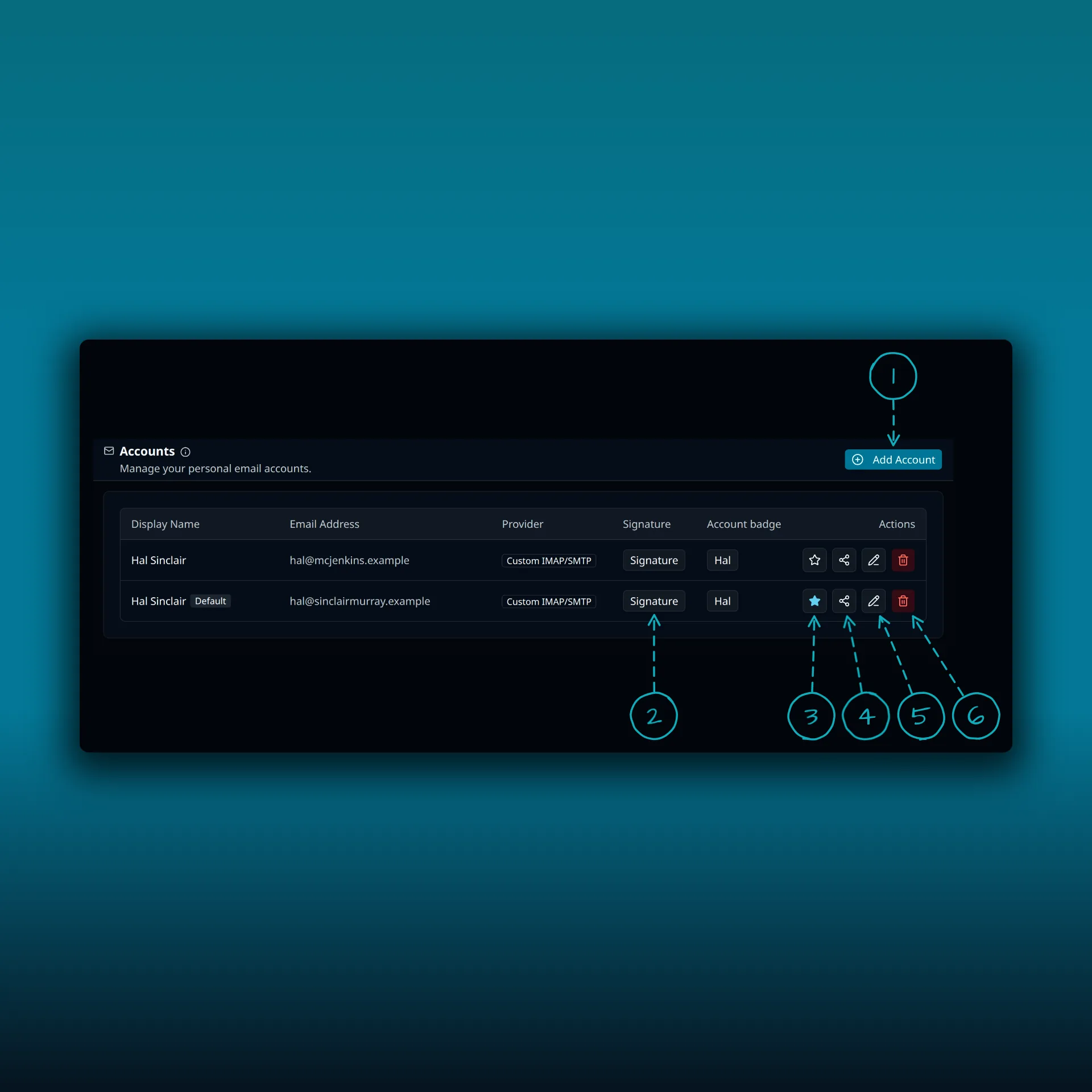
The Accounts tab with the Add Account button and the buttons on an account row numbered

  1. Add Account.
  2. Signature.
  3. The star that marks the default account.
  4. Share. Sharing a mailbox needs Ultimate or Lifetime.
  5. Edit.
  6. Delete.

Pick by what you will do

Ask what you will do in the next month.

If you read one address and send from it, stay on Free. Add the WordPress SMTP setup if you also want password resets to go through your own server.

If you juggle several addresses, or want contacts, a calendar or scheduled send in the same place, Starter or Premium covers it. Choose by the number of sites. Snooze, scheduled send and undo send and the combined inbox are part of that.

If several people on a site need to work in one mailbox, or you want to hand clients a branded version, you need Ultimate or Lifetime. The agency guide shows what that setup looks like on one site.

If you are still comparing tools, the plugin comparison and the SMTP plugin comparison explain how PressedMail differs from a send-only plugin.

Frequently asked questions

Does Free stop working after a while?

No. Free needs no license key and has no expiry.

Do I need a PressedMail account for Free?

No. Install it from the WordPress.org directory and connect your mailbox. Your provider’s own terms and limits still apply.

Do I need AI credits?

Only for PressedMail AI. AI is off until an administrator sets it up, and you can use your own provider instead.

Which plan fits an agency?

Ultimate or Lifetime. They cover up to 100 sites and add shared mailboxes with roles and white labelling.

Can I move from Free to paid later?

Yes. WordPress’s plugin management guide covers uploading a plugin ZIP. Your accounts, settings and data stay in place.

Manage your email inside WordPress

PressedMail Free adds an email client directly to your WordPress dashboard. Connect a compatible IMAP/SMTP mailbox, read and send mail, organize messages, and configure WordPress SMTP.


Download PressedMail Free →

Newsletter

Get useful PressedMail updates.

New releases, setup guidance, and practical ways to handle email in WordPress.

Occasional PressedMail email. Unsubscribe whenever you like.

Choose the plan that fits your WordPress sites.

Paid plans include unlimited accounts and users. Compare Premium and Ultimate features, then choose the site count you need.

Yearly plans are priced by number of sites. Lifetime is a one-time payment covering up to 100 sites.

Starter

For one site

$49/ year
1 Website
  • All current and future Premium features
  • Unlimited email accounts
  • Contacts, calendar, and scheduled email rules
  • Templates, blocks, and signup forms
  • AI tools and phishing detection
  • Layouts, themes, and workspace controls
  • Licensed updates and priority support
  • 10,000 PressedMail AI credits a yearLimited time
Most Popular

Premium

For multiple sites

$89/ year
10 Websites
  • All current and future Premium features
  • Unlimited email accounts
  • Contacts, calendar, and scheduled email rules
  • Templates, blocks, and signup forms
  • AI tools and phishing detection
  • Layouts, themes, and workspace controls
  • Licensed updates and priority support
  • 25,000 PressedMail AI credits a yearLimited time
All Features

Ultimate

For agencies

$169/ year
100 Websites
  • Everything in Premium, plus:
  • Campaigns and shared templates
  • Share inboxes, calendars and contact lists
  • White labelling with a brand theme
  • 50,000 PressedMail AI credits a yearLimited time

What customers say after bringing email into WordPress.

Using PressedMail in your own work? Submit a testimonial

I save hours & it’s easy to use

I have a lot of email accounts, and it’s annoying to manage them through different providers. I needed something better than what was out there, so I built it. I spent the better part of two years making PressedMail the plugin I wanted to use every day, and now I get to share it with everyone else. I added my accounts, automated the cleanup of over 3000 emails, and it’s saved me hours of work.

Robert H. AlexanderFounder - CurbSoftwareCreator of PressedMail

Helps get more clients

As a freelancer I need to manage several clients’ accounts. I installed PressedMail on WordPress on localhost and use it as my main email client. I manage everything for clients from PressedMail. And several clients use PressedMail now after I have set their WordPress instances up.

Gene Piki
  • Email Swiss Army Knife

    We use PressedMail as a value added service for clients and potential clients as a feature of our agency’s offering helping put us ahead of competition. We love the white-labelling feature, automation, and security controls. It also replaces several of the other plugins we used to use and it’s like a small CRM.

    Cyrus M. (InCurb Digital)

  • Fast inbox organization with phishing detection

    PressedMail helps us organize our inboxes fast. We especially like the phishing detection feature.

    John & Andrea

  • One source of truth for every client

    As a VA, I use PressedMail to keep each client’s inbox separate while managing everything from one app. It gives me a single source of truth without mixing client work together.

    Amber, K

  • Teaching and client work stay organized

    I balance teaching with social media marketing clients. PressedMail helps me keep both sides of my work organized in one place.

    J.A. Payo

FAQ

Common questions

Free version

Start with one inbox. Free.

One mailbox for one user, a rich-text composer, custom folders, unlimited email rules, one signature, two themes and one layout. Contacts, calendar, scheduling and AI require a paid plan.

1 account · 1 user · 2 themes · unlimited rules
Roadmap

See what is coming next.

Follow planned work, current progress, and recently completed features.

  1. Planned

    Calendar Sync with External Providers

    Planned. Today calendars and events live in WordPress and do not sync with any outside provider. Two-way sync with Google Calendar, Outlook, iCloud and CalDAV-compatible services is on the roadmap.

  2. Planned

    Dedicated Support

    A higher-touch support channel beyond the current paid Priority Email Support entitlement.

  3. Planned

    Activity Log

    A searchable audit trail of key actions across PressedMail accounts, with per-user and admin views, retention controls, and export.

Bring your working inbox into WordPress.

Compare Premium and Ultimate features, then choose a paid plan for the number of WordPress sites you manage.

Free or Paid: Which PressedMail Plan Do You Need?