

The best WordPress email plugin depends on whether you need to read an existing mailbox, deliver site notifications or collect messages into a narrower workflow. Search results mix those jobs, so start with the task rather than the number of features in a listing.
For a conventional one-mailbox inbox inside wp-admin, PressedMail Free is a direct option to evaluate. WP INBOX also advertises inbox functions, but its directory page carries an outdated compatibility warning. MailDraft AI describes a more specialized incoming-mail and AI-drafting workflow.
PressedMail publishes this guide. The comparison below uses current product source for PressedMail and the other developers' directory descriptions. It is a documentation-based comparison, not a claim that these products were tested side by side or a ranking of the entire directory.
What counts as an email client?
A mailbox client should let you open existing messages and carry out the conversation you need. Reading, replying, composing, folder handling and authentication support matter more than whether “email” appears in the plugin name.
An SMTP router has another job: it changes the route used by WordPress-generated mail. That can solve a site's sending requirement without providing an inbox.
Before choosing a product, read whether WordPress can be an email client and the SMTP-versus-client comparison. Those distinctions prevent a common mistake: installing a sender when the intended result is reading customer replies.
A short, evidence-based shortlist
| Product | Documented focus | Decision to make |
|---|---|---|
| PressedMail | Mailbox interface plus separately configured WordPress SMTP | Does its current account and edition scope cover your workflow? |
| WP INBOX | Reading, sending and organizing mailbox email | Can its older compatibility position meet your site's requirements? |
| MailDraft AI | Incoming IMAP mail and AI-assisted reply drafting | Do you want that specialized workflow and its external-service dependency? |
| WP Mail SMTP | WordPress outgoing-mail transport | Do you need site sending rather than a mailbox interface? |
These entries answer different needs. The table does not imply equal compatibility, identical authentication or an established winner.
PressedMail for a mailbox inside WordPress
PressedMail Free connects one compatible mailbox and supplies basic composing, folders, tags, limited rules and one signature. It also includes a separate site-wide SMTP server configuration and a metadata log for WordPress mail.
Paid features include additional mailboxes, contacts, calendar and advanced workflows. Check the actual feature you need instead of assuming every control in a marketing screenshot belongs to Free.
Provider authentication is part of the decision. Gmail currently uses eligible app passwords; Google sign-in is not available in that connection flow. Microsoft mailbox connections use OAuth. An organizational policy can still prohibit the access.
The first-message walkthrough is a useful evaluation task: connect one authorized mailbox and open a known message before exploring advanced features.
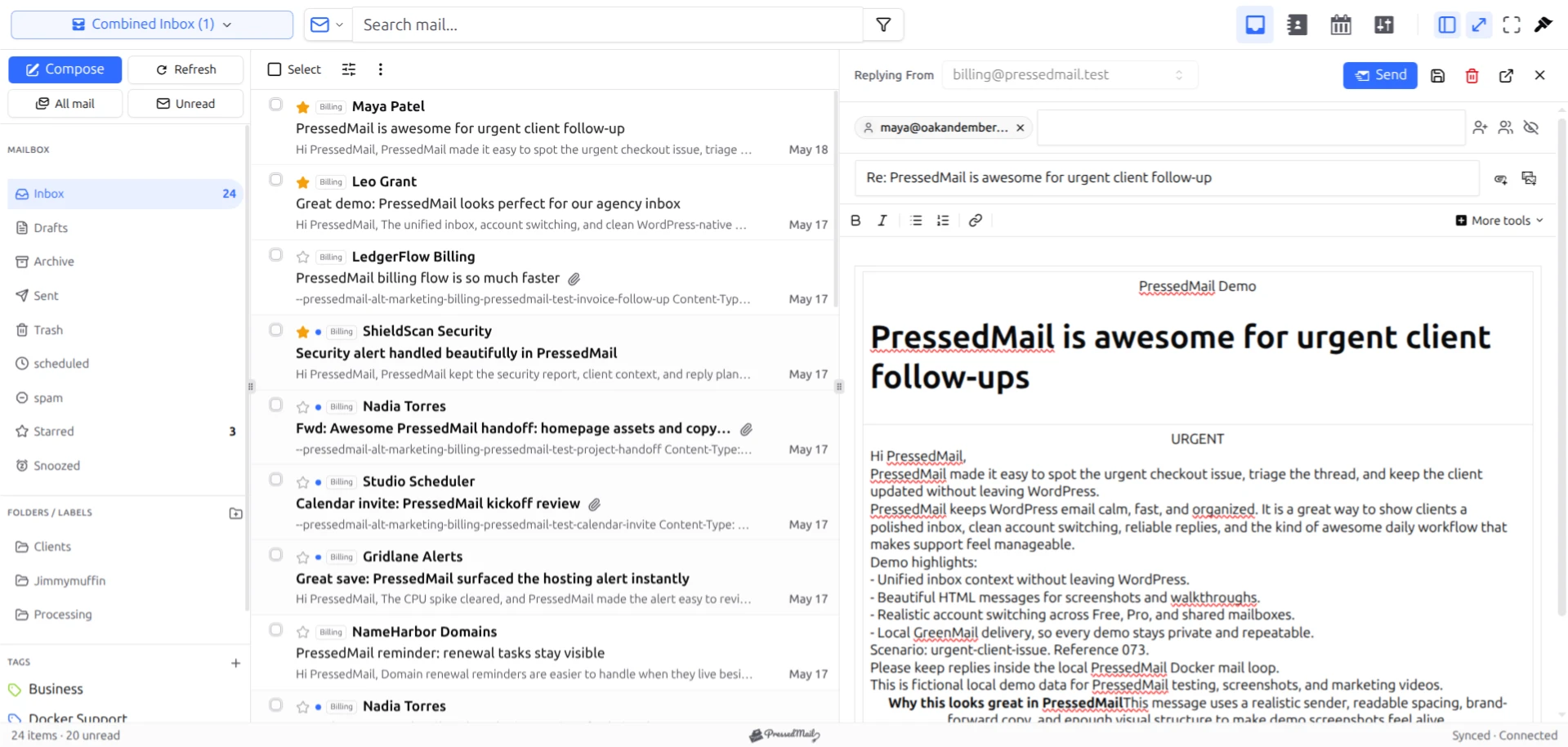
PressedMail screenshot with fictional email. This is an interface reference, not comparative test evidence or a promise that every visible control is included in Free.
WP INBOX for an older inbox implementation
The WP INBOX directory page lists reading, sending, replying and attachment features. At the September 2026 review, it also warns that the plugin has not been tested with the latest three major WordPress releases.
That warning establishes uncertainty about current compatibility. It does not prove that every installation fails, nor does it establish a current security assessment. Treat support, current WordPress compatibility and provider authentication as questions to resolve before using it with business mail.
Do not assume its historical Gmail-related instructions describe today's provider policies. Authentication requirements can change independently of a plugin's interface.
MailDraft AI for an incoming-mail drafting workflow
The MailDraft AI listing describes IMAP access, an incoming-mail dashboard and OpenAI-based reply drafting.
That may be relevant when your goal is reviewing incoming leads and drafting responses. The documented workflow and its external AI service should be evaluated separately from the needs of a general mailbox client.
Check which actions happen locally, what content is sent to the AI provider and how a drafted reply becomes an outgoing message. The listing alone does not establish that every folder or mailbox-management task matches a conventional client.
WP Mail SMTP when outgoing site mail is the task
WP Mail SMTP describes reconfiguring WordPress sending through SMTP or supported providers. Its focus is the website's outgoing-mail route.
That is a reasonable category to consider when password resets or notifications are the requirement. It should not be counted as a demonstrated inbox client merely because it sends email. The WordPress SMTP setup guide explains that separate job.
Compare authentication before interface polish
A plugin can look suitable and still lack an authentication method your account permits.
Ask which provider hosts the mailbox, whether third-party access is allowed and whether the plugin implements the required method. “Supports IMAP” does not establish support for every OAuth flow or managed-account policy.
The IMAP versus SMTP guide explains why incoming and outgoing access need separate checks. Both must support your intended conversation.
Also ask who will maintain the WordPress installation. A mailbox interface depends on that environment, its updates and its access controls. Provider webmail remains an alternative when you do not want the website to host the client.
Evaluate one task consistently
Use an appropriate test site and fictional messages. Begin with the same task for each candidate:
- Connect one authorized account.
- Open a known incoming message.
- Reply to a separate address you control.
- Confirm receipt at that address.
- Check a harmless folder action against provider webmail.
Record the WordPress and plugin versions, provider account type and outcome. A documentation claim and an observed result belong in separate columns of your notes.
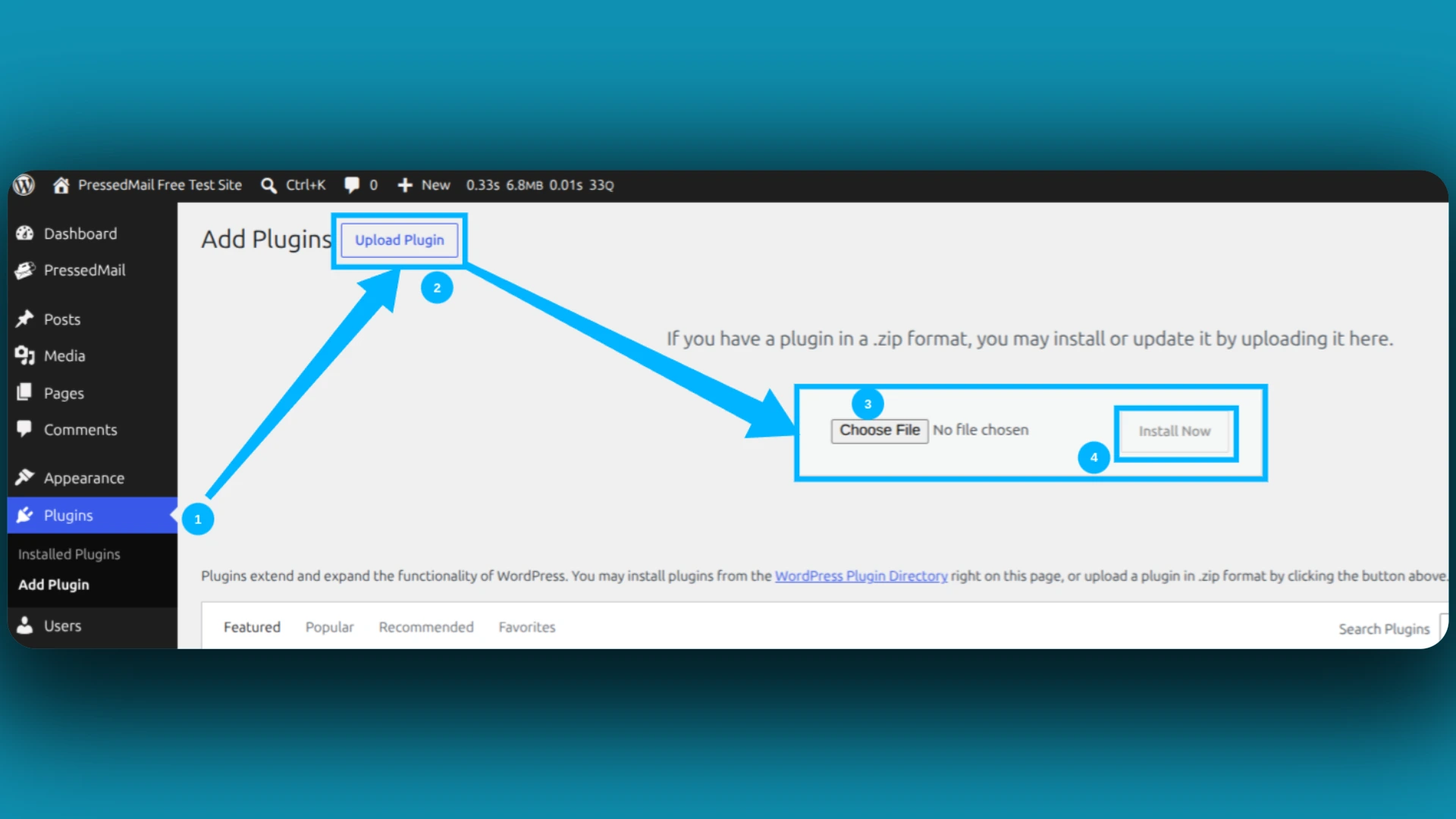
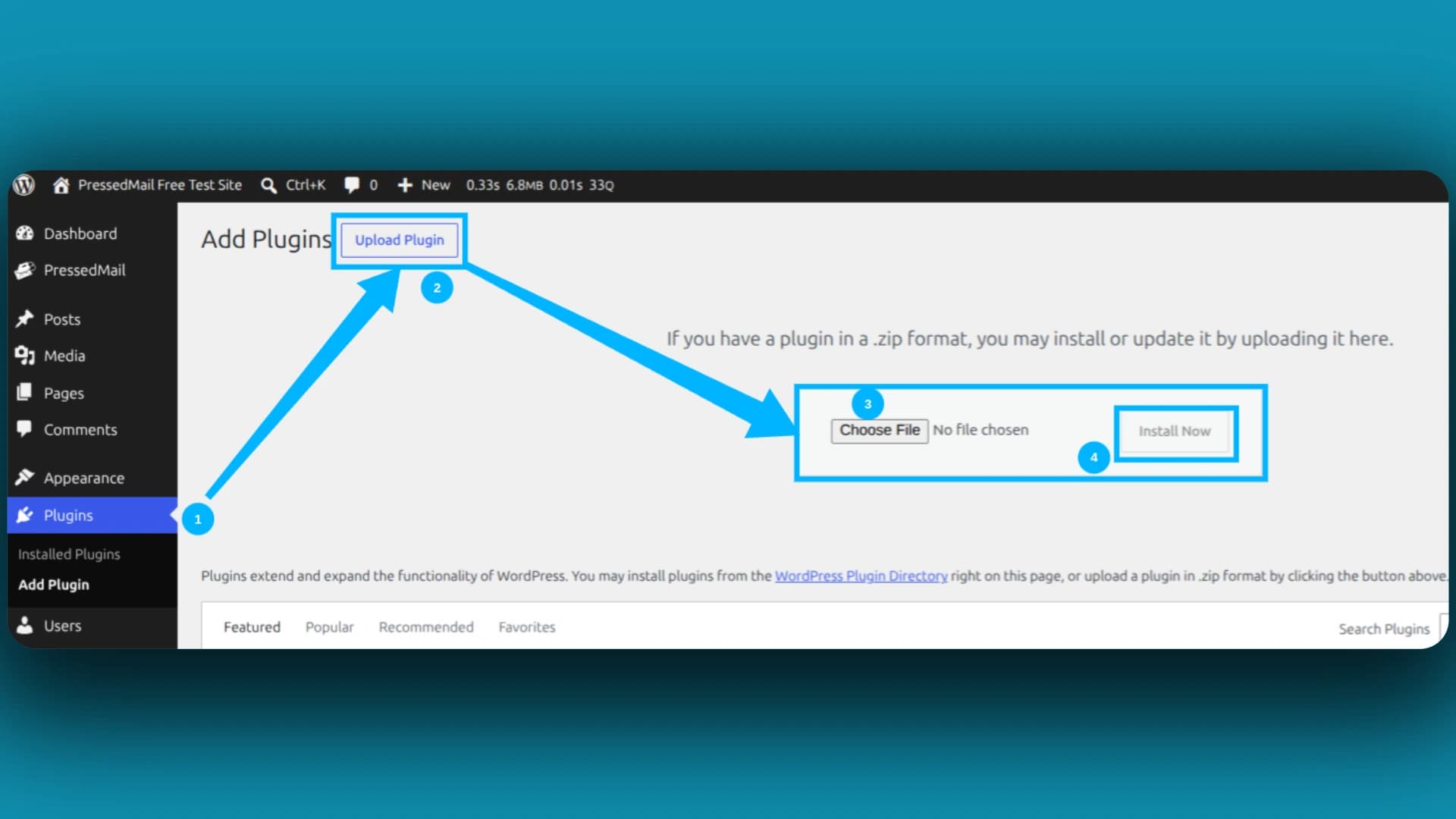
Screenshot of WordPress's ZIP-upload installer. Directory search is another installation route; this image does not show a plugin comparison.
Avoid entering a real shared business mailbox merely to see whether an unfamiliar plugin works. Start with controlled data and establish compatibility before depending on the workflow.
Consider webmail outside the plugin list
Provider webmail or a desktop client may already meet the need. Keeping the mailbox interface outside WordPress reduces the website-specific setup, while a WordPress client can suit people who work in wp-admin throughout the day.
PressedMail versus Roundcube compares two of those arrangements. A narrower requirement may also mean you do not need a second SMTP plugin once one verified route is configured.
Frequently asked questions
Is the plugin with the most installations the best inbox client?
Installation counts do not establish that a plugin reads mail at all. Verify its category, authentication and the task you need.
Was every product here tested hands-on?
No. This comparison identifies documented capabilities and the limits of that evidence. It does not present invented benchmarks or test results.
Does an outdated compatibility warning prove a plugin is broken?
No. It means current compatibility is not established by that listing. Resolve that uncertainty before relying on it.
What should I try first?
If your goal is one mailbox inside WordPress, try the Free reading and reply workflow with a controlled account. If you only need site notifications, evaluate the sending route instead.
Manage your email inside WordPress
PressedMail Free adds an email client directly to your WordPress dashboard. Connect a compatible IMAP/SMTP mailbox, read and send mail, organize messages, and configure WordPress SMTP.




