
Themes, Layouts, and Accessibility
Tune the admin email workspace for different working styles.
Appearance and accessibility live together because they are the same decision: making the workspace readable for the person in front of it, whoever that is.
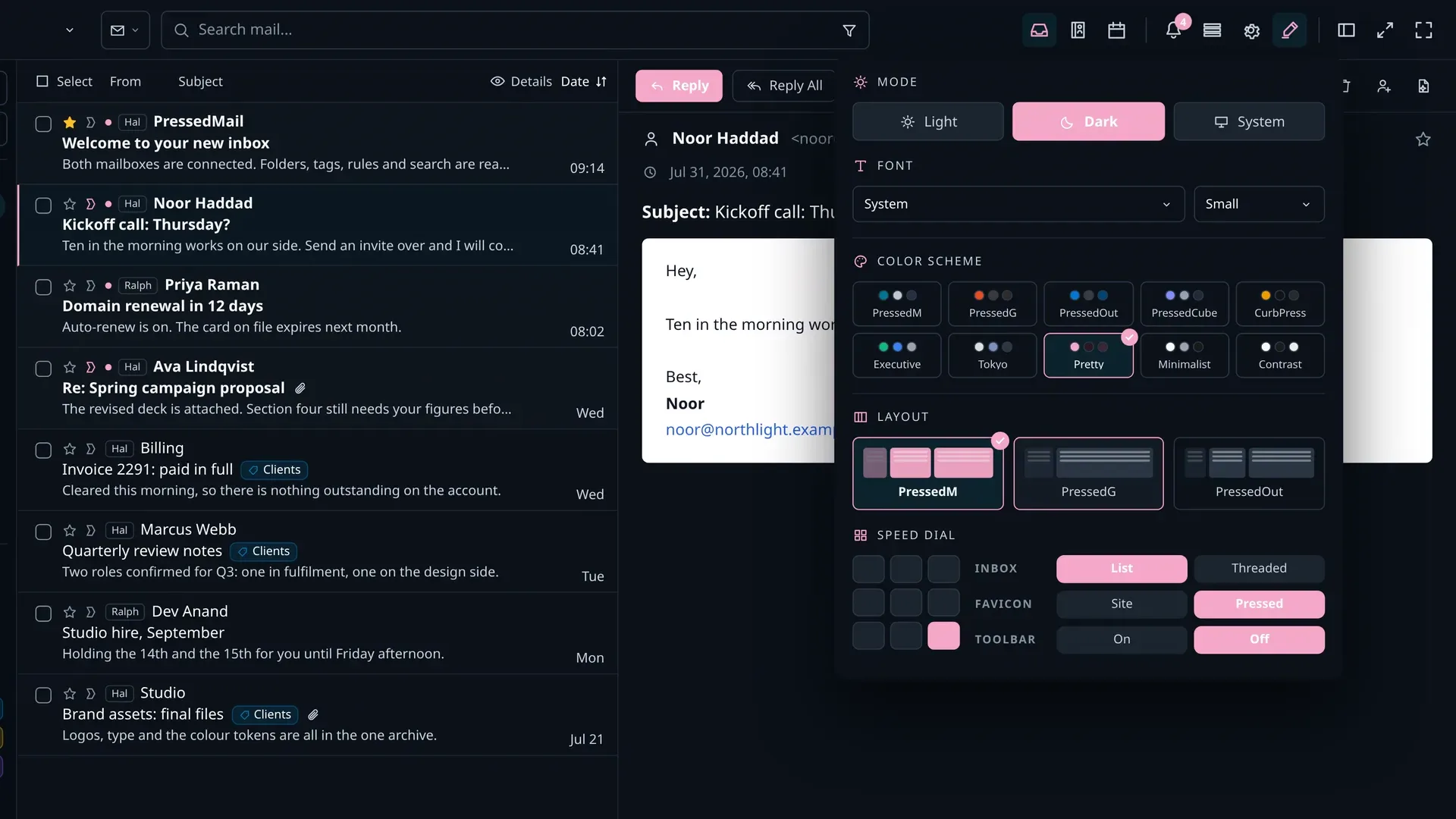
Themes and modes
- Free includes two built-in themes. Every paid plan includes all ten built-in themes, including a dedicated high-contrast theme.
- System-aware mode follows the operating system's setting; choices settle per user.
- Ultimate and Lifetime add the Brand Theme and white labelling.
Layouts
Three layouts (PressedM three-pane, PressedG conversation view, PressedOut ribbon), with resizable panels and a repositionable reading pane. The Free build uses the standard layout; layout switching is a paid feature.
Reading Comfort
- Fifteen typefaces, including one designed for dyslexic readers, with independent size control for long-form reading.
- Comfortable or compact density on the message list.
- Reduced motion honours the operating system preference. Transitions settle rather than animate.
Keyboard and screen readers
- Twenty default shortcuts across navigation, actions, composing, and search, plus a Gmail preset. Every one is remappable.
- Focus states are visible on every focusable control.
- Touch targets are sized for fingers, and semantic labels and skip-to-content patterns run across the workspace.