PressedMail AI tags your mail and checks it for spam and phishing. It needs no AI account and no API key of your own, because CurbSoftware runs it. The price of that convenience is a balance of credits that every check spends from.
This guide explains what costs what, where to read your balance, what happens when it hits zero and how to keep one busy inbox from using it all.
What a credit pays for
One credit covers one task on one email.
- Auto-tagging an email costs one credit.
- Checking an email for spam and phishing costs one credit. Both checks on the same email share that one credit.
- Running a check again costs another credit.
So tagging plus the spam and phishing checks on one email is two credits. If fifty new emails arrive and all three run, that is 100 credits. With only tagging on, it is 50.
Email rules can run the same tagging and checks, and they spend credits the same way. The first-rule guide shows how rules fit in.
Drafts and summaries are a different matter. They use your own AI provider, billed by that provider, and spend no PressedMail credits. The auto-tagging guide and the spam and phishing guide explain what each check does.
Who gets credits
PressedMail AI is part of the paid editions. Free never sends mail to it, so Free has no credits and nothing to spend.
Credits belong to your licence, not to one site. Every site on the same licence draws from the same balance. They never expire, and unused credits from your plan keep rolling forward. When you buy extra credits, they join the same balance on top of what the plan gave you.
At the time of writing, the yearly plans include credits as part of a limited-time promotion: 10,000 for Starter, 25,000 for Premium and 50,000 for Ultimate. Lifetime includes 200,000 once. Those amounts can change, so the credits page in the docs is the place to confirm the current numbers. The plan guide compares what each plan adds.
Where to see your balance
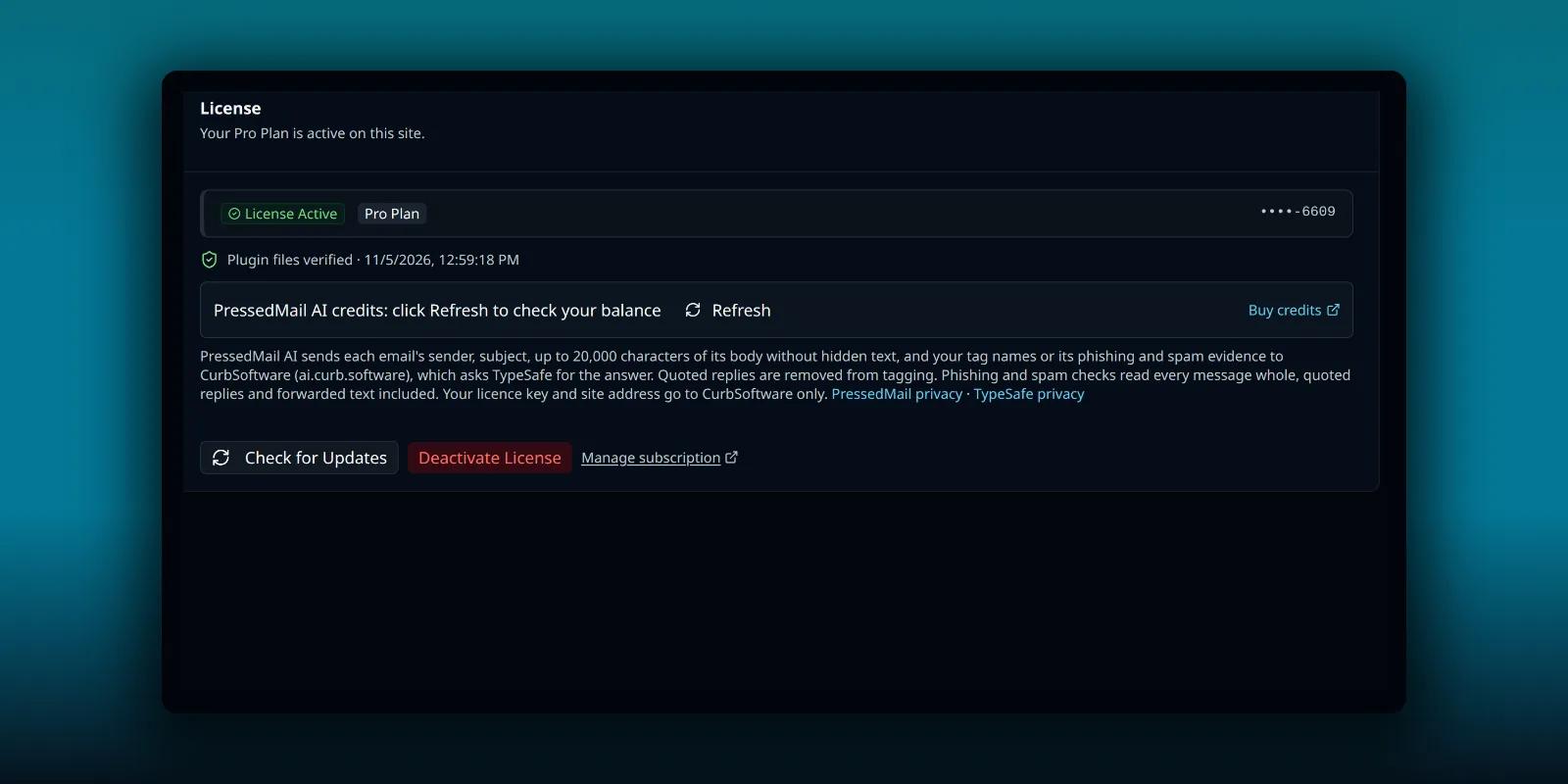
The Licensing tab is the home of your credits. Open PressedMail, then Settings, then Licensing.
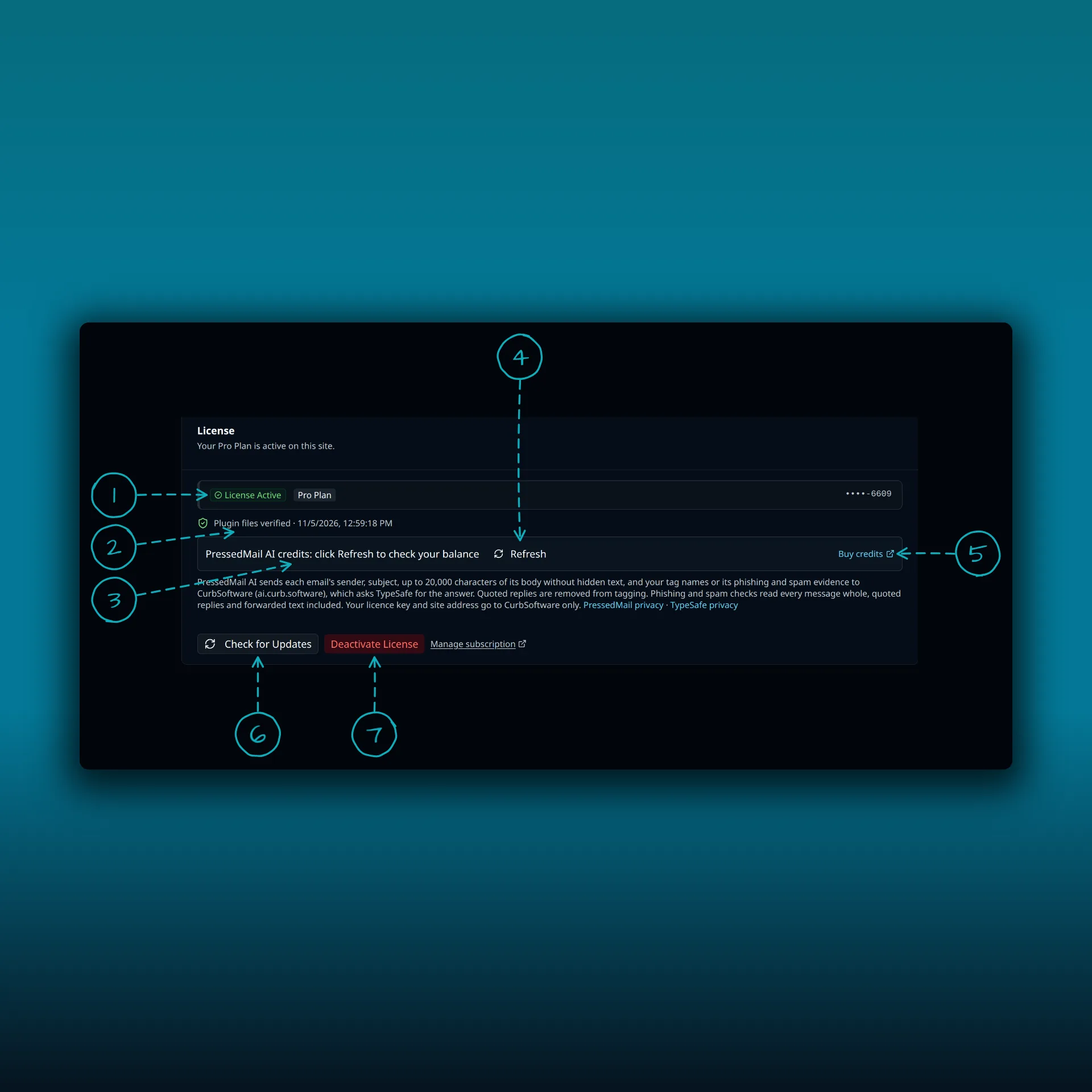
- License Active. The badge shows the plan the licence belongs to.
- Plugin files verified, with the time of the last check.
- The PressedMail AI credits row. It reads “click Refresh to check your balance” until you fetch a number.
- Refresh. Fetches your balance now.
- Buy credits. Opens your PressedMail home page.
- Check for Updates.
- Deactivate License.
The paragraph under the credits row says exactly what PressedMail AI sends and where. It names CurbSoftware’s AI service and its processor, TypeSafe. You can read the TypeSafe privacy policy if you want the processor’s own terms.
AI Tools shows the balance once, above its tabs. Your account page on pressedmail.com has a PressedMail AI credits card too, with the credits used so far. The plugin remembers the number for a few minutes, so press Refresh after you buy a pack.
Turn it on per feature
Open Settings, then AI Tools. Each feature has a dropdown with three choices: Disabled, Enabled (your AI provider) and PressedMail AI. Only PressedMail AI spends credits.
Auto-tagging has its own choice. Phishing and spam checks share one. That lets you tag with PressedMail AI and check spam with your own provider, or the other way round.
Above the choices sits a site-wide switch, Enable AI features. Turn it off and every AI feature on the site stops.
When credits run out
Tagging and phishing checks pause. Nothing breaks and nothing is lost. New mail waits in a queue, and a notice on PressedMail’s screens says why.
Add credits and the work picks up again within the hour. To wake it now, press Refresh next to the balance.
Stop one inbox from using it all
Everyone on a licence shares one balance, so one busy mailbox could eat the lot. The Team credits tab in AI Tools sets limits.
- Default monthly limit applies to everyone. Leave it blank for no limit. A limit of 0 turns PressedMail AI off for everyone who has no limit of their own, so the page asks you to confirm before it saves.
- Each person gets a row showing the credits they have used this month. Give them a different limit or switch PressedMail AI off for them.
- On a big team, search by name or email. Changes on one page are kept while you look at another, and they all save together.
When someone reaches their cap, their new mail skips auto-tagging and phishing checks until next month or until you raise the limit. Spam scoring can still be decided from mailbox history without a credit. That mail is not picked up later on its own, so run tagging or a phishing check by hand on anything that matters. Everyone else carries on. People can see their own usage under the AI section of their personal settings.
The guide to sharing a mailbox covers who else can be let in, which is who ends up with a row.
Bulk runs spend credits too
Select messages in the list and use the AI actions in the bulk bar. Above 10 messages, PressedMail warns you first. Your administrator sets a cap for each selection, 50 by default and 200 at most. Above the cap, the app asks you to confirm rather than refusing.
On paid builds with Email Sweep, the AI checks can run over a whole folder. Every email checked costs credits, so look at the count before you start.
Buying more
Extra credits come in four packs, from 10,000 to 100,000. A pack adds to the same balance and never expires. Buy it from the billing page on pressedmail.com while signed in, so the credits land on your own licence. A pack costs less when it is on the same checkout as a plan. Check the billing page for the current prices.
If PressedMail AI had paused for lack of credits, it resumes within the hour once the pack lands.
Frequently asked questions
Does Free use credits?
No. Free never sends mail to PressedMail AI. It has no credits.
Do drafts and summaries cost credits?
No. Those use your own AI provider and are billed by that provider.
Do credits expire?
No. Credits never expire, and unused plan credits roll forward.
Why does one email cost two credits?
Auto-tagging costs one credit. The spam and phishing checks share a second credit. Running all three on one email costs two.
Can I limit how many credits one person uses?
Yes. The Team credits tab in AI Tools sets a default monthly limit and a limit for each person.
Manage your email inside WordPress
PressedMail Free adds an email client directly to your WordPress dashboard. Connect a compatible IMAP/SMTP mailbox, read and send mail, organize messages, and configure WordPress SMTP.