PressedMail has two separate checks for suspicious mail. One scores spam. The other looks for phishing. They are paid features, an administrator has to switch them on, and each gives you a number and the reasons behind it.
This guide explains what each check reports, how to read the numbers, how to turn them on, and what they cost. It also covers what neither one does. Neither tool moves or deletes mail on its own unless you set that up.
Two tools, two questions
Spam scoring asks whether a message is unwanted mail. Phishing analysis asks whether a message is trying to trick you into giving something up, such as a password, money or a file. A message can be one without the other. A phishing warning does not make a message spam, and a spam score does not say anything about a scam.
Both tools give a confidence from 0 to 100, a position on a scale and not a probability you can quote. A low number does not prove a message is genuine. Every check that finishes ends in a number. If a check fails, it says so and shows no number.
The spam scale
The list, the reading pane and the report show “Spam confidence”, for example 86 percent. The number falls into one of four bands, and the interface and the rules compare the band.
- Clean is 0 to 29.
- Newsletter or promotion is bulk mail that scores under 50. Wanted bulk mail keeps its own band and ranks with clean.
- Suspicious is ordinary mail that scores 30 to 74, or bulk mail that scores 50 to 74.
- Spam is 75 to 100.
Open the message to see the reasons. They name the signals that counted, so a result you disagree with tells you what to put in a rule or a block list. Marking a message Not spam teaches your site the sender is fine, and a sender you marked as Junk counts strongly against their mail.
The phishing scale
The phishing report shows “Phishing confidence”, for example 62 percent. Below 31 the verdict is Looks safe. From 31 it is Suspicious. From 61 it is Likely phishing.
The report checks the sender’s identity, the language, the authentication headers (the checks that standards such as DMARC define), the links and images, the attachment details and any hidden content. It sorts what it finds into named types, such as lookalike domains, a reply-to mismatch, an authentication failure, suspicious links, hidden text and suspicious attachments. The attachment check reads the file name, extension and declared type. It is not an antivirus scan.
Read the findings before you act. A legitimate new sender can trigger a warning, and a careful scam can avoid known patterns. If something asks for money or a password, check it through a contact method you already know.
Turn them on
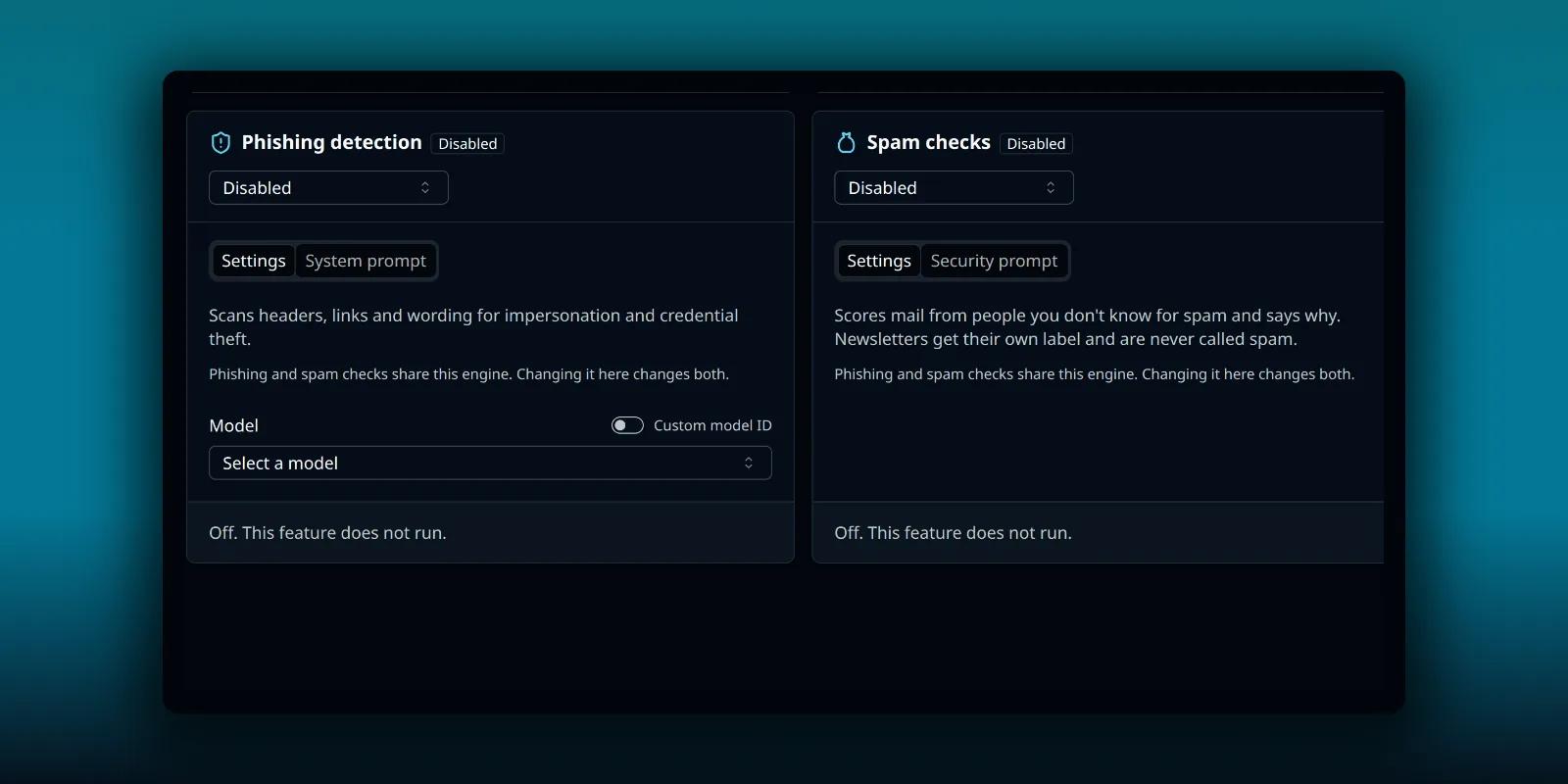
An administrator has to enable the site-wide AI setting first. Turning that off also turns off both checks. Then each tool has its own card in AI Tools, in the Admin group of the settings menu.
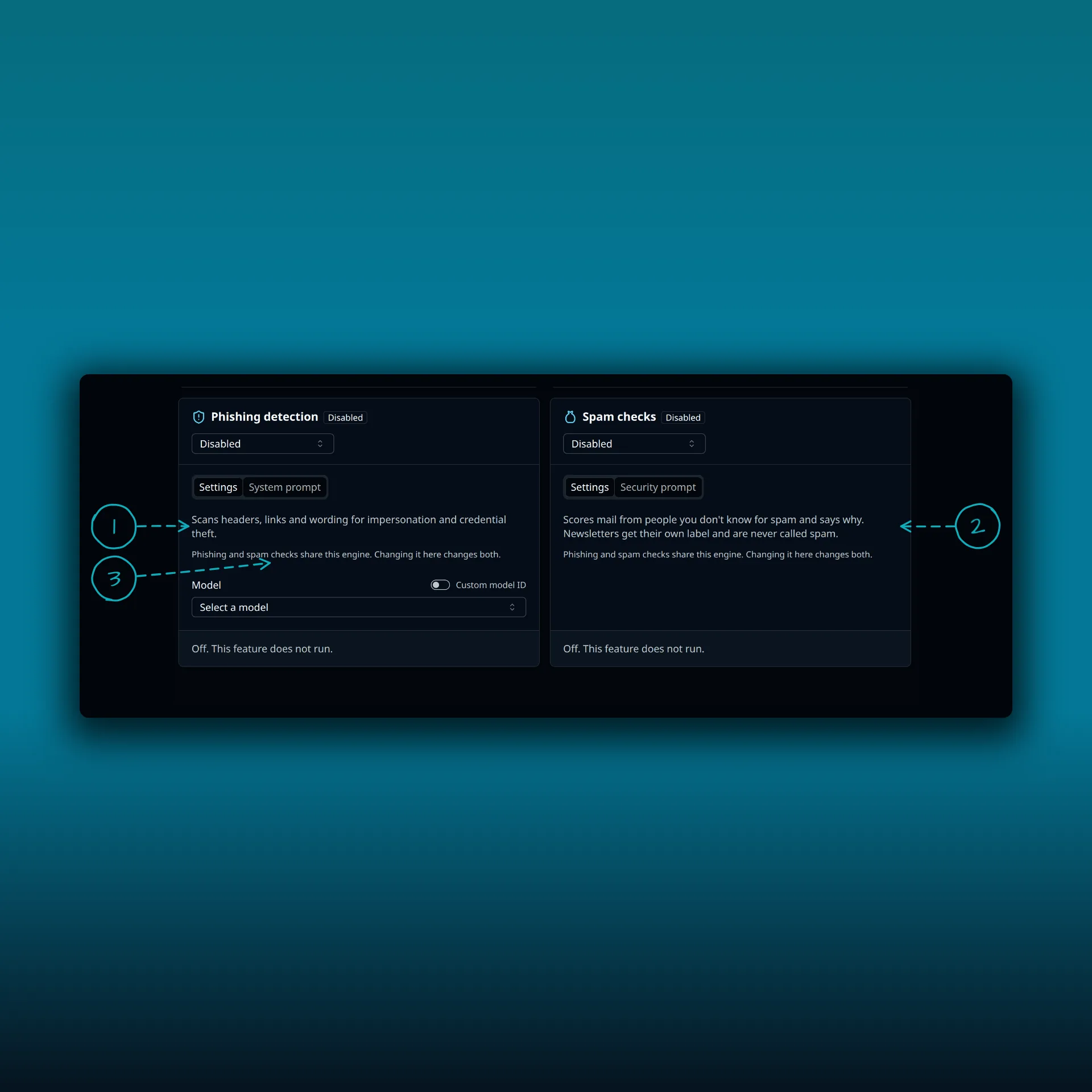
- The Phishing detection card. It scans headers, links and wording for impersonation and credential theft.
- The Spam checks card. It scores mail from people you do not know and says why.
- The note that phishing and spam checks share one engine, so changing it on one card changes both.
Each card has a menu for how the check runs. It offers Disabled, your own AI provider, or PressedMail AI. Disabled turns the check off. Your own provider means the provider’s charges apply and no PressedMail credits are used. PressedMail AI uses credits.
What it costs
On PressedMail AI, a spam score costs one credit per email, and a phishing check does too. When both run on the same email they share one credit, so spam, phishing and auto-tagging together cost two. Running a check again costs another credit. Credits do not expire. The credits guide covers the balance and team limits.
A silent animation of how AI credits are spent, about 15 seconds. Auto-tagging costs 1 credit per email. The spam and phishing checks on one email share 1 credit, so all three on one email cost 2. Running one again costs another credit.
If credits run out, the AI step pauses. An automatic phishing check for someone who has used up the month’s credits keeps PressedMail’s own findings and lists “AI skipped: monthly limit” in the verdict step. The post on AI auto-tagging covers the credit queue and team limits in more detail.
When a check fails
With your own provider, a failed AI call does not leave you with nothing. The phishing report still runs on PressedMail’s own checks of the sender, headers, links and body, and shows a warning that AI review was unavailable. With PressedMail AI there is no fallback to your provider, so a failed call leaves no report and no number. The check reads “Could not check message”, and nothing is saved.
Use the result in rules
On a paid plan, an email rule can test the spam result.
- Spam confidence compares the number, 0 to 100.
- The band condition compares the band, so a rule can match “suspicious or worse” without naming a number.
- The category condition matches the kind of mail the check found, such as bulk mail or a commercial pitch.
A rule needs a result to compare, so a message nobody has checked matches none of these conditions, not even a negative one. The first rule guide shows the editor, and the post on rules that do not run covers the triggers. A rule can also start after a security check.
Scoring itself never moves or deletes mail. It reports, and your rules decide what happens next. One opt-in setting changes that. Under Settings, Preferences, AI, “When a check flags an email” can move flagged mail to a folder, tag it, or both once a check reaches the level you choose. It is off until you turn it on, an administrator can switch it off, your own rules run first, and every move can be undone.
What leaves your site
Provider analysis can include an excerpt of the body and the raw headers. With your own provider, check its terms first, since they decide retention and use. PressedMail AI goes through a service that the PressedMail AI documentation describes. Remote images and links are handled by separate controls, covered in the post on securing email display inside WordPress.
Which plan do I need?
Both checks need a paid plan. The plan comparison lists what each plan includes.
Frequently asked questions
Is a low spam score proof that a message is safe?
No. The number says how sure the check is that a message is spam. A low number does not prove a message is genuine.
Does PressedMail delete messages it scores as spam?
No. The check only reports. A rule or the opt-in setting under Preferences does the moving, and every move can be undone.
Do the checks use my credits when I use my own provider?
No. Your own provider bills you directly, and PressedMail credits are not used.
Is the phishing check an antivirus scan?
No. It reads attachment details such as the file name, extension and declared type, but it does not scan the file.
Why does a message show no number?
Either nobody has run a check on it, or the check failed. A failed check reads “Could not check message” with no number.
Manage your email inside WordPress
PressedMail Free adds an email client directly to your WordPress dashboard. Connect a compatible IMAP/SMTP mailbox, read and send mail, organize messages, and configure WordPress SMTP.