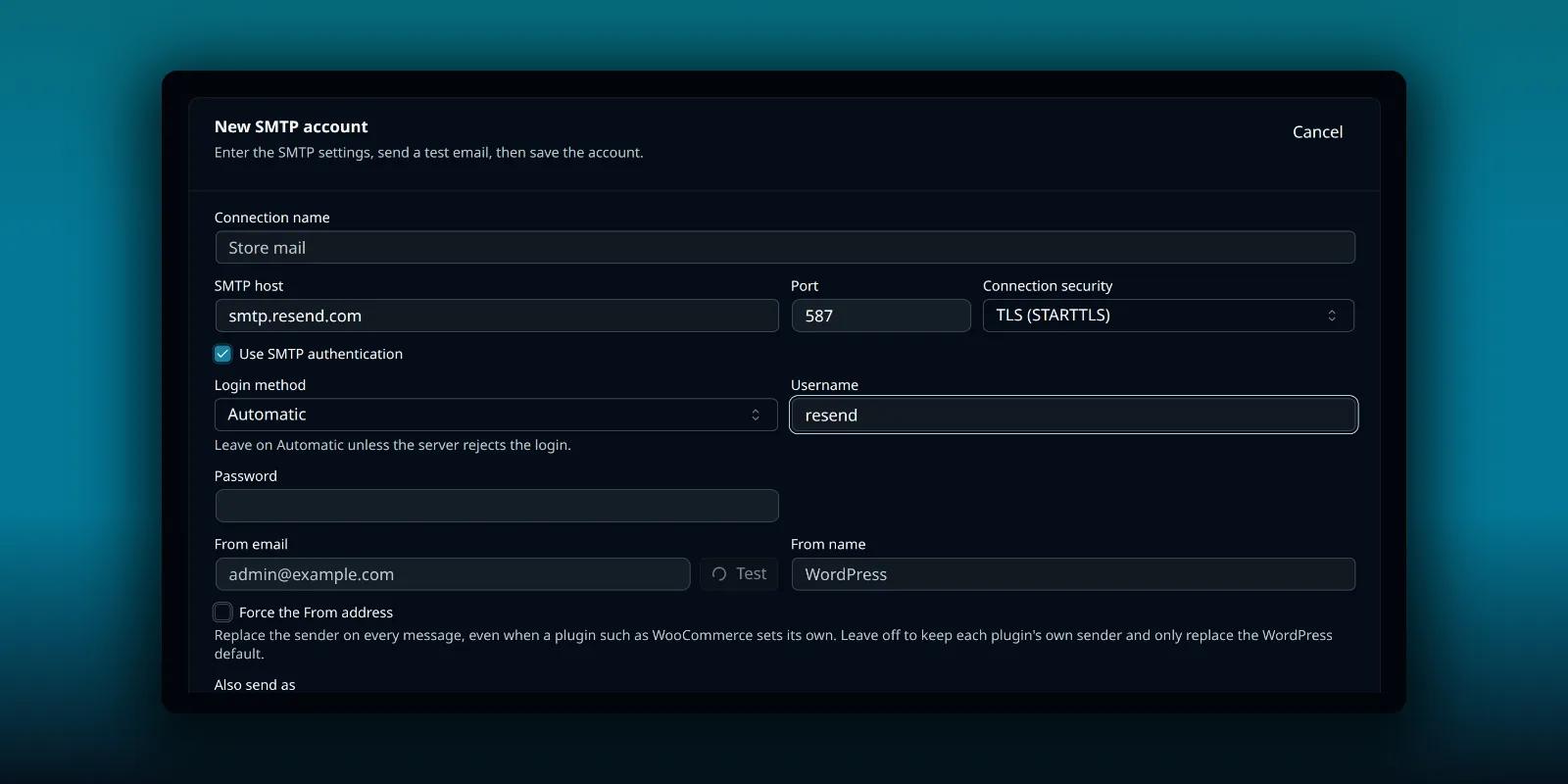
Resend keeps SMTP simple. There is one host, one fixed username and your API key as the password. The part that needs care is the domain: Resend sends only from a verified one. This guide connects Resend to PressedMail’s WordPress Email settings so WordPress’s own mail leaves through it.
It covers WordPress’s notifications, not your inbox.
What you need
- A Resend account and an API key.
- A verified domain in Resend. Resend’s SMTP page lists both as prerequisites.
- PressedMail with a WordPress Email SMTP slot. Free has one. Paid builds have several.
The settings
Resend’s SMTP documentation gives these values:
| Field | Value |
|---|---|
| SMTP host | smtp.resend.com |
| Port | 587 (also 25, 465, 2465 or 2587) |
| Connection security | TLS (STARTTLS) for 587 |
| Username | resend |
| Password | Your API key |
The username is the literal word resend, the same for every account. The API key is the secret.
Resend sorts its ports by security. Ports 465 and 2465 use implicit SSL/TLS, where the connection is encrypted from the first byte. That is PressedMail’s SSL option. Ports 25, 587 and 2587 connect first in plain text and then upgrade, which is the TLS (STARTTLS) option. Port 587 with TLS (STARTTLS) suits most sites.
Add it in PressedMail
Open PressedMail, then Settings, then WordPress Email, then SMTP Accounts. On Free, the tab is Mail servers and the button reads Add mail server. Choose Add SMTP account.
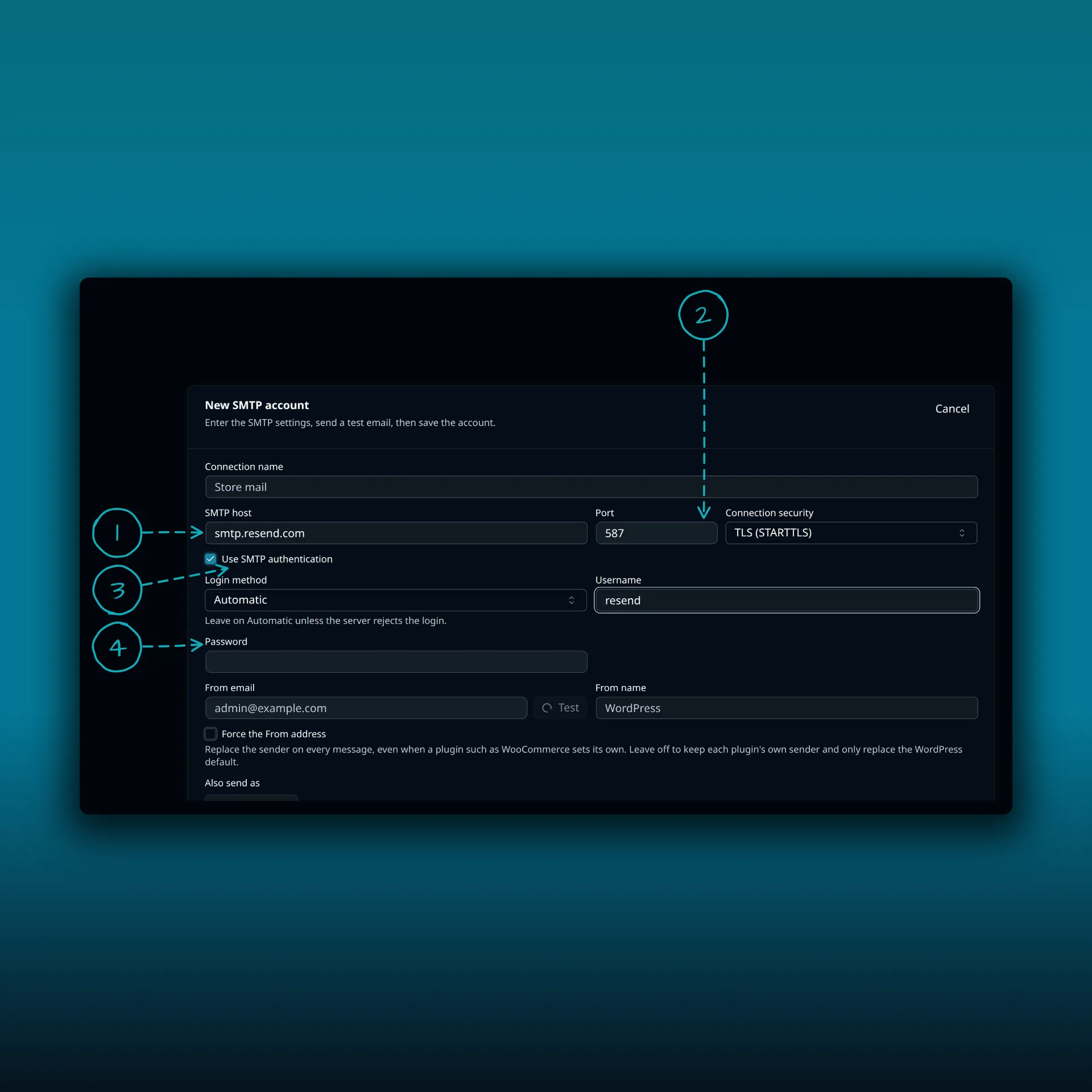
- SMTP host. smtp.resend.com.
- Port and connection security. 587 with TLS (STARTTLS).
- Use SMTP authentication. Leave it on.
- Username and password. The username is the word resend. The password is your API key.
The picture shows the host, port and username typed from Resend’s documentation and nothing saved. Paste your real API key into the password field yourself.
Set the From email to an address on your verified domain, then save and test.
Verify the domain
Resend sends from domains you have verified. Its page on domains explains how to add one and which DNS records to publish. Do this before you test, because a message from an unverified domain is refused.
Use an address on that domain for the From email. If WordPress or a plugin sends from another address, turn on Force the From address in PressedMail so the server replaces the sender on every message with yours. Contact forms that set the visitor as the sender would then hide the visitor, so keep their address in Reply-To. The routing guide explains how PressedMail chooses a server and sender.
What Resend does and does not show you
Two things in Resend’s FAQ are worth knowing before something goes wrong.
- Resend does not provide SMTP server logs for debugging. If you run into trouble, its page says to contact support. So the best evidence you have lives on your own side.
- Mail sent over SMTP appears in your emails table in Resend. That is where to confirm that Resend received a message.
PressedMail’s delivery log fills the first gap. It records what WordPress handed over and which server it went through, without storing the message body. The delivery log guide shows how to turn it on.
The rate limit over SMTP is the same as over the API, according to Resend. A burst of notifications from WordPress can hit it, so spread bulk sending out.
Headers PressedMail does not set
Resend lets SMTP clients add an idempotency key header and other custom headers. PressedMail’s SMTP form has no custom header field, so you cannot use those from this form. WordPress notifications do not normally need them.
Switch WordPress over to it
Adding the account does not move WordPress’s mail by itself. On a paid build, open the Default SMTP tab and choose PressedMail SMTP.
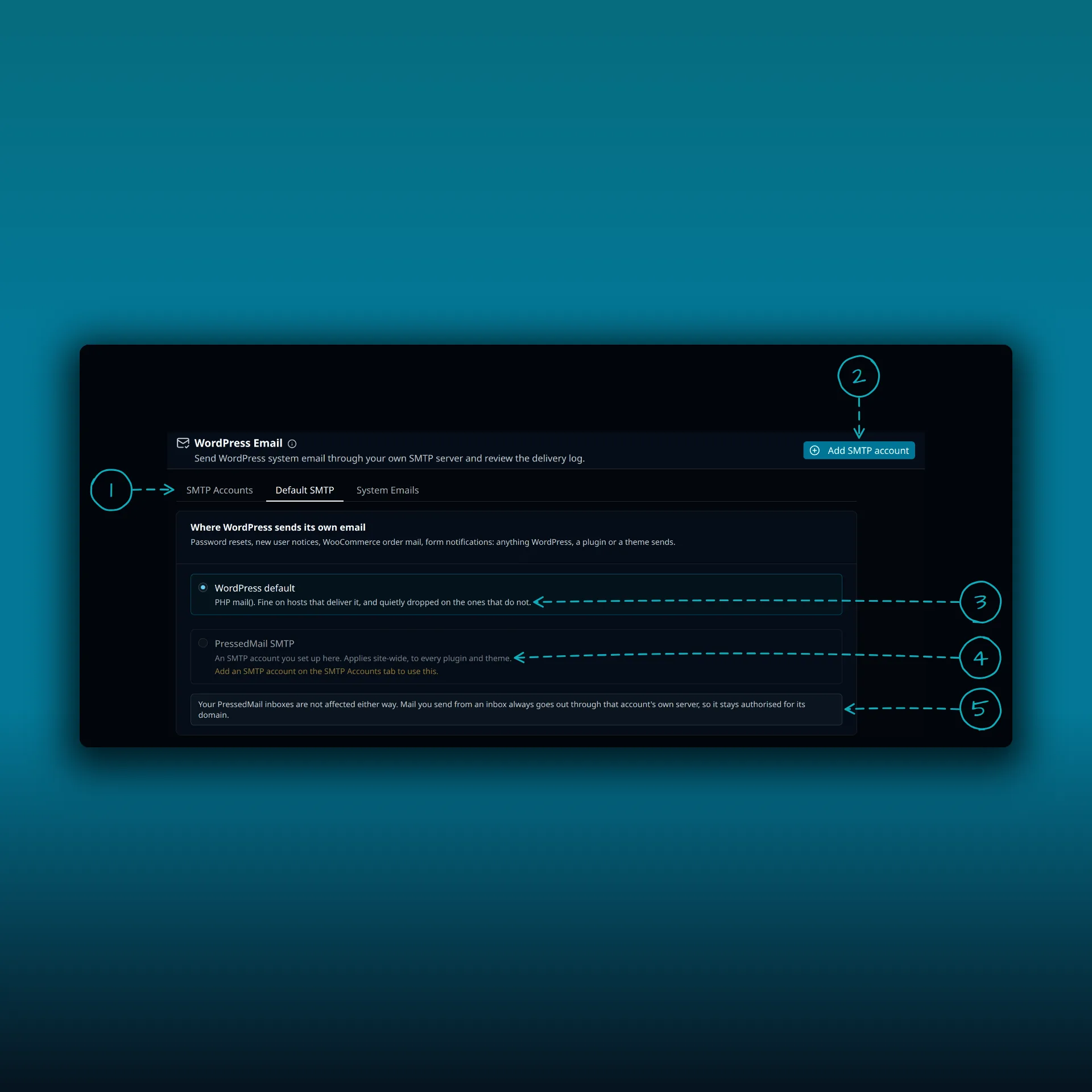
- The tabs. Paid builds show SMTP Accounts, Default SMTP and System Emails. Free shows System Emails and Mail servers.
- Add SMTP account. The Free button reads Add mail server.
- WordPress default. PHP mail().
- PressedMail SMTP. Sends what WordPress, a plugin or a theme sends through the server you set up here. It stays unavailable until you add one.
- A note that your PressedMail inboxes are not affected either way.
The picture is from a paid build.
Test it
Press Send Test Email with an address you control, then trigger a real WordPress message such as a password reset. Check the recipient mailbox, including spam, and look for the message in Resend’s emails table. Server acceptance, delivery and inbox placement are separate things, and the SMTP test guide keeps them apart.
If the message reached Resend and the recipient never sees it, the cause is usually sender authorization. The guide to stopping WordPress email going to spam covers it, and Test connection passes but sending fails covers refusals after a good connection.
Common questions
What do I type as the username?
The word resend, exactly.
Which port should I use?
587 with TLS (STARTTLS) suits most sites. Resend also accepts 465 with SSL.
Why was my message refused?
Most often the From address is not on a verified domain.
Can I see SMTP logs in Resend?
Resend says it does not provide SMTP server logs. Messages sent over SMTP show in its emails table.
Does this send mail from my inbox?
No. This is WordPress’s own mail. The WordPress SMTP guide explains how it differs from your inbox.
Manage your email inside WordPress
PressedMail Free adds an email client directly to your WordPress dashboard. Connect a compatible IMAP/SMTP mailbox, read and send mail, organize messages, and configure WordPress SMTP.