WordPress sends mail by calling one function, [wp_mail()](https://developer.wordpress.org/reference/functions/wp_mail/). It does not care which server carries the message. PressedMail steps in at the last moment and decides, on paid builds, which of your SMTP servers sends it and which address it appears to come from.
Most sites need one server and never think about this. If you have several, or a plugin that sets its own sender, the rules are worth knowing. They explain why a message went out through the server you did not expect, and why one sometimes leaves through plain PHP mail with a notice.
This guide covers paid builds, where the WordPress Email page has three tabs: SMTP Accounts, Default SMTP and System Emails. Free has a single mail server and no routing.
Where the choice happens
PressedMail hooks into WordPress’s mail path after everything else has had its say. A theme or plugin can build a message with its own From address. PressedMail then looks at the message and applies, in this order:
- The choice you made for that particular system email, if you made one.
- The sender routing rule, which picks a server from the From address.
- The default connection, if nothing else decided.
The default connection
Open PressedMail, then Settings, then WordPress Email, then Default SMTP. Two cards decide what happens to mail nobody has routed.
- WordPress default sends with PHP
mail(). It works on hosts that deliver it and gets quietly dropped on hosts that do not. - PressedMail SMTP sends through the server you set up in this plugin. It stays unavailable until you add one on the SMTP Accounts tab.
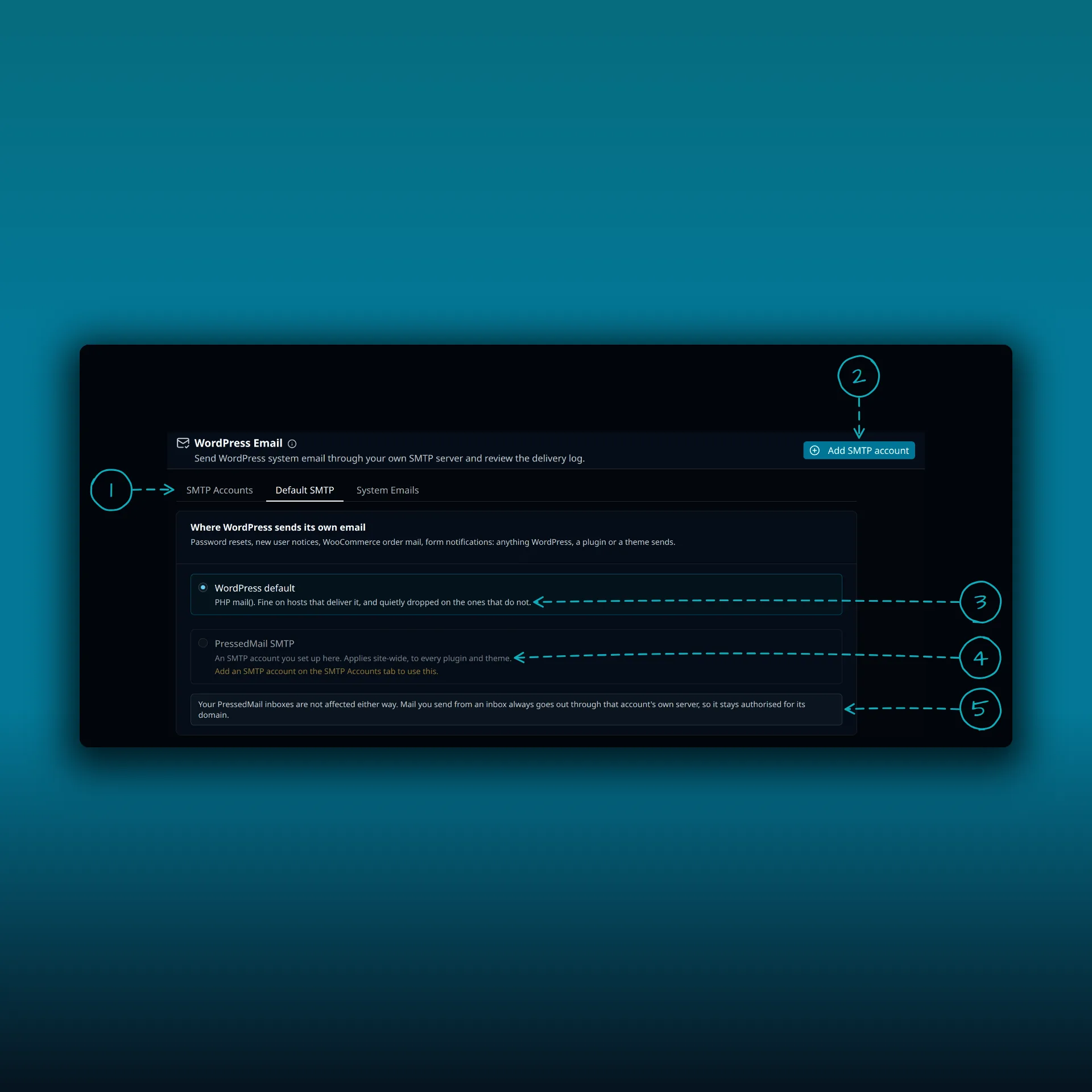
- The tabs. Paid builds show SMTP Accounts, Default SMTP and System Emails.
- Add SMTP account.
- WordPress default. PHP
mail(). - PressedMail SMTP. Unavailable until you add a server.
- A note that your PressedMail inboxes are not affected either way.
Choosing per system email
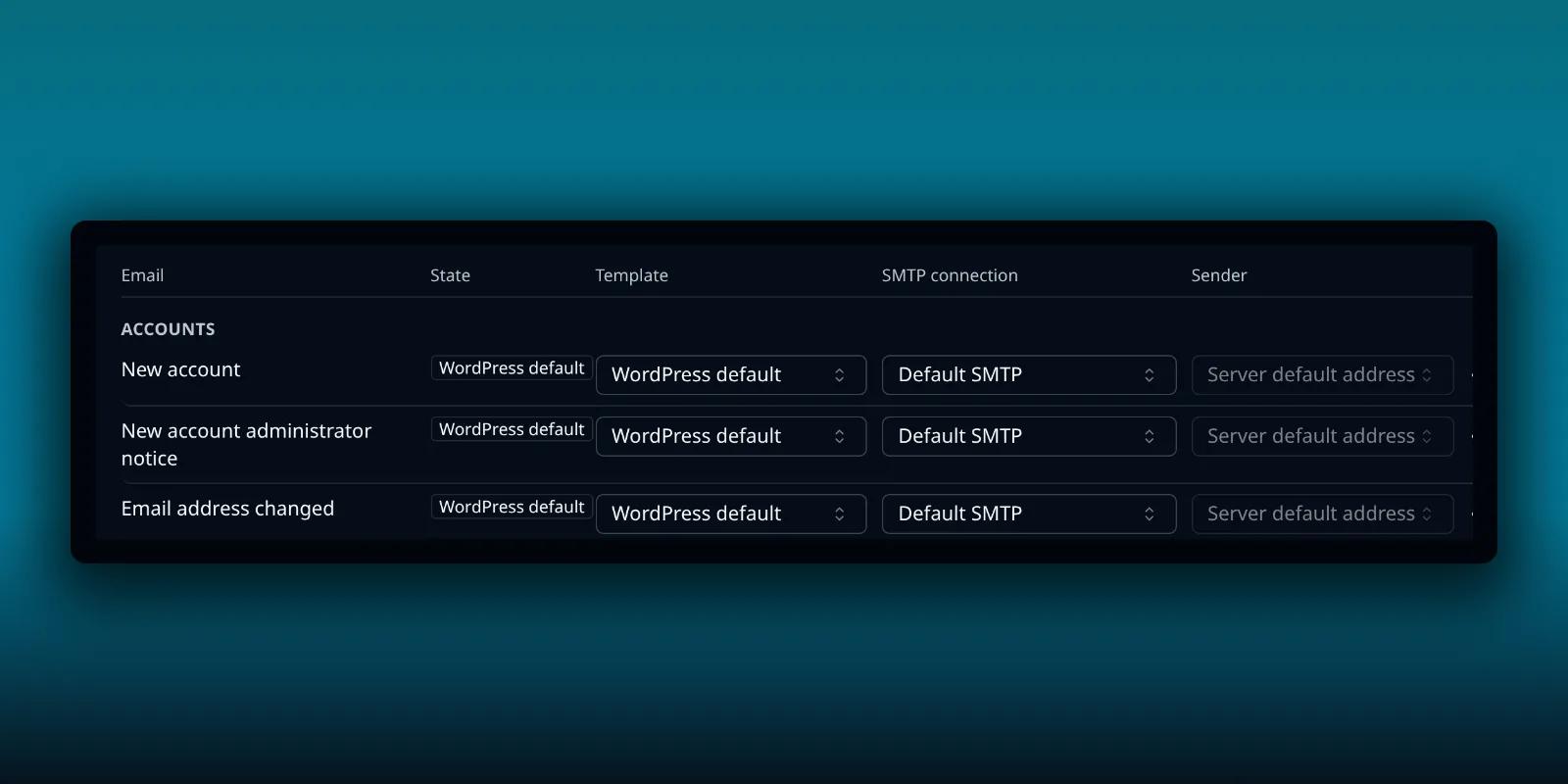
System Emails lists every message WordPress sends by itself, grouped as Accounts, Passwords, Site admin, Updates and PressedMail. For each one you choose a template, an SMTP connection and a sender.
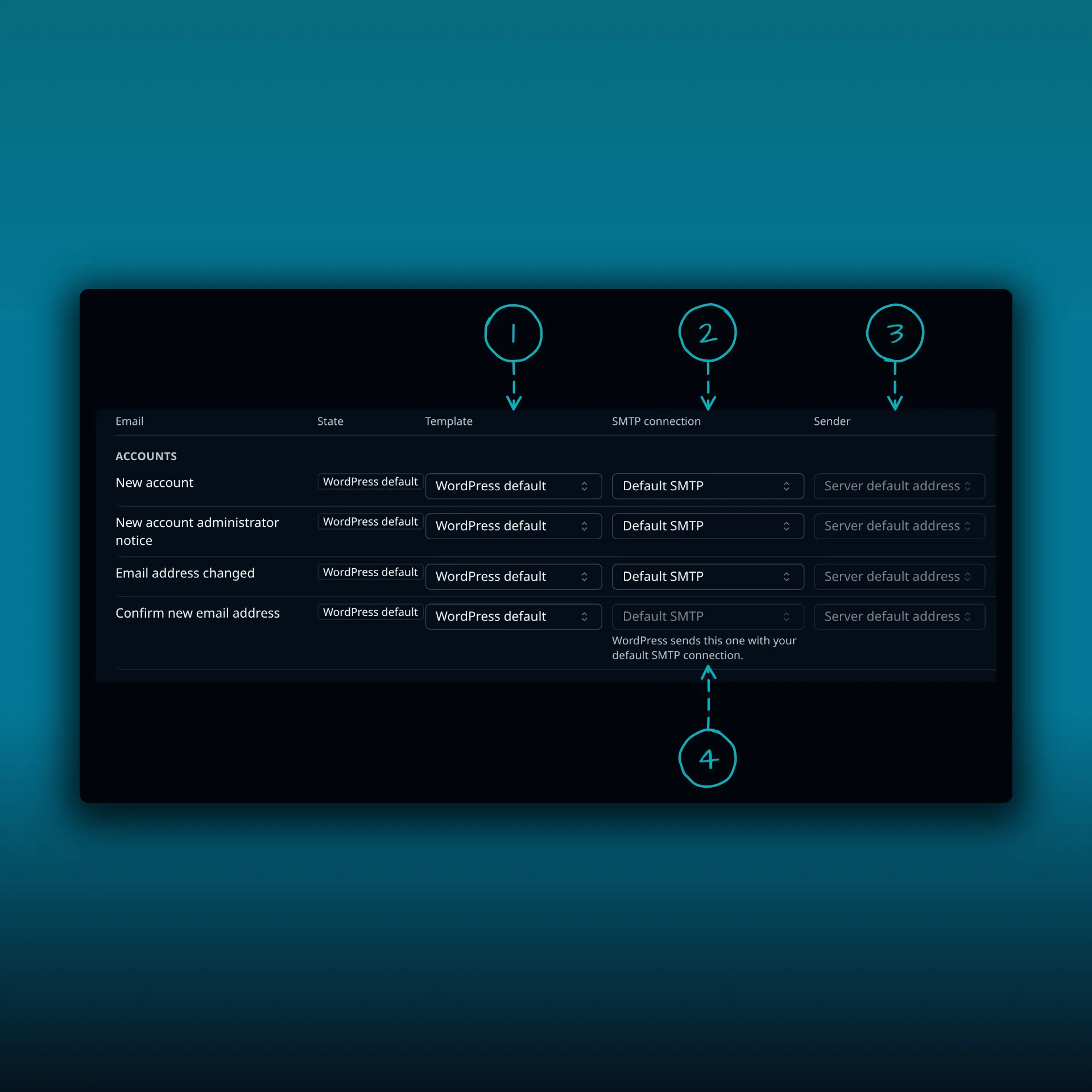
- Template. WordPress default sends the message the way WordPress writes it. Pick a template to change the wording.
- SMTP connection. Default SMTP, or one of your accounts.
- Sender. The server’s default address, or another address that server owns.
- A note on rows where the connection is fixed. WordPress sends these with your default SMTP connection.
The two confirmation messages, one for a new email address and one for the site administrator’s address, always use the default connection. The page says so on those rows. A sender you choose here changes the address but keeps the From name WordPress or the plugin gave it. Only a server set to force its whole From replaces the name as well.
How a server claims an address
The rule that chooses a server from the From address needs a definition: a server claims an address when it owns it. An SMTP account claims:
- every address in its list of From addresses
- its From email
- its SMTP username, when the username is an email address and the account has no valid From email
PressedMail only honours a sender that the chosen server claims. A stale or made-up address cannot make mail leave under an identity the login does not own. It also reports an address that two accounts claim, so keep each address on one account.
The sender routing rule
When no per-email choice exists, PressedMail looks at the From address.
- Exactly one server claims it. The message goes through that server.
- Two servers claim it. The message goes through neither, because choosing one would send as an identity nobody approved. It leaves by PHP
mail(), and the administrator gets a notice. - No server claims it. It goes through the default connection. That includes a visitor’s address a contact form dropped into From, and your provider may refuse an address it does not own.
- WordPress’s own wordpress@ address counts as no deliberate sender, so it never picks a server.
Force the From address
Each SMTP account has a Force the From address switch. When it is on, the account replaces the sender on every message it sends, even when a plugin sets its own. That is handy when your provider only accepts one address. It also hides a mistake: a contact form that sets the visitor as the sender will look fine in WordPress and go out under your address. Reply-To is the usual place to keep the visitor’s address. The contact form guide explains how.
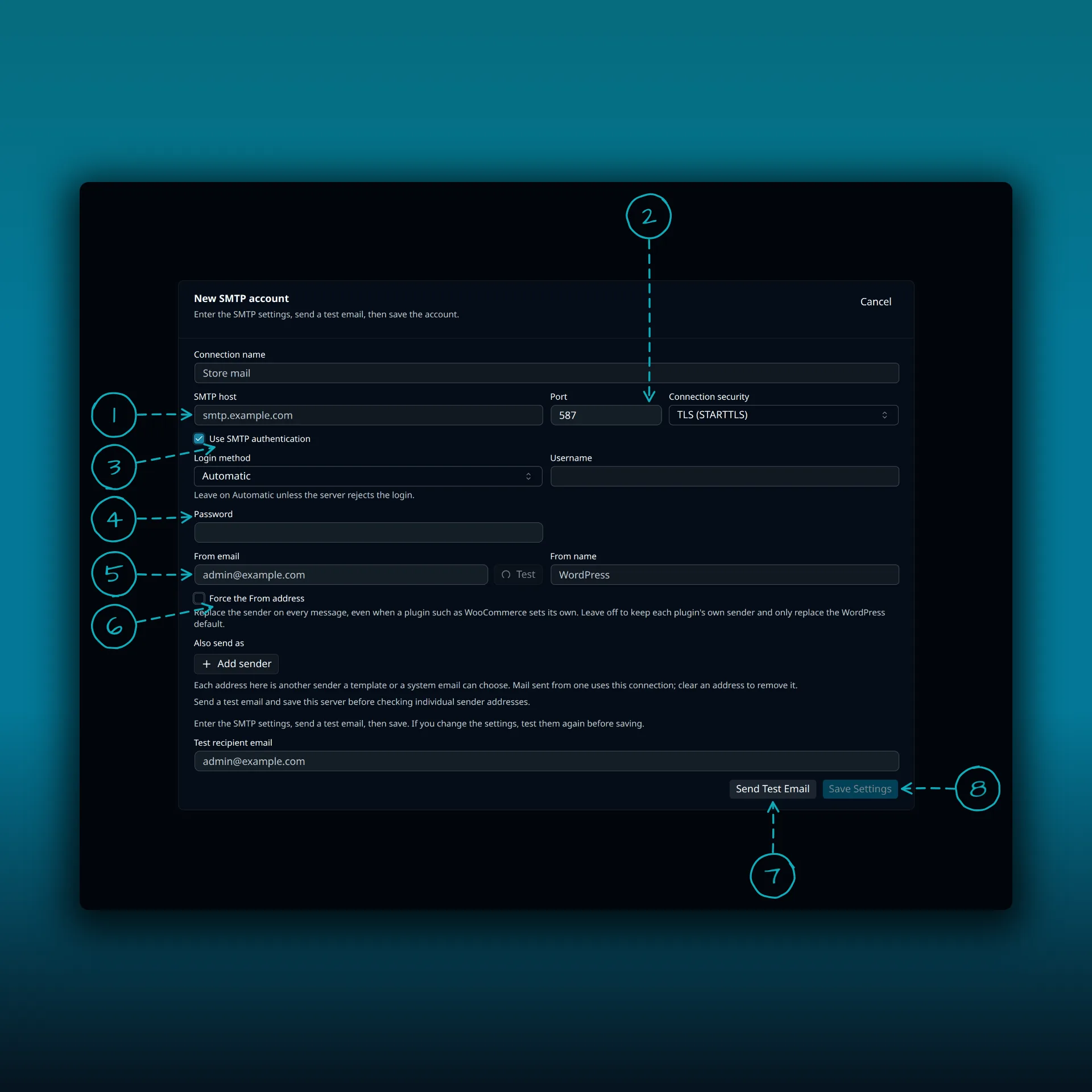
- SMTP host. The outgoing server your provider gives you.
- Port and connection security.
- Use SMTP authentication.
- Username and password.
- From email, with a Test button beside it.
- Force the From address.
- Send Test Email.
- Save Settings.
The values in the picture are placeholders.
Check what actually happened
Turn on the delivery log under System Emails and look at the Server column. It names the connection that sent each message. Not sent by PressedMail means the message left by PHP mail() or another plugin’s transport and PressedMail only recorded it. The delivery log guide shows how.
If a message reached the server and still did not arrive, the cause is usually at the provider or the receiver. The guide to stopping WordPress email going to spam covers sender authorization, and Test connection passes but sending fails covers the other common case. The WooCommerce guide shows routing for shop mail.
A setup that stays predictable
- Give each SMTP account its own From addresses, and never list one address on two accounts.
- Set the default connection to the server you trust most.
- Use the per-email choice only for the few messages that need another server or sender.
- Leave Force the From address off unless your provider forces your hand, and use Reply-To for visitors.
Common questions
Does PressedMail choose a server for every WordPress email?
On paid builds, yes. A per-email choice wins, then the sender routing rule, then the default connection.
Why did a message leave through PHP mail?
Either the default is set to WordPress default, or two of your accounts claim the same sender, so PressedMail refused to guess.
Can I send a system email through a different address?
Yes, on the System Emails tab. Pick an address the chosen server claims. The name stays as it was unless the server forces its own From.
Does Free have routing?
No. Free has one mail server that sends WordPress’s own email. Paid builds add several connections and sender routing.
Does this change how I send from my inbox?
No. Mail you write in the PressedMail composer goes through the mailbox you picked. This page is about WordPress’s own mail.
Manage your email inside WordPress
PressedMail Free adds an email client directly to your WordPress dashboard. Connect a compatible IMAP/SMTP mailbox, read and send mail, organize messages, and configure WordPress SMTP.