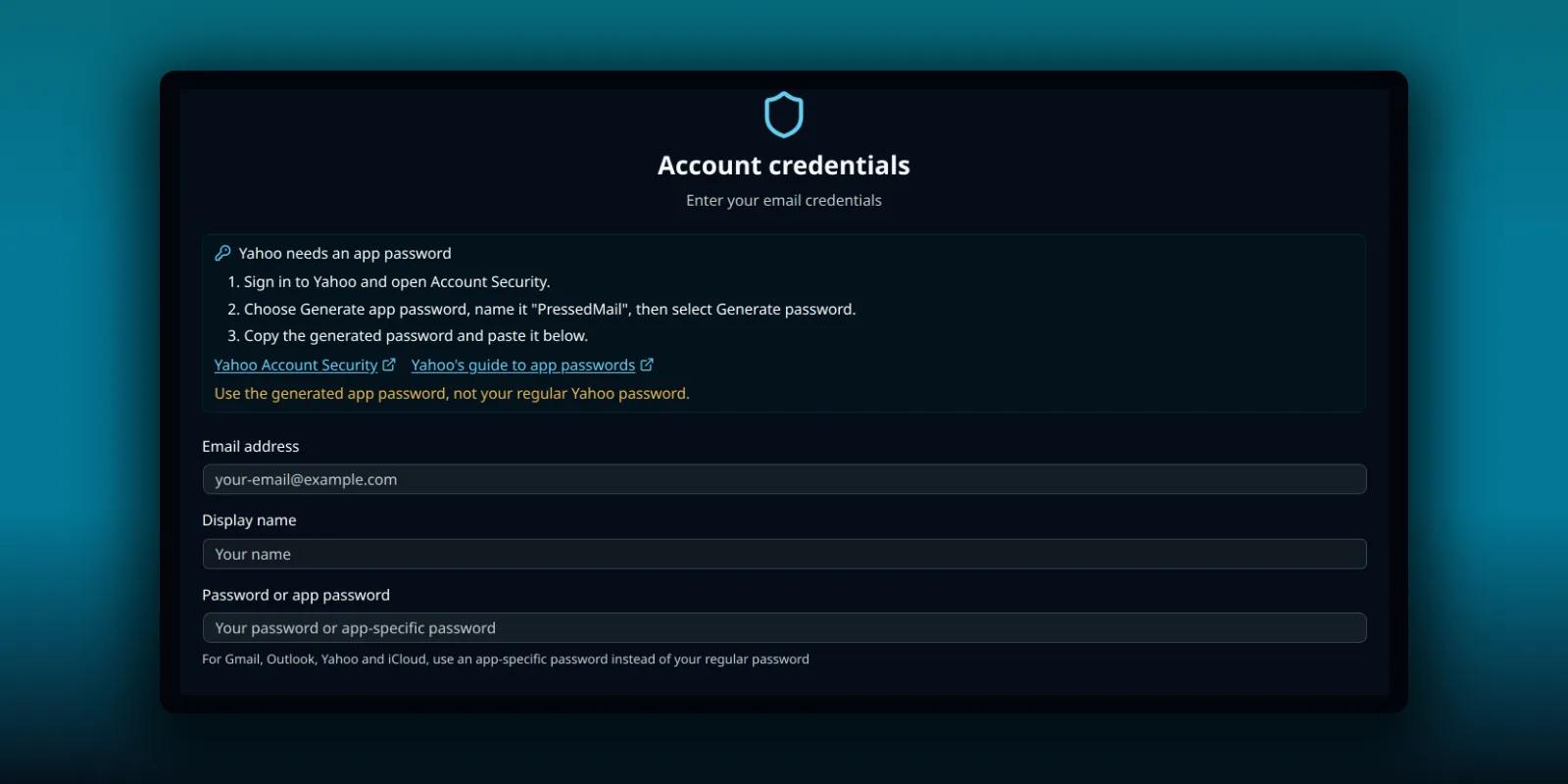
Yahoo Mail connects to PressedMail with an app password. Your regular Yahoo password will not work, and the form says so. This guide takes you from creating the password to reading and sending a first message.
Yahoo Mail appears in the provider list of paid builds. Free lists Gmail, Outlook/Hotmail and Custom Email, so a Free site connects Yahoo through Custom email with the same server settings. Both routes are below.
Before you start
Sign in to Yahoo in your browser and make sure the account works. Then have these ready:
- Your full Yahoo address.
- Access to the account’s security page, where you create app passwords.
- A few minutes to wait for the first sync.
Yahoo documents its own steps in the help article on generating and managing third-party app passwords. Yahoo’s screens change, so use that article if a button has moved.
Pick Yahoo in PressedMail
Open the settings with the Settings icon, go to the Accounts tab and choose Add Account. On the provider screen, choose App password on the Yahoo Mail card.
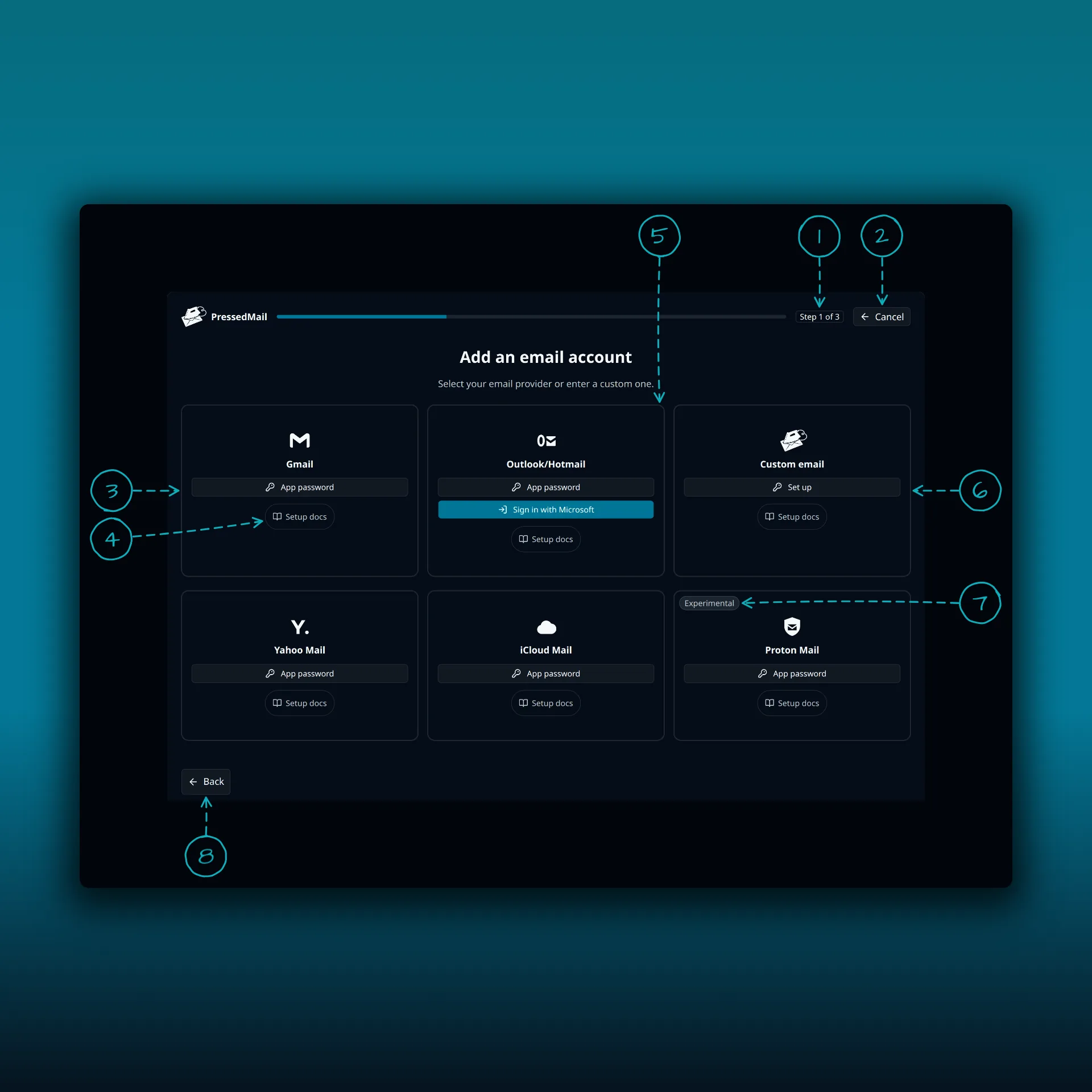
- The progress bar. This is step 1 of 3.
- Cancel.
- Gmail.
- Setup docs. Every card has one.
- Outlook/Hotmail.
- Custom email.
- The Experimental badge on the Proton Mail card.
- Back.
Yahoo Mail is on the second row of the screen, beside iCloud Mail and Proton Mail. Each of those cards has its own App password button and a Setup docs link to the provider’s guide.
Create the app password
The next step shows Yahoo’s instructions on the screen, next to the form.
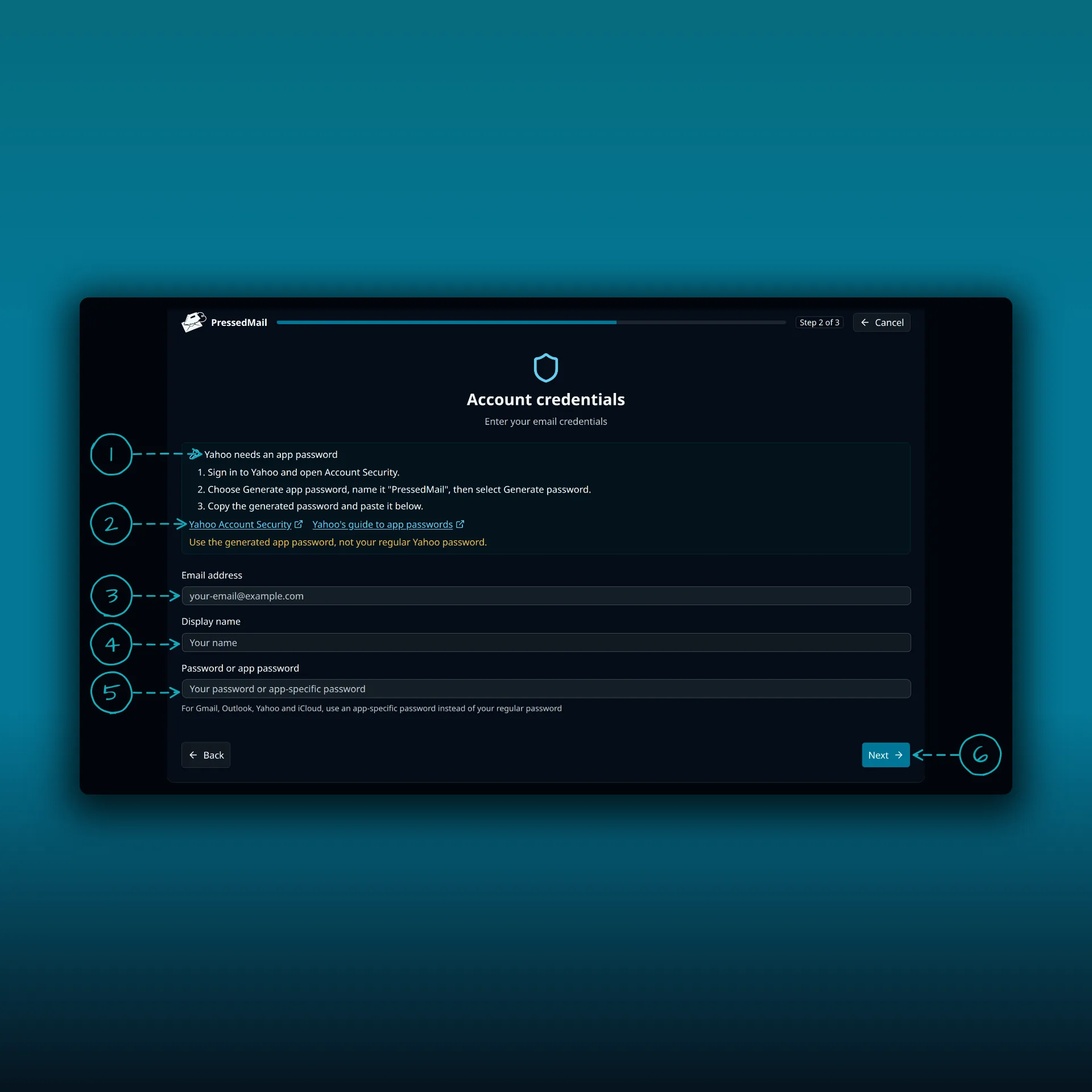
- The instructions. Sign in to Yahoo, open Account Security, choose Generate app password, name it PressedMail and select Generate password.
- Two links: Yahoo Account Security and Yahoo’s guide to app passwords. Both open in a new tab.
- Your full Yahoo address.
- The display name people see on your messages.
- The app password. Paste the generated password here, not your regular one.
- Next.
The values in the picture are placeholders. Copy the generated password straight into the field, and do not paste it anywhere else.
Review the servers and test
The next screen shows the Yahoo servers the preset fills in. They match Yahoo’s own IMAP settings.
| Connection | Server | Port | Security |
|---|---|---|---|
| Incoming (IMAP) | imap.mail.yahoo.com | 993 | SSL/TLS |
| Outgoing (SMTP) | smtp.mail.yahoo.com | 465 | SSL/TLS |
Yahoo also accepts port 587 for outgoing mail, but the preset uses 465. Choose Test Connection and read the incoming and outgoing results one at a time, as the IMAP and SMTP explanation describes. Save the account once both pass.
On a Free site
Choose Custom email, then Set up, and enter the same values from the table: your Yahoo address, the app password and the two servers. The custom IMAP guide walks through that form field by field.
Keep the app password safe
An app password is a credential. Anyone who has it can read the mailbox. PressedMail encrypts stored credentials, but the copy you paste is still plain text until you do, so paste it once into the form and close the Yahoo tab.
If you ever need to cut PressedMail off, you can manage or remove app passwords from the same Yahoo security page. Removing it stops the connection without changing your main Yahoo password.
Check it works
Let the first sync finish. Open Inbox and look for a message you can see in Yahoo. Then send a short plain-text message to another address you control and reply to it. The send and receive walkthrough explains what each result proves.
If sign-in fails
- Check that you pasted the generated app password and not your Yahoo password. PressedMail’s error says Yahoo needs an app password for exactly this case.
- Check the address. Use the full Yahoo address as the username.
- Create a fresh app password and try once. Do not keep retrying with the same rejected one.
- If the connection times out instead of being rejected, the problem is the network path from your server. The delivery troubleshooting guide separates those cases.
Frequently asked questions
Can I use my normal Yahoo password?
No. Yahoo requires an app password for this connection.
Does PressedMail replace Yahoo Mail?
No. Yahoo keeps hosting the mailbox. Changes you make in a connected client, such as moving or deleting mail, can show up in Yahoo too, so test with harmless mail first.
Does this send my WordPress site’s own email?
No. Connecting a mailbox is separate from WordPress Email. The SMTP setup guide covers site mail.
Can I connect several Yahoo addresses?
Several mailboxes need a paid plan. Free connects one mailbox per site.
Manage your email inside WordPress
PressedMail Free adds an email client directly to your WordPress dashboard. Connect a compatible IMAP/SMTP mailbox, read and send mail, organize messages, and configure WordPress SMTP.