Use code "LIGHTHOUSE20" to save 20% on all plans forever. Get it now!

How to Connect iCloud Mail to WordPress

Create an iCloud app-specific password and connect iCloud Mail to PressedMail, with the servers, the username question and the test.

Cover image for How to Connect iCloud Mail to WordPress

iCloud Mail connects to PressedMail with an app-specific password. Your Apple Account password will not work, and two-factor authentication must be on before Apple lets you create one. This guide covers both and the one detail that catches people: the username.

iCloud Mail appears in the provider list of paid builds. Free lists Gmail, Outlook/Hotmail and Custom Email, so a Free site connects iCloud through Custom email with the same server settings. Both routes are below.

Before you start

Check these three things first.

  • Two-factor authentication is on for your Apple Account. Apple requires it for app-specific passwords.
  • Mail works in iCloud on the web or on a device, so you know the account is healthy.
  • You have your full iCloud address, such as one ending in icloud.com.

Apple documents the server details in iCloud Mail server settings for other email client apps. The steps below follow what PressedMail shows on its own screen.

Pick iCloud in PressedMail

Open the settings with the Settings icon, go to the Accounts tab and choose Add Account. On the provider screen, choose App password on the iCloud Mail card.
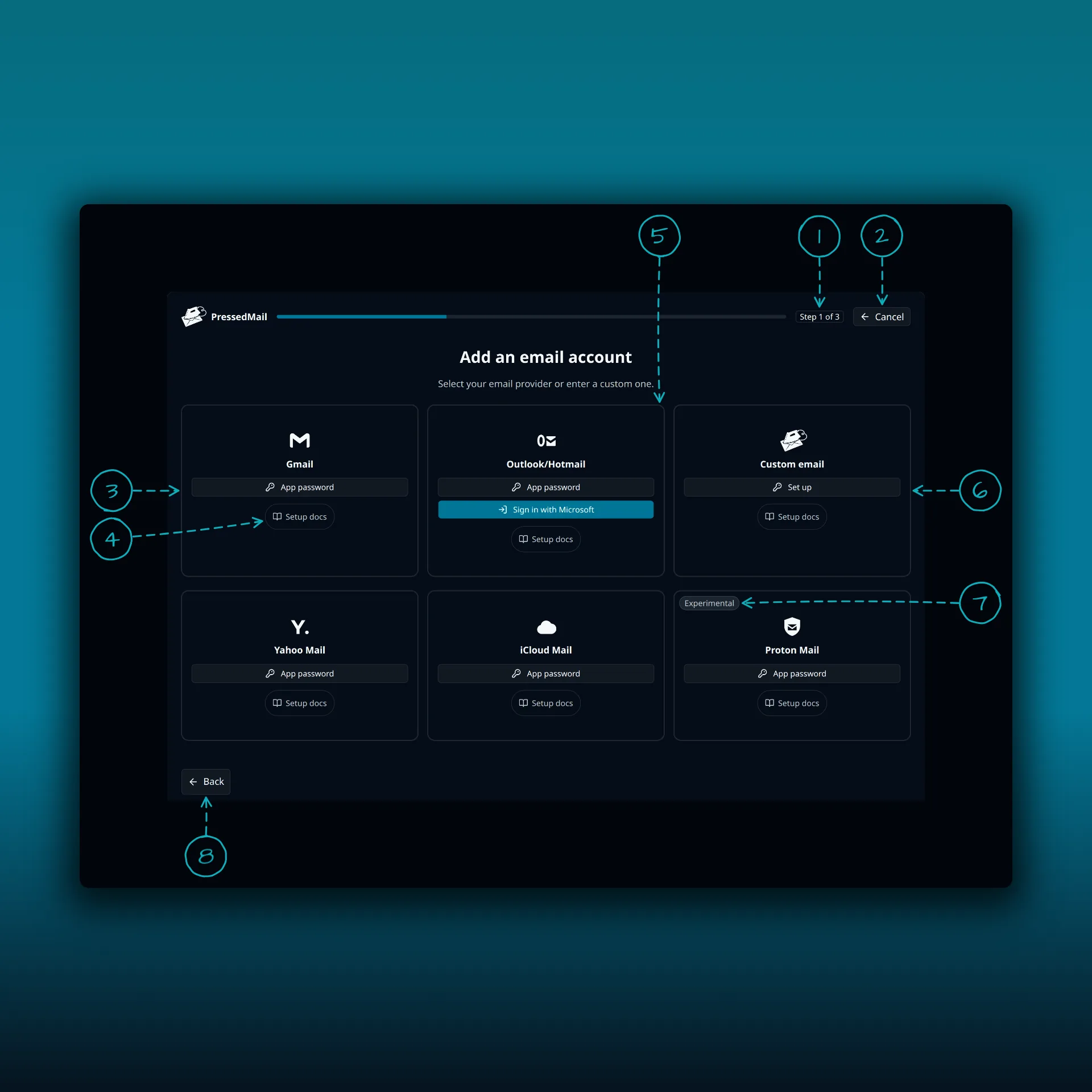
The Add an email account screen with six provider cards and eight areas numbered

  1. The progress bar. This is step 1 of 3.
  2. Cancel.
  3. Gmail.
  4. Setup docs. Every card has one.
  5. Outlook/Hotmail.
  6. Custom email.
  7. The Experimental badge on the Proton Mail card.
  8. Back.

iCloud Mail is on the second row, between Yahoo Mail and Proton Mail.

Create the app-specific password

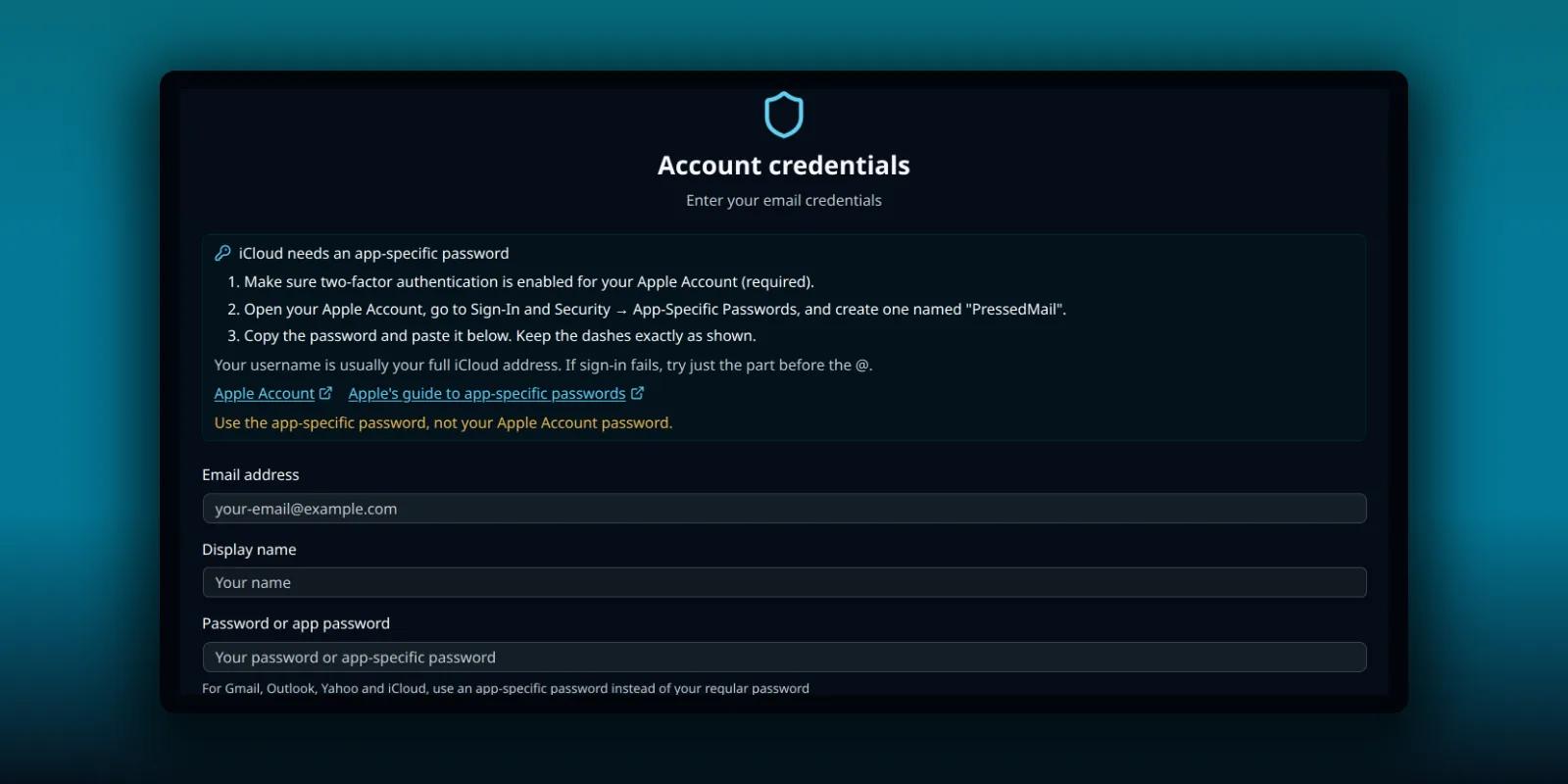
The next step shows Apple’s instructions next to the form.
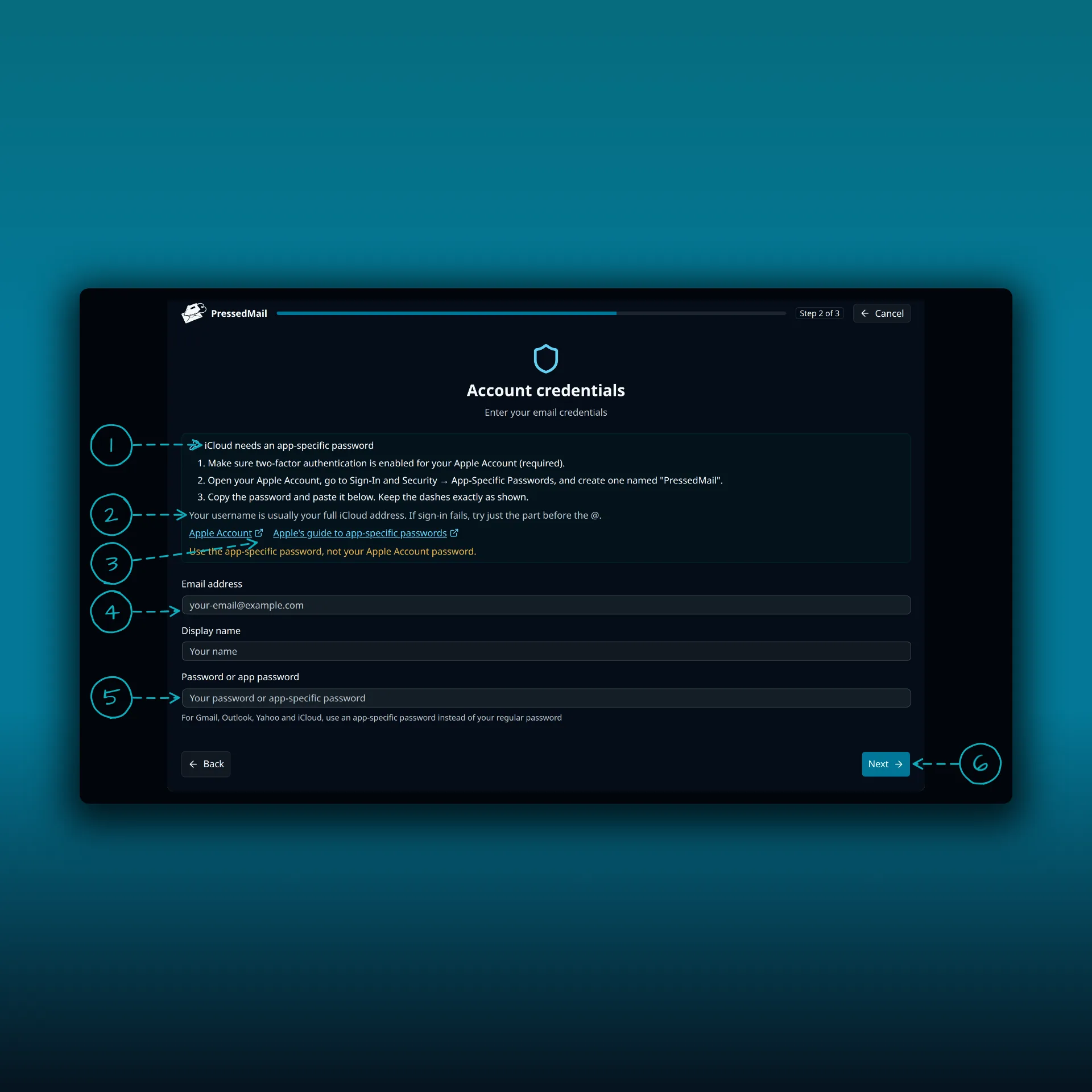
The iCloud account credentials step with six areas numbered

  1. The instructions. Make sure two-factor authentication is on, open your Apple Account, go to Sign-In and Security, then App-Specific Passwords, and create one named PressedMail.
  2. A note about the username. It is usually your full iCloud address. If sign-in fails, try only the part before the @.
  3. Two links, Apple Account and Apple’s guide to app-specific passwords. Both open in a new tab.
  4. Your email address.
  5. The app-specific password. Paste it with the dashes exactly as Apple shows them.
  6. Next.

The values in the picture are placeholders. Apple shows the password with dashes, so paste it straight into the field.

Review the servers and test

The next screen shows the iCloud servers the preset fills in.

ConnectionServerPortSecurity
Incoming (IMAP)imap.mail.me.com993SSL/TLS
Outgoing (SMTP)smtp.mail.me.com587STARTTLS

Choose Test Connection and read the incoming and outgoing results one at a time. The IMAP and SMTP explanation shows why they can disagree. Save the account once both pass.

On a Free site

Choose Custom email, then Set up. Enter your iCloud address, the app-specific password and the two servers from the table. Use STARTTLS for the outgoing server on port 587. The custom IMAP guide walks through that form field by field.

The username question

Apple’s server settings page says to use your full iCloud address. PressedMail’s own hint adds a fallback: if sign-in fails with the full address, try just the part before the @. Try the full address first, change it once if it fails, and stop. Repeated wrong attempts will not make the right one succeed.

Check it works

Let the first sync finish. Open Inbox and look for a message you can see in iCloud. Then send a short plain-text message to another address you control and reply to it. The send and receive walkthrough explains what each result proves.

If sign-in fails

  • Check that you used an app-specific password and not your Apple Account password. PressedMail’s error says so when it sees an iCloud host.
  • Check that the dashes are in the password exactly as Apple showed them.
  • Check that two-factor authentication is still on for the Apple Account.
  • If you get a timeout instead of a rejection, the problem is the network path from your server. The delivery troubleshooting guide separates those cases.

Keep the password safe

An app-specific password lets whoever has it read the mailbox. PressedMail encrypts stored credentials. The copy you paste stays readable until you close the page, so paste it once and do not keep it in a note or a message. You can remove it from your Apple Account if you want to disconnect.

Frequently asked questions

Can I use my Apple Account password?

No. Apple requires an app-specific password for this connection.

Does PressedMail replace iCloud Mail?

No. Apple keeps hosting the mailbox. Changes you make in a connected client can show up in iCloud too, so test with harmless mail first.

Does this send my WordPress site’s own email?

No. Connecting a mailbox is separate from WordPress Email. The SMTP setup guide covers site mail.

Can I connect several iCloud addresses?

Several mailboxes need a paid plan. Free connects one mailbox per site.

Manage your email inside WordPress

PressedMail Free adds an email client directly to your WordPress dashboard. Connect a compatible IMAP/SMTP mailbox, read and send mail, organize messages, and configure WordPress SMTP.


Download PressedMail Free →

Newsletter

Get useful PressedMail updates.

New releases, setup guidance, and practical ways to handle email in WordPress.

Occasional PressedMail email. Unsubscribe whenever you like.

Choose the plan that fits your WordPress sites.

Paid plans include unlimited accounts and users. Compare Premium and Ultimate features, then choose the site count you need.

Yearly plans are priced by number of sites. Lifetime is a one-time payment covering up to 100 sites.

Starter

For one site

$49/ year
1 Website
  • All current and future Premium features
  • Unlimited email accounts
  • Contacts, calendar, and scheduled email rules
  • Templates, blocks, and signup forms
  • AI tools and phishing detection
  • Layouts, themes, and workspace controls
  • Licensed updates and priority support
  • 10,000 PressedMail AI credits a yearLimited time
Most Popular

Premium

For multiple sites

$89/ year
10 Websites
  • All current and future Premium features
  • Unlimited email accounts
  • Contacts, calendar, and scheduled email rules
  • Templates, blocks, and signup forms
  • AI tools and phishing detection
  • Layouts, themes, and workspace controls
  • Licensed updates and priority support
  • 25,000 PressedMail AI credits a yearLimited time
All Features

Ultimate

For agencies

$169/ year
100 Websites
  • Everything in Premium, plus:
  • Campaigns and shared templates
  • Share inboxes, calendars and contact lists
  • White labelling with a brand theme
  • 50,000 PressedMail AI credits a yearLimited time

What customers say after bringing email into WordPress.

Using PressedMail in your own work? Submit a testimonial

I save hours & it’s easy to use

I have a lot of email accounts, and it’s annoying to manage them through different providers. I needed something better than what was out there, so I built it. I spent the better part of two years making PressedMail the plugin I wanted to use every day, and now I get to share it with everyone else. I added my accounts, automated the cleanup of over 3000 emails, and it’s saved me hours of work.

Robert H. AlexanderFounder - CurbSoftwareCreator of PressedMail

Helps get more clients

As a freelancer I need to manage several clients’ accounts. I installed PressedMail on WordPress on localhost and use it as my main email client. I manage everything for clients from PressedMail. And several clients use PressedMail now after I have set their WordPress instances up.

Gene Piki
  • Email Swiss Army Knife

    We use PressedMail as a value added service for clients and potential clients as a feature of our agency’s offering helping put us ahead of competition. We love the white-labelling feature, automation, and security controls. It also replaces several of the other plugins we used to use and it’s like a small CRM.

    Cyrus M. (InCurb Digital)

  • Fast inbox organization with phishing detection

    PressedMail helps us organize our inboxes fast. We especially like the phishing detection feature.

    John & Andrea

  • One source of truth for every client

    As a VA, I use PressedMail to keep each client’s inbox separate while managing everything from one app. It gives me a single source of truth without mixing client work together.

    Amber, K

  • Teaching and client work stay organized

    I balance teaching with social media marketing clients. PressedMail helps me keep both sides of my work organized in one place.

    J.A. Payo

FAQ

Common questions

Free version

Start with one inbox. Free.

One mailbox for one user, a rich-text composer, custom folders, unlimited email rules, one signature, two themes and one layout. Contacts, calendar, scheduling and AI require a paid plan.

1 account · 1 user · 2 themes · unlimited rules
Roadmap

See what is coming next.

Follow planned work, current progress, and recently completed features.

  1. Planned

    Calendar Sync with External Providers

    Planned. Today calendars and events live in WordPress and do not sync with any outside provider. Two-way sync with Google Calendar, Outlook, iCloud and CalDAV-compatible services is on the roadmap.

  2. Planned

    Dedicated Support

    A higher-touch support channel beyond the current paid Priority Email Support entitlement.

  3. Planned

    Activity Log

    A searchable audit trail of key actions across PressedMail accounts, with per-user and admin views, retention controls, and export.

Bring your working inbox into WordPress.

Compare Premium and Ultimate features, then choose a paid plan for the number of WordPress sites you manage.