You are away for a week and people keep writing. An auto-reply tells them when you will be back, so they do not wonder. PressedMail can send one for each mailbox you have connected. It is a paid feature, and it runs on the site, not in your mail provider’s own out-of-office settings.
This guide covers where the setting lives, what each field does, and which messages PressedMail will leave unanswered on purpose.
What an auto-reply does
One responder belongs to one connected account. When new mail arrives in that account’s inbox, PressedMail checks it against a list of rules. If the message passes, it queues a reply and sends it through the same outgoing connection the account already uses. Each person gets one reply per throttle period, not one per message.
The reply is marked as automatic, so other mail systems know not to answer it back. That mark matters. Two auto-repliers can otherwise keep writing to each other until someone notices.
Where to find it
Open Settings and choose Auto-Replies in the Personal group. The page lists one card for each responder and has an Add auto-reply button at the top.
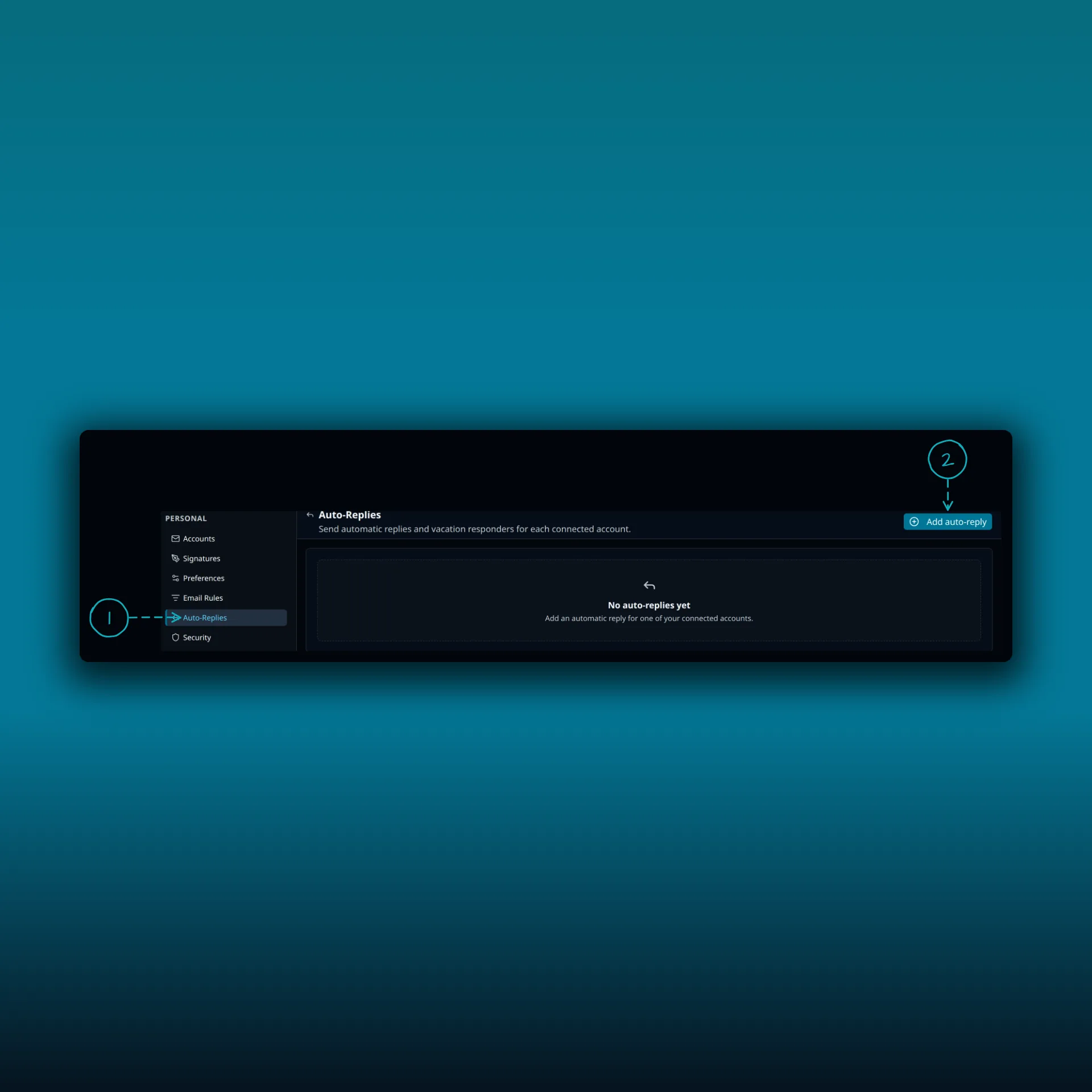
- Auto-Replies in the Personal group of the settings menu.
- Add auto-reply. It opens the form for one of your connected accounts.
The picture is from a paid build with no responders yet, which is why the list shows its empty message. Free builds do not include auto-replies. If a licence lapses, existing responders stay on the page. You can turn them off or delete them, but you cannot edit them until the licence is active again.
Fill in the form
Choose Add auto-reply, pick the account, and fill in the fields.
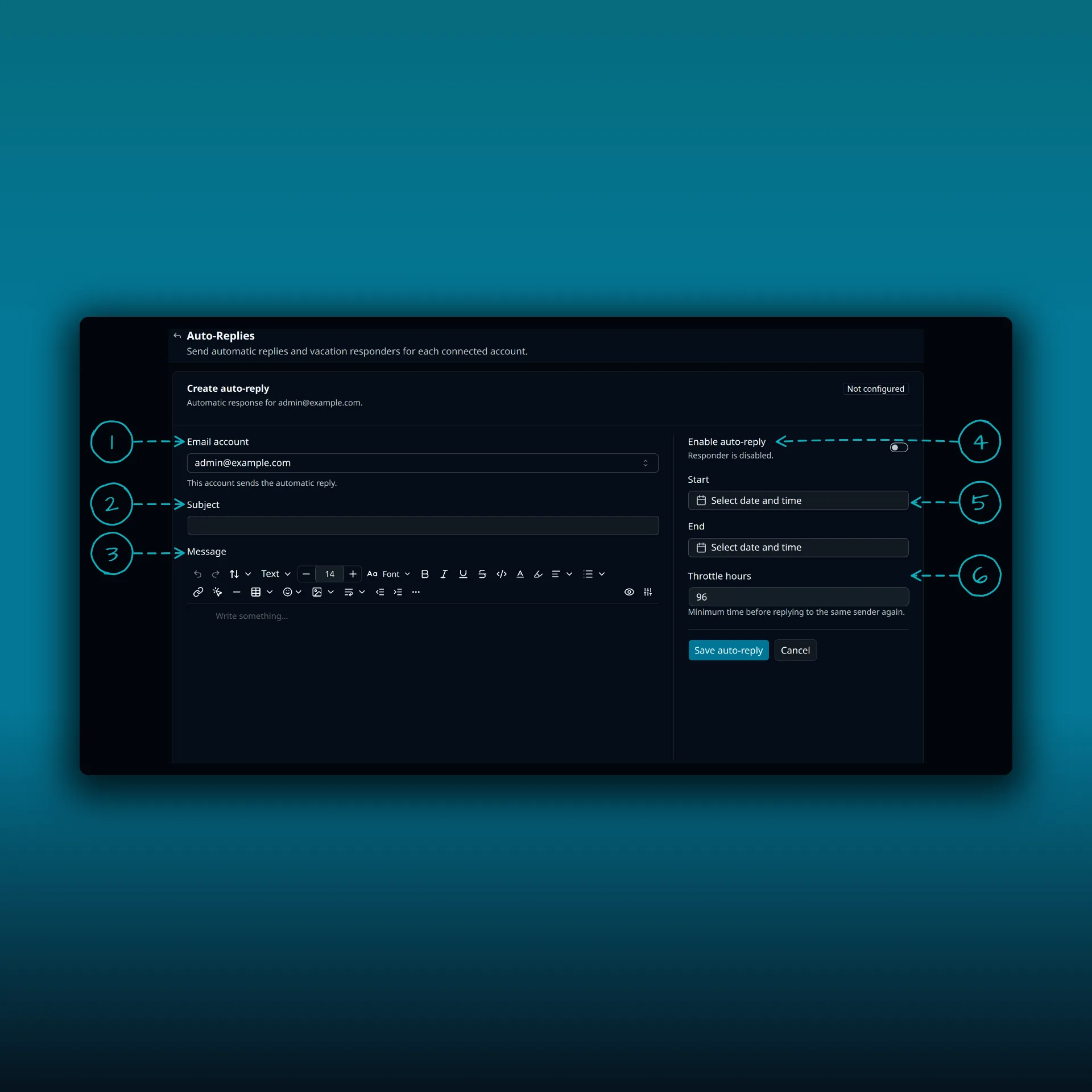
- Email account. The mailbox that sends the reply. Each account can have one responder.
- Subject. What the recipient sees. Leave it empty and PressedMail writes “Automatic reply:” followed by the subject of the message it is answering.
- Message. The text of the reply, in the same editor you use to compose mail.
- Enable auto-reply. The switch that turns the responder on or off without deleting it.
- Start and End. An optional window. Leave both empty and the reply runs until you turn it off.
- Throttle hours. The minimum time before the same sender gets another reply.
Save auto-reply when you are done. The card then shows one of four states: Disabled, Scheduled, Enabled or Expired.
Set a window
A responder with a Start date shows Scheduled until that moment arrives. After the End date it shows Expired. The start must come before the end, or the form will not save.
There is one detail worth knowing. Mail that reached the mailbox before your Start time never gets a reply, even if PressedMail only syncs it later. The window counts from when the message arrived, not from when the plugin saw it.
Choose a throttle
The default is 96 hours, four days. That means someone who writes on Monday and again on Wednesday gets one reply. Lower it if you want people to hear from you more often. The smallest value is one hour.
Write the message
Say when you are back and who to contact instead. Keep it short. Do not promise a reply time you cannot keep, and leave out anything you would not want forwarded to a stranger.
What it will not answer
PressedMail follows RFC 3834, the standard for automatic responses. A message is skipped when any of these is true.
- It did not arrive in the inbox.
- It is itself an automatic message, or asks that automatic replies be suppressed.
- It is mailing list traffic, which means it carries a List-Id or other List header, or it is marked bulk, list or junk.
- It comes from a no-reply style address such as noreply, do-not-reply, mailer-daemon, postmaster or bounces.
- It has an empty return path, which is how bounce messages are sent.
- It comes from your own address.
- It does not name your account as a recipient. A message that reached you through a Bcc is skipped.
- It is more than 48 hours old when PressedMail sees it.
New responders also skip people at your own domain. If the account is you@example.com, a colleague at example.com does not get the reply. The form has no switch for this, so plan on it.
Newsletters, receipts and system alerts end up in that skip list, which is usually what you want.
Check that it works
Test it before you leave.
- Turn the responder on with no window.
- From a different address, send a message to the account.
- Wait a few minutes. The reply is queued and sent in the background.
- Check that it arrived, then check the subject and the text.
- Set the real window and save again.
Replies go out through WP-Cron, WordPress’s scheduled-task runner, which WordPress documents as running when someone loads a page. On a quiet site the reply can be late. A reply that fails to send is attempted up to three times. The post on late snoozes and scheduled sends covers the same cron checks.
If no reply arrives, work through the skip list above first. The usual causes are a test message from your own domain, a throttle that already fired for that address, or a message sent before the Start time. Then read the delivery troubleshooting guide, because an auto-reply uses the same outgoing connection as every other message. If that connection is broken, nothing goes out.
Which plan do I need?
Auto-replies need a paid plan. Free has none. The plan comparison lists what each plan adds. If you read several mailboxes in one place, the combined inbox guide shows how to switch between them, so you can check each account’s responder.
Frequently asked questions
Does one auto-reply cover all my mailboxes?
No. Each connected account has its own responder, with its own message, window and throttle.
Will people get a reply for every message they send?
No. The throttle limits it to one reply per sender in each throttle period. The default is 96 hours.
Can I use my provider’s out-of-office instead?
Yes, if it has one. PressedMail’s reply works from the site, so it only runs while the plugin is active and WordPress background tasks are running. A provider setting does not depend on your site.
Will the reply go to mailing lists?
No. List traffic is skipped on purpose, along with bulk mail and no-reply senders.
What happens when the end date passes?
The card shows Expired and no more replies are sent. The responder stays saved, so you can edit the dates and use it again.
Manage your email inside WordPress
PressedMail Free adds an email client directly to your WordPress dashboard. Connect a compatible IMAP/SMTP mailbox, read and send mail, organize messages, and configure WordPress SMTP.