

Phishing reports
Read the evidence and limits of a paid phishing analysis.
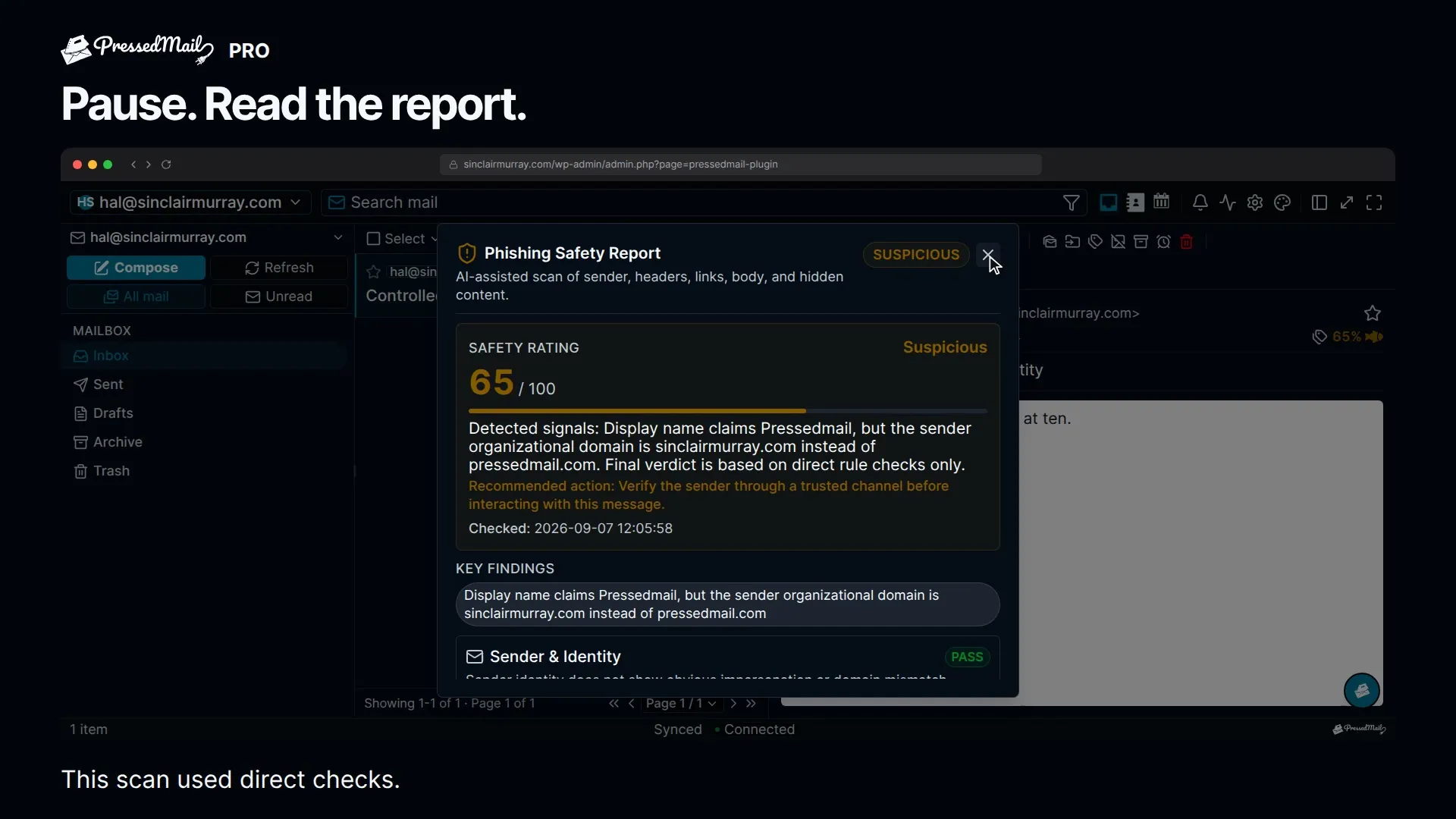
Phishing reports are a paid feature. Open the report to inspect why a message was flagged, then verify unusual requests through a known contact method. A low confidence does not prove a message is genuine.
Run a check
An administrator must enable the site-wide AI master setting and the phishing feature configuration before this workflow is available. Turning the AI master off also disables the phishing workflow; the local fallback does not run independently of that switch.
The administrator's policy then controls the message action:
- Allow makes the check available when you choose to run it.
- Force scans opened messages automatically.
- Disable hides the control and stops that workflow.
AI settings affect provider analysis: the feature must be switched on, and its provider or PressedMail AI engine must work. If the provider step fails, the service can still return local findings and mark the analysis as partial.
Read the evidence
The analysis checks sender identity, suspicious language, authentication headers, links and images, attachment metadata, hidden content, and whether the claimed identity fits the request. A configured model can review that evidence.
Header checks can be skipped if the message identifiers or headers are unavailable. Attachment inspection covers details such as filename, extension, and declared MIME type; it is not an antivirus scan of the file.
The report classifies findings into named types such as lookalike domains, reply-to mismatch, authentication failure, suspicious links, hidden text, prompt injection, and suspicious attachments.
Understand the confidence
The report shows "Phishing confidence 62%": how sure the check is that the message is phishing, from 0 (certainly not) to 100 (certainly). It is a position on a scale, not a chance you can quote. Below 31 the verdict is Looks safe, from 31 it is Suspicious, and from 61 it is Likely phishing. Every check ends in a number; you will not see "uncertain" or "could not tell".
With PressedMail AI, the model answers questions about the message: whether it asks for a password, money or a file, and whether it claims to be someone it is not, links somewhere else or imitates another domain. A second model, fitted on thousands of real and public messages, weighs those answers together with what your site found (authentication, links, attachments, hidden text) and how far the sender is trusted. Phishing is a lie and a request together, so a request alone, such as a sign-in code, does not convict a message. Proof of an attack, such as a password form that posts to another site or a link to a bare address, is Likely phishing on its own. Weaker signs, such as a macro document or a link whose text names another site, are never shown as Looks safe, but they need the model's answers to climb higher. When the model finds little to judge in a message, the number comes from what your site found, and the report says so.
With your own AI provider, heuristic findings produce a risk score capped at 100. The final score uses the higher of the local and model scores, with additional floors for suspicious or multiple high-severity findings. The model cannot lower the local score. The confidence shown is that score.
Treat the number as a summary of the checks that ran, not a measurement of the probability that an email is safe.
Read the findings and skipped checks before acting. A legitimate new sender may trigger a warning; a fraudulent message can avoid the known patterns.
Data and background work
Provider analysis can include a body excerpt and raw headers. Review Set up and use AI and Where your mail and data live before enabling it.
Queued work depends on background processing and provider availability. Queue batch size is not a promise of one API call for several messages. A cached report also reflects the earlier analysis, not a new scan on every open.
Reports do not automatically apply a suspicious-message tag. For independent image and link controls, see Email safety and audit history.