

Use code "LIGHTHOUSE20" to save 20% on all plans forever. Get it now!
- Runs in
- WordPress admin
- Works with
- Gmail · Outlook · IMAP/SMTP
- Accounts
- Bring your own provider
Hi there,
Please review the invoice and source package for the redesign milestone. The archive includes the responsive layouts, brand exports, and implementation notes.
If everything looks correct, we can queue the final deployment package for the client workspace.
Best regards,
Alex Morgan
Folders, tags & accounts. Every account, one list. Read, reply & organize.
Email Client
Manage every inbox inside WordPress.
Email Templates
Reusable templates, blocks, and personalization.
Email Campaigns
Signup forms, mailing lists, and newsletters.
AI Tools
Smart tagging, spam detection, and phishing alerts.
SMTP Delivery
Reliable sending for WordPress and transactional emails.
Team Sharing
Role-based access without shared passwords.
为什么管理邮件要离开 WordPress?
你的网站、客户和内容都已经在 WordPress 里管理了。为什么每查一封邮件,都要切换到另一个应用?
PressedMail 把一个完整的邮件客户端直接带进你的 WordPress 仪表盘。阅读、发送、回复、整理邮件,不打断你的工作节奏。
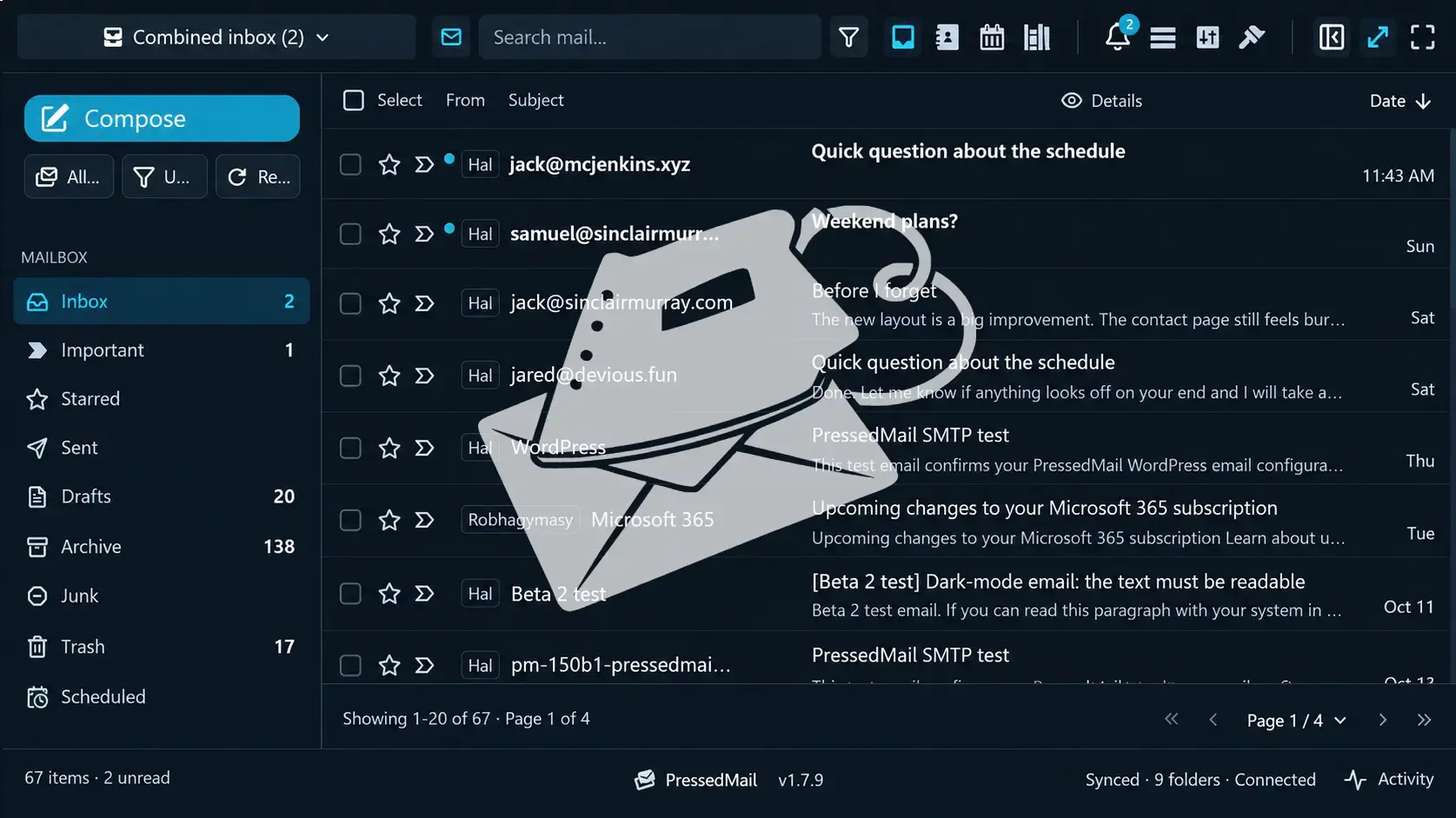
一切都在一个仪表盘
网站和邮件,在一起协作。
完整的邮件体验
收件箱、撰写、附件、搜索、联系人和日历。
更少切换,更多完成
不用在应用之间来回跳,保持专注。
邮件插件是不是太多了?
SMTP、事务邮件、营销活动、电子通讯、表单、邮件管理。既然一个就能全部搞定,为什么还要安装维护一堆插件?
PressedMail 把核心邮件功能整合进一个 WordPress 一体化方案,减少插件堆积,不增加复杂度却给你更多能力。

SMTP 与事务邮件
管理 WordPress 通知和事务邮件的发送。
营销与电子通讯
创建活动、设计模板、管理订阅者、收集注册。
完整的邮件客户端
从多个账户发送、接收并管理会话。
你的收件箱有多乱?
多个账户、爆满的收件箱、丢失的会话、永远回不完的消息。让邮件保持有序,不该需要时刻盯着。
PressedMail 把你的账户汇到一起,用智能规则、AI 标签、批量操作、共享收件箱、联系人和日历帮你保持条理。
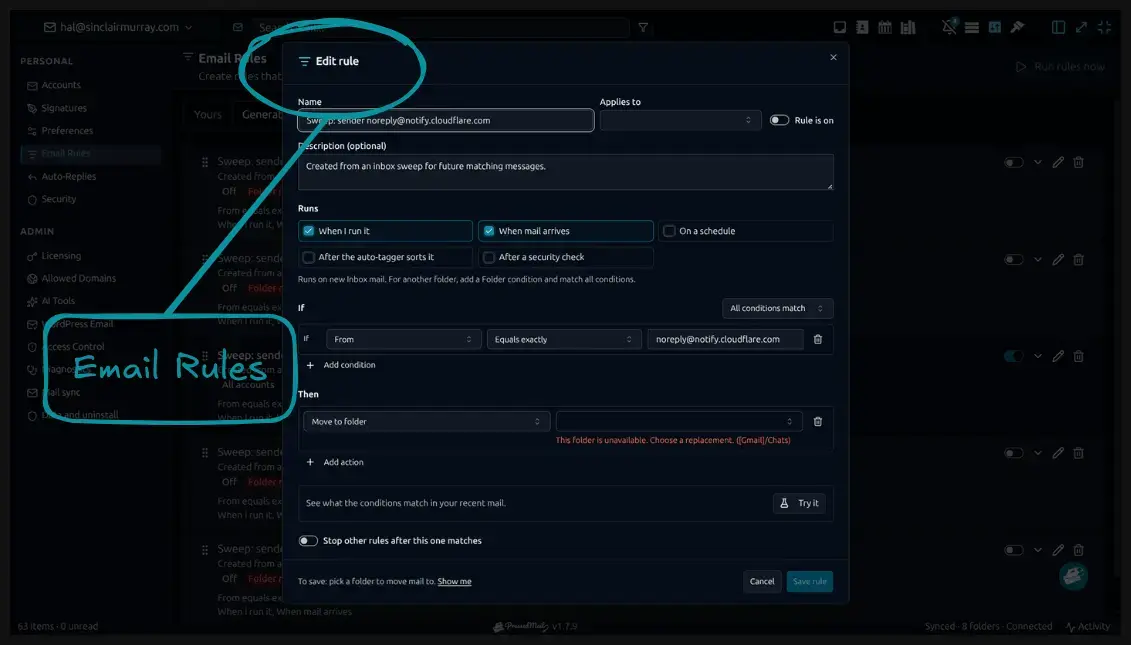
一个合并的收件箱
把 Gmail、Outlook 等兼容服务商接进同一个工作区。
自动化的整理
用智能规则自动分类、打标、移动和管理邮件。
一切都连着
共享收件箱、联系人和日历让沟通保持有序。
连接你的所有邮箱服务商
你已经在用的每个账户,都收进 WordPress 里的同一个收件箱。
你的邮件安全又私密吗?
垃圾邮件、钓鱼攻击、可疑消息、多余的访问,都在给你的业务制造风险。只靠基础的邮件管理保护不了你。
PressedMail 把 AI 威胁检测和细致的管理控制结合起来,让你对邮件环境看得更清、管得更住。
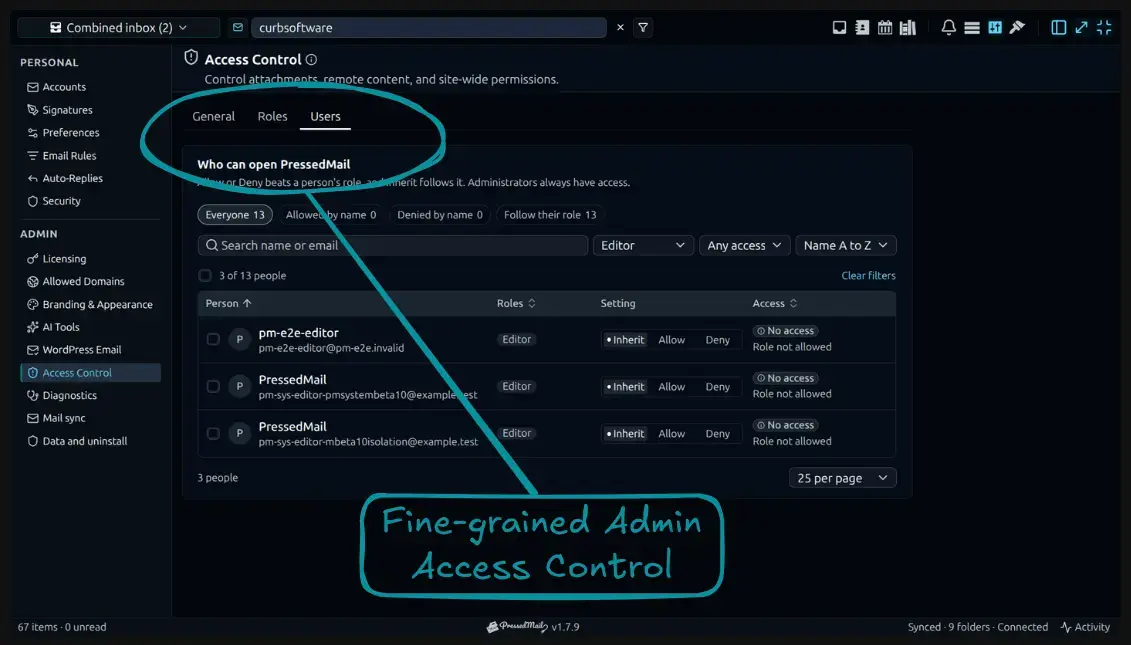
智能威胁检测
AI 辅助的垃圾邮件和钓鱼识别,帮助标记潜在危险的消息。
细粒度权限
按你的组织调整访问和管理设置。
更强的掌控
按你的需要配置账户、隐私偏好和邮件设置。
在邮件上花的时间太多了?
整理消息、重复回复、归类文件夹、处理日常琐事,每周可能吃掉好几个小时。如果大部分工作能自己完成呢?
PressedMail 用自动化工作流、规则、模板、AI 助手和强大的批量操作,让日常邮件管理更快。
自动化你的流程
创建规则,响应收到的消息、时间计划和手动触发。
回复更快
可复用的模板和 AI 写作工具,简化日常沟通。
清理堆积
Sweep 批量操作帮你清理成百上千封邮件,不必逐封处理。
你的邮件被拴在办公桌前吗?
离开电脑,工作不会停下。你的邮件也不该被限制在一台设备、一种布局或一种工作方式里。
PressedMail 带来灵活的邮件体验:支持渐进式网络应用(PWA),桌面与移动端都能访问,界面可深度自定义。
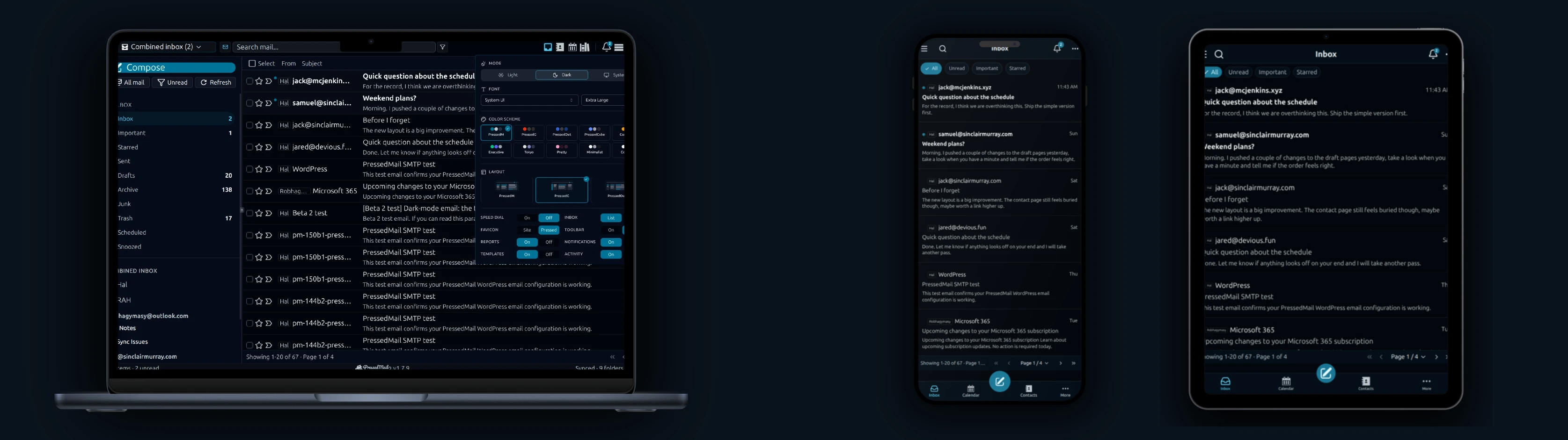
邮件随处可用
在支持的设备上把 PressedMail 安装为 PWA,移动和桌面都方便。
选择你的布局
多种收件箱排列和导航方式,适应你的工作流。
做成你的样子
自定义主题、颜色、字体和外观,打造理想的工作区。
Newsletter
了解 PressedMail 的最新动态。
获取产品更新、新功能公告、电子邮件工作流程提示和 WordPress 收件箱指南。
没有垃圾邮件。 Just PressedMail 更新和有用的 WordPress 电子邮件提示。
选择适合您的 WordPress 站点数量的方案。
每个方案都包含完整的 PressedMail 工作区。请根据您管理的站点数量进行选择。
年度计划根据站点数量定价。终身计划为一次性付款,最多可覆盖100个站点。
入门者
适用于单个网站
- 所有当前和未来的 Premium 功能
- 无限邮箱账户
- 联系人、日历和定时邮件规则
- 模板、内容块和订阅表单
- AI 工具和钓鱼检测
- 布局、主题和工作区控制
- 授权更新和优先支持
- 每年 10,000 PressedMail AI 额度限时
高级版
适用于多个网站
- 所有当前和未来的 Premium 功能
- 无限邮箱账户
- 联系人、日历和定时邮件规则
- 模板、内容块和订阅表单
- AI 工具和钓鱼检测
- 布局、主题和工作区控制
- 授权更新和优先支持
- 每年 25,000 PressedMail AI 额度限时
终极版
适用于代理机构
- Premium 的全部功能,另加:
- 营销活动和共享模板
- 共享收件箱、日历和联系人列表
- 带品牌主题的白标设置
- 每年 50,000 PressedMail AI 额度限时
I save hours & it’s easy to use
I have a lot of email accounts and it’s annoying to manage them through different providers. I installed PressedMail, added my accounts, and automated the cleanup of over 3000 emails. PressedMail has saved me hours of work.
 Robert H. Alexander创始人 - CurbSoftware Tech Innovations
把邮件带进 WordPress 之后,客户怎么说。
I save hours & it’s easy to use
I have a lot of email accounts and it’s annoying to manage them through different providers. I installed PressedMail, added my accounts, and automated the cleanup of over 3000 emails. PressedMail has saved me hours of work.
Helps get more clients
As a freelancer I need to manage several clients’ accounts. I installed PressedMail on WordPress on localhost and use it as my main email client. I manage everything for clients from PressedMail. And several clients use PressedMail now after I have set their WordPress instances up.
 Gene Piki
Email Swiss Army Knife
We use PressedMail as a value added service for clients and potential clients as a feature of our agency’s offering helping put us ahead of competition. We love the white-labelling feature, automation, and security controls. It also replaces several of the other plugins we used to use and it’s like a small CRM.
 Cyrus M. (InCurb Digital)
Fast inbox organization with phishing detection
PressedMail helps us organize our inboxes fast. We especially like the phishing detection feature.
 John & Andrea
One source of truth for every client
As a VA, I use PressedMail to keep each client’s inbox separate while managing everything from one app. It gives me a single source of truth without mixing client work together.
Teaching and client work stay organized
I balance teaching with social media marketing clients. PressedMail helps me keep both sides of my work organized in one place.
 J.A. Payo
正在自己的工作中使用 PressedMail?
Common questions
See what is coming next.
Follow planned work, current progress, and recently completed features.
- Planned
Shared Inboxes for Team Mailboxes
Share a single inbox with teammates so support, order, and operations email can be monitored and handled together from WordPress.
- Planned
Shared Calendars for Scheduling and Coverage
Give teammates access to shared calendars so meetings, time off, and internal event planning can stay coordinated inside WordPress.
- Planned
Calendar Sync with External Providers
Planned. Today calendars and events live in WordPress and do not sync with any outside provider. Two-way sync with Google Calendar, Outlook, iCloud and CalDAV-compatible services is on the roadmap.
Get started
Bring your working inbox into WordPress.
Compare Premium and Ultimate features, then choose a paid plan for the number of WordPress sites you manage.