

Use code "LIGHTHOUSE20" to save 20% on all plans forever. Get it now!
WordPress ダッシュボードで メール を一元管理。
すでにお使いのWordPressダッシュボードでメールの送受信・管理ができます。既存のメールプロバイダーに接続するだけ。新しいアカウントは不要です。
- Runs in
- WordPress admin
- Works with
- Gmail · Outlook · IMAP/SMTP
- Accounts
- Bring your own provider
Hi there,
Please review the invoice and source package for the redesign milestone. The archive includes the responsive layouts, brand exports, and implementation notes.
If everything looks correct, we can queue the final deployment package for the client workspace.
Best regards,
Alex Morgan
Folders, tags & accounts. Every account, one list. Read, reply & organize.
Email Client
Manage every inbox inside WordPress.
Email Templates
Reusable templates, blocks, and personalization.
Email Campaigns
Signup forms, mailing lists, and newsletters.
AI Tools
Smart tagging, spam detection, and phishing alerts.
SMTP Delivery
Reliable sending for WordPress and transactional emails.
Team Sharing
Role-based access without shared passwords.
メールの管理のために WordPress を離れる?
サイトも顧客もコンテンツも、もう WordPress で管理しています。メッセージを確認するたびに別のアプリへ切り替える理由はどこにあるでしょう?
PressedMail は完全なメールクライアントを WordPress のダッシュボードへ直接組み込みます。作業の流れを止めずに、メールの閲覧、送信、返信、整理ができます。
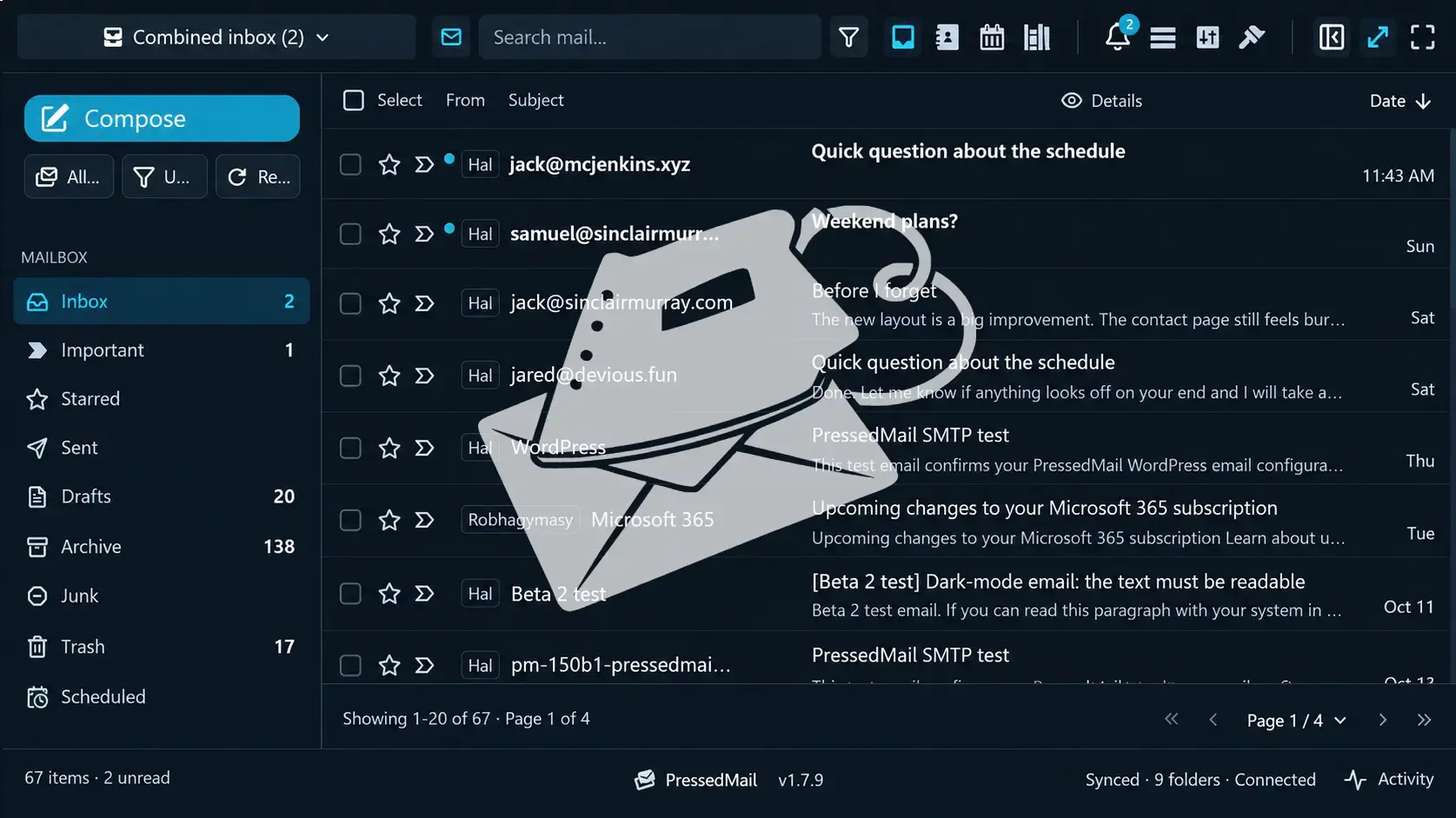
すべてをひとつのダッシュボードに
ウェブサイトとメールを、ひとつの場所で。
完全なメール体験
受信トレイ、作成、添付ファイル、検索、連絡先、カレンダー。
切り替え減って、はかどる
アプリを行き来せず、集中を持続できます。
メール用プラグイン、増えすぎていませんか?
SMTP、トランザクションメール、マーケティング、ニュースレター、フォーム、メール管理。別々のプラグインを入れて保守し続ける理由はあるでしょうか?
PressedMail はメールに必要な機能を WordPress の統合ソリューションひとつにまとめ、プラグインの散らかりを減らし、複雑さを増さずにできることを広げます。

SMTP とトランザクションメール
WordPress の通知やトランザクションメールの配信を管理。
マーケティングとニュースレター
キャンペーン作成、テンプレート設計、購読者管理、登録フォーム。
本物のメールクライアント
複数アカウントの送受信と会話をまとめて管理。
あなたの受信トレイは、どれくらい整理されていますか?
複数のアカウント、あふれる受信トレイ、見失う会話、終わらないメッセージ。メールを整理し続けるために、常に気を配る必要はありません。
PressedMail はアカウントをまとめ、スマートなルール、AI によるタグ付け、一括操作、共有受信トレイ、連絡先、カレンダーで整理を支えます。
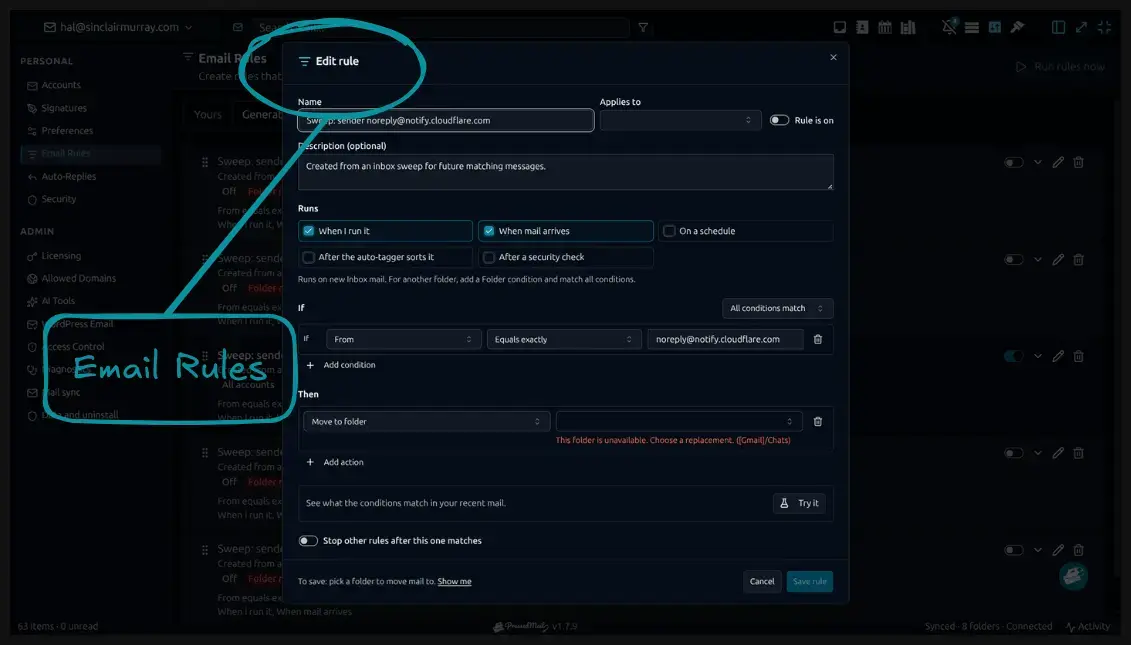
ひとつの統合受信トレイ
Gmail や Outlook など対応プロバイダを、ひとつの作業スペースに。
整理は自動で
賢いルールでメッセージを自動的に分類、タグ付け、移動。
すべてつながる
共有トレイ、連絡先、カレンダーがコミュニケーションを整理します。
すべてのプロバイダーを接続
お使いのすべてのアカウントを、WordPress 内のひとつの受信トレイに。
メールは安全でプライベートですか?
スパム、フィッシング、不審なメッセージ、不要なアクセス。ビジネスを守るには基本の管理だけでは足りません。
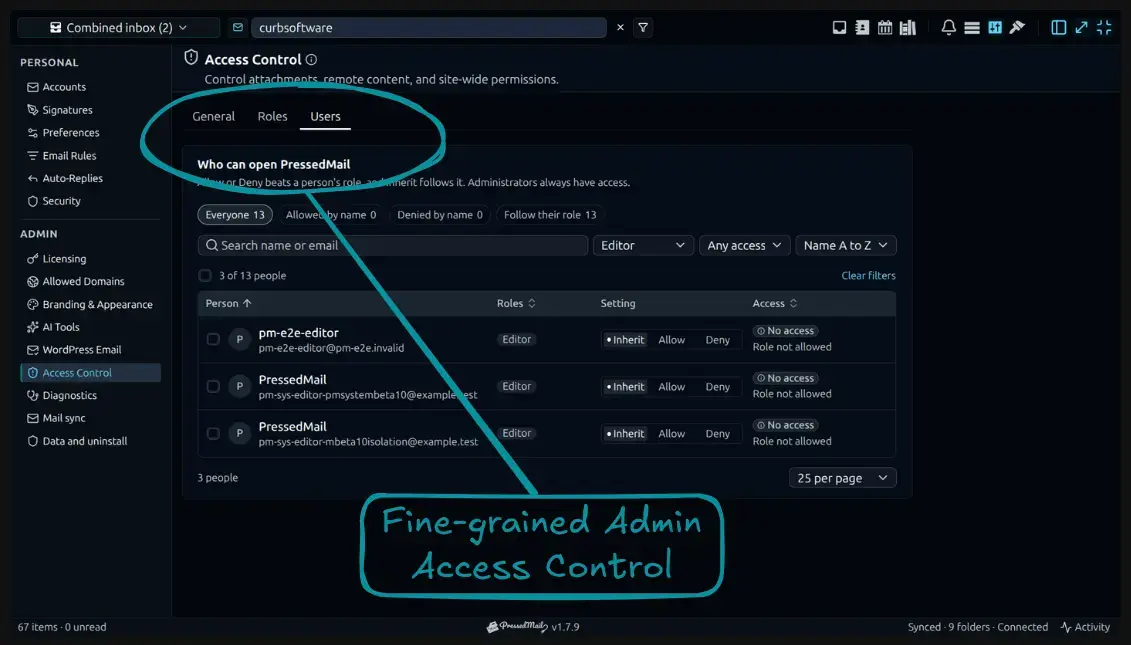
PressedMail は AI による脅威検出と細かい管理コントロールを組み合わせ、メール環境への可視性と制御を高めます。
インテリジェントな脅威検出
AI 支援のスパム・フィッシング判定が、危険なメッセージの検出を助けます。
細かな権限設定
アクセスと管理設定を組織に合わせて調整。
より大きな制御
アカウント、プライバシー、メール設定を自分のneeds に合わせて構成。
メールに時間を使いすぎていませんか?
仕分け、同じ返信の繰り返し、フォルダ整理、定型作業。毎週何時間も溶けていきます。その大半が自分で片付いたらどうでしょう?
PressedMail は自動化ワークフロー、ルール、テンプレート、AI 支援、強力な一括操作で日々のメール管理を速くします。
ワークフローの自動化
受信メッセージ、スケジュール、手動トリガーに反応するルールを作成。
より速い返信
再利用できるテンプレートと AI ライティングで日々の連絡を簡潔に。
散らかりを一掃
Sweep の一括操作で、数百件のメッセージを一つずつ扱わず整理。
メール、デスクに縛られていませんか?
仕事はパソコンを離れても続き、メールもひとつの端末、ひとつのレイアウト、ひとつの働き方に限定されるべきではありません。
PressedMail は PWA 対応、デスクトップとモバイルからのアクセス、柔軟なインターフェース変更を備えたメール体験を提供します。
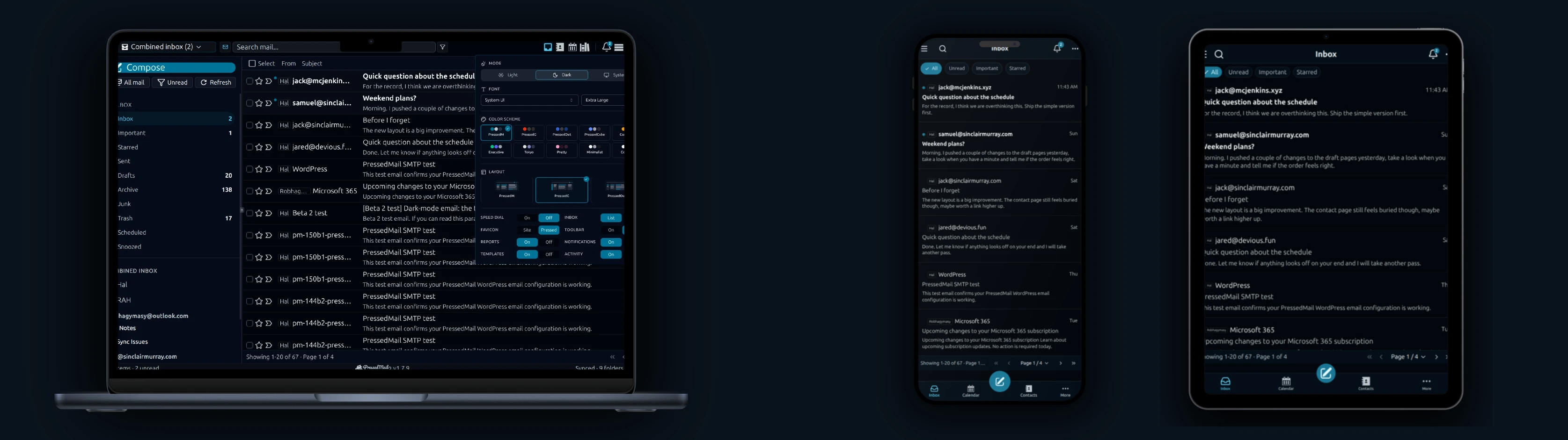
どこにいてもメール
対応端末なら PWA としてインストールし、モバイルでもデスクトップでも。
レイアウトは選べる
複数の受信トレイ配置とナビゲーションが作業スタイルに合わせられます。
自分らしく
テーマ、色、書体、見た目を整えて理想の作業スペースへ。
Newsletter
PressedMail の最新情報を入手してください。
製品のアップデート、新機能のお知らせ、電子メールによるワークフローのヒント、WordPress 受信トレイのガイダンスを入手します。
スパムはありません。 Just PressedMail のアップデートと役立つ WordPress メールのヒント。
WordPress サイト数に合ったプランを選択。
すべてのプランに PressedMail の完全なワークスペースが含まれます。管理するサイト数に合わせて選択してください。
年間プランはサイト数に応じた料金です。生涯プランは最大100サイトまで対応する一回限りの支払いです。
スターター
1 サイト向け
- 現在および今後のすべての Premium 機能
- 無制限のメールアカウント
- 連絡先、カレンダー、定期実行メールルール
- テンプレート、ブロック、登録フォーム
- AI ツールとフィッシング検出
- レイアウト、テーマ、ワークスペース制御
- ライセンス付きアップデートと優先サポート
- 年間10,000 PressedMail AIクレジット期間限定
プレミアム
複数サイト向け
- 現在および今後のすべての Premium 機能
- 無制限のメールアカウント
- 連絡先、カレンダー、定期実行メールルール
- テンプレート、ブロック、登録フォーム
- AI ツールとフィッシング検出
- レイアウト、テーマ、ワークスペース制御
- ライセンス付きアップデートと優先サポート
- 年間25,000 PressedMail AIクレジット期間限定
究極の
代理店向け
- Premium のすべてに加えて:
- キャンペーンと共有テンプレート
- 受信トレイ、カレンダー、連絡先リストを共有
- ブランドテーマ付きホワイトラベル
- 年間50,000 PressedMail AIクレジット期間限定
I save hours & it’s easy to use
I have a lot of email accounts and it’s annoying to manage them through different providers. I installed PressedMail, added my accounts, and automated the cleanup of over 3000 emails. PressedMail has saved me hours of work.
 Robert H. Alexander創業者 - CurbSoftware Tech Innovations
WordPressでメールを扱うようになったお客様の声。
I save hours & it’s easy to use
I have a lot of email accounts and it’s annoying to manage them through different providers. I installed PressedMail, added my accounts, and automated the cleanup of over 3000 emails. PressedMail has saved me hours of work.
Helps get more clients
As a freelancer I need to manage several clients’ accounts. I installed PressedMail on WordPress on localhost and use it as my main email client. I manage everything for clients from PressedMail. And several clients use PressedMail now after I have set their WordPress instances up.
 Gene Piki
Email Swiss Army Knife
We use PressedMail as a value added service for clients and potential clients as a feature of our agency’s offering helping put us ahead of competition. We love the white-labelling feature, automation, and security controls. It also replaces several of the other plugins we used to use and it’s like a small CRM.
 Cyrus M. (InCurb Digital)
Fast inbox organization with phishing detection
PressedMail helps us organize our inboxes fast. We especially like the phishing detection feature.
 John & Andrea
One source of truth for every client
As a VA, I use PressedMail to keep each client’s inbox separate while managing everything from one app. It gives me a single source of truth without mixing client work together.
Teaching and client work stay organized
I balance teaching with social media marketing clients. PressedMail helps me keep both sides of my work organized in one place.
 J.A. Payo
ご自身の仕事でPressedMailをお使いですか?
Common questions
See what is coming next.
Follow planned work, current progress, and recently completed features.
- Planned
Shared Inboxes for Team Mailboxes
Share a single inbox with teammates so support, order, and operations email can be monitored and handled together from WordPress.
- Planned
Shared Calendars for Scheduling and Coverage
Give teammates access to shared calendars so meetings, time off, and internal event planning can stay coordinated inside WordPress.
- Planned
Calendar Sync with External Providers
Planned. Today calendars and events live in WordPress and do not sync with any outside provider. Two-way sync with Google Calendar, Outlook, iCloud and CalDAV-compatible services is on the roadmap.
Get started
Bring your working inbox into WordPress.
Compare Premium and Ultimate features, then choose a paid plan for the number of WordPress sites you manage.