

Use code "LIGHTHOUSE20" to save 20% on all plans forever. Get it now!
Lesen, beantworten, suchen und organisieren Sie jedes verbundene Postfach in einem Posteingang in WordPress.
Hi there,
Three rooms are free that week and I am holding all of them until Friday afternoon. Costs and floor plans are attached, along with the access notes for the loading bay.
The Garden Room seats 80 and opens onto the terrace, which is the one people always ask about. The Long Gallery seats 120 but the acoustics are hard work without the panels, and those are hired separately. The Studio is the cheapest of the three and the only one with its own kitchen.
Catering can be booked through us or brought in. If you bring your own, we need the supplier details a week ahead for the insurance.
Let me know which one you want and I will confirm with the venue. If you need to see them first, I can get you in on the Tuesday or the Thursday.
Best regards, Paco
Einheitlicher Posteingang
Lesen Sie alle verbundenen Konten in einer zusammengeführten Liste oder wechseln Sie zu einem einzelnen Postfach, wenn Sie sich nur darauf konzentrieren möchten.
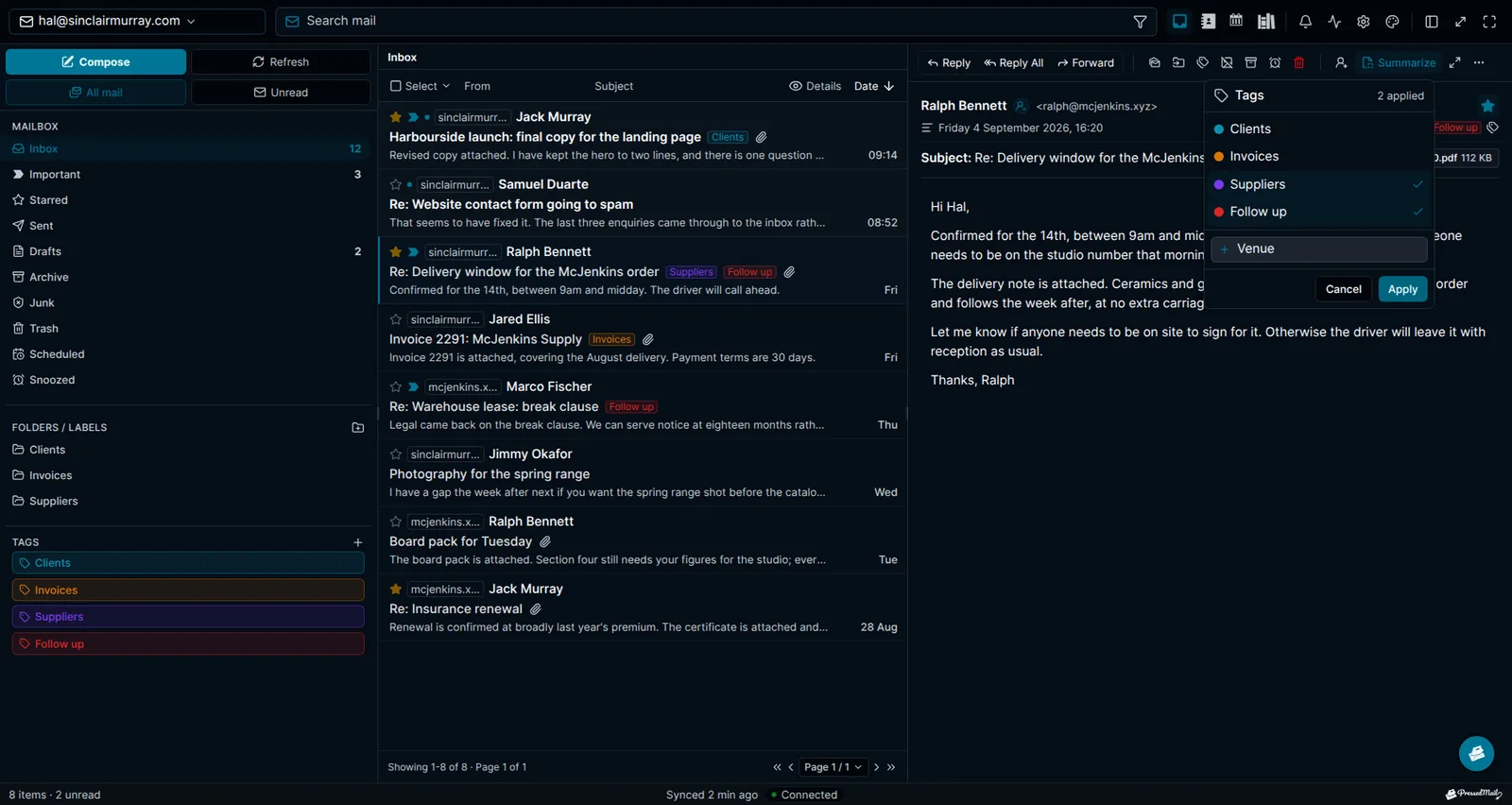
Ordner und Tags
Die Ordnerstruktur Ihres Anbieters bleibt erhalten, genau so verschachtelt wie auf dem Server, und übersteht Umbenennungen und Verschiebungen. Tags und eigene Ordner stehen neben dieser Struktur des Anbieters.
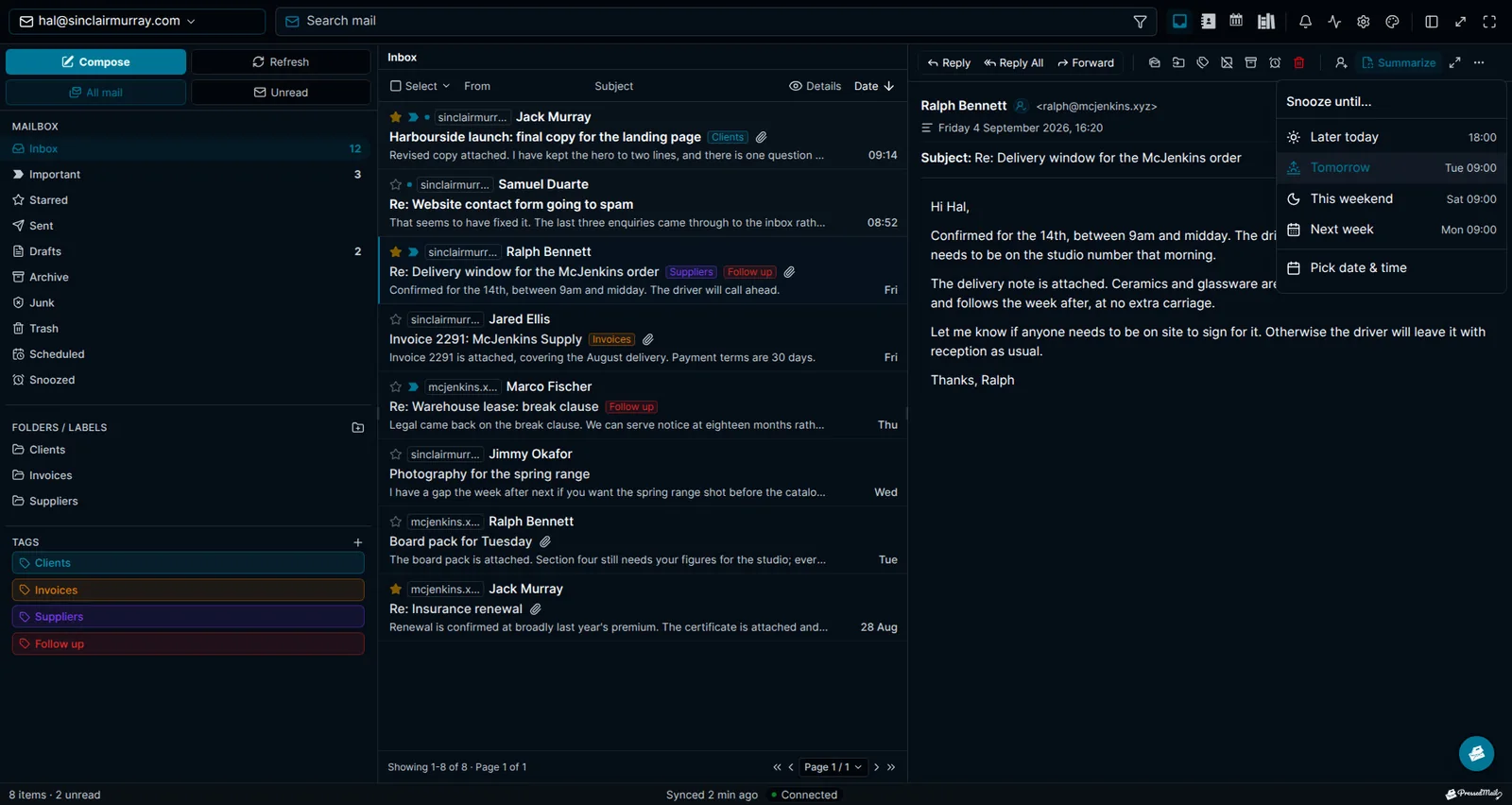
Schlummern, Planen und Rückgängig
Parken Sie eine Nachricht bis später heute, morgen, zum Wochenende, bis nächste Woche oder nächsten Monat. Reihen Sie einen Versand für ein späteres Datum ein. Holen Sie eine Nachricht innerhalb von fünfzehn Sekunden nach dem Klick auf Senden zurück.
Posteingang für mehrere Konten
Ein Arbeitsbereich für jedes Postfach, das Sie verbinden, mit Filtern pro Konto und Drag-and-drop zwischen Ordnern. Verbinden Sie so viele Konten von Administratoren oder Benutzern, wie Ihr Workflow braucht.
Konversationen in Threads
Konversationen werden anhand der Header Message-ID, In-Reply-To und References gruppiert statt anhand gleicher Betreffzeilen. So bleiben Antworten zusammen, und unzusammenhängende Nachrichten mit demselben Betreff werden nicht vermischt.
Anhänge und Suche
Zeigen Sie Bilder und PDFs in einem Pop-up als Vorschau an und durchsuchen Sie Nachrichten und Kontakte gemeinsam über alle verbundenen Konten. Speichern Sie jede Kombination aus Suche und Filter als Ansicht, zu der Sie zurückkehren können.
Geteilte Postfächer
Teilen Sie ein Postfach mit Personen auf Ihrer Website, die PressedMail öffnen können. Betrachter lesen, Responder antworten zusätzlich von dieser Adresse und sortieren E-Mails ein, und Manager können den Papierkorb leeren und Teammitglieder hinzufügen, alles ohne das Postfachpasswort zu sehen.
Bleiben Sie mit PressedMail auf dem Laufenden.
Erhalten Sie Produktaktualisierungen, Ankündigungen neuer Funktionen, Tipps zum E-Mail-Workflow und Anleitungen zum WordPress-Posteingang.
Kein Spam. Nur PressedMail-Updates und nützliche WordPress-E-Mail-Tipps.
Wählen Sie den passenden Plan für Ihre WordPress-Websites.
Jeder Plan umfasst den vollständigen PressedMail-Arbeitsbereich. Wählen Sie nach der Anzahl der von Ihnen verwalteten Websites.
Jährliche Pläne richten sich nach der Anzahl der Websites. Lebenszeit ist eine einmalige Zahlung für bis zu 100 Websites.
Starter
Für eine Website
- Alle aktuellen und zukünftigen Premium-Funktionen
- Unbegrenzte E-Mail-Konten
- Kontakte, Kalender und zeitgesteuerte E-Mail-Regeln
- Vorlagen, Blöcke und Anmeldeformulare
- KI-Tools und Phishing-Erkennung
- Layouts, Themes und Workspace-Steuerung
- Lizenzierte Updates und vorrangiger Support
- 10.000 PressedMail AI-Credits pro JahrBefristet
Premium
Für mehrere Websites
- Alle aktuellen und zukünftigen Premium-Funktionen
- Unbegrenzte E-Mail-Konten
- Kontakte, Kalender und zeitgesteuerte E-Mail-Regeln
- Vorlagen, Blöcke und Anmeldeformulare
- KI-Tools und Phishing-Erkennung
- Layouts, Themes und Workspace-Steuerung
- Lizenzierte Updates und vorrangiger Support
- 25.000 PressedMail AI-Credits pro JahrBefristet
Ultimate
Für Agenturen
- Alles aus Premium, plus:
- Kampagnen und gemeinsam genutzte Vorlagen
- Postfächer, Kalender und Kontaktlisten teilen
- Eigenes Branding mit Markendesign
- 50.000 PressedMail AI-Credits pro JahrBefristet
Was Kunden sagen, seit sie ihre E-Mails in WordPress erledigen.
Nutzen Sie PressedMail in Ihrer eigenen Arbeit? Testimonial senden
I save hours & it’s easy to use
I have a lot of email accounts, and it’s annoying to manage them through different providers. I needed something better than what was out there, so I built it. I spent the better part of two years making PressedMail the plugin I wanted to use every day, and now I get to share it with everyone else. I added my accounts, automated the cleanup of over 3000 emails, and it’s saved me hours of work.
 Robert H. AlexanderGründer - CurbSoftwareEntwickler von PressedMail
Helps get more clients
As a freelancer I need to manage several clients’ accounts. I installed PressedMail on WordPress on localhost and use it as my main email client. I manage everything for clients from PressedMail. And several clients use PressedMail now after I have set their WordPress instances up.
 Gene Piki
Email Swiss Army Knife
We use PressedMail as a value added service for clients and potential clients as a feature of our agency’s offering helping put us ahead of competition. We love the white-labelling feature, automation, and security controls. It also replaces several of the other plugins we used to use and it’s like a small CRM.
Cyrus M. (InCurb Digital)
Fast inbox organization with phishing detection
PressedMail helps us organize our inboxes fast. We especially like the phishing detection feature.
John & Andrea
One source of truth for every client
As a VA, I use PressedMail to keep each client’s inbox separate while managing everything from one app. It gives me a single source of truth without mixing client work together.
Amber, K
Teaching and client work stay organized
I balance teaching with social media marketing clients. PressedMail helps me keep both sides of my work organized in one place.
J.A. Payo
Häufige Fragen
Starten Sie mit einem Postfach. Kostenlos.
Ein Postfach für einen Benutzer, ein Rich-Text-Editor, eigene Ordner, unbegrenzt viele E-Mail-Regeln, eine Signatur, zwei Themes und ein Layout. Kontakte, Kalender, zeitversetzter Versand und KI erfordern einen kostenpflichtigen Tarif.
1 Konto · 1 Benutzer · 2 Themes · unbegrenzt viele RegelnSehen Sie, was als Nächstes kommt.
Verfolgen Sie geplante Arbeiten, den aktuellen Stand und kürzlich abgeschlossene Funktionen.
- Geplant
Calendar Sync with External Providers
Planned. Today calendars and events live in WordPress and do not sync with any outside provider. Two-way sync with Google Calendar, Outlook, iCloud and CalDAV-compatible services is on the roadmap.
- Geplant
Dedicated Support
A higher-touch support channel beyond the current paid Priority Email Support entitlement.
- Geplant
Activity Log
A searchable audit trail of key actions across PressedMail accounts, with per-user and admin views, retention controls, and export.
Holen Sie den Posteingang, mit dem Sie arbeiten, nach WordPress.
Vergleichen Sie die Funktionen von Premium und Ultimate und wählen Sie dann einen kostenpflichtigen Plan passend zur Zahl der WordPress-Websites, die Sie betreuen.